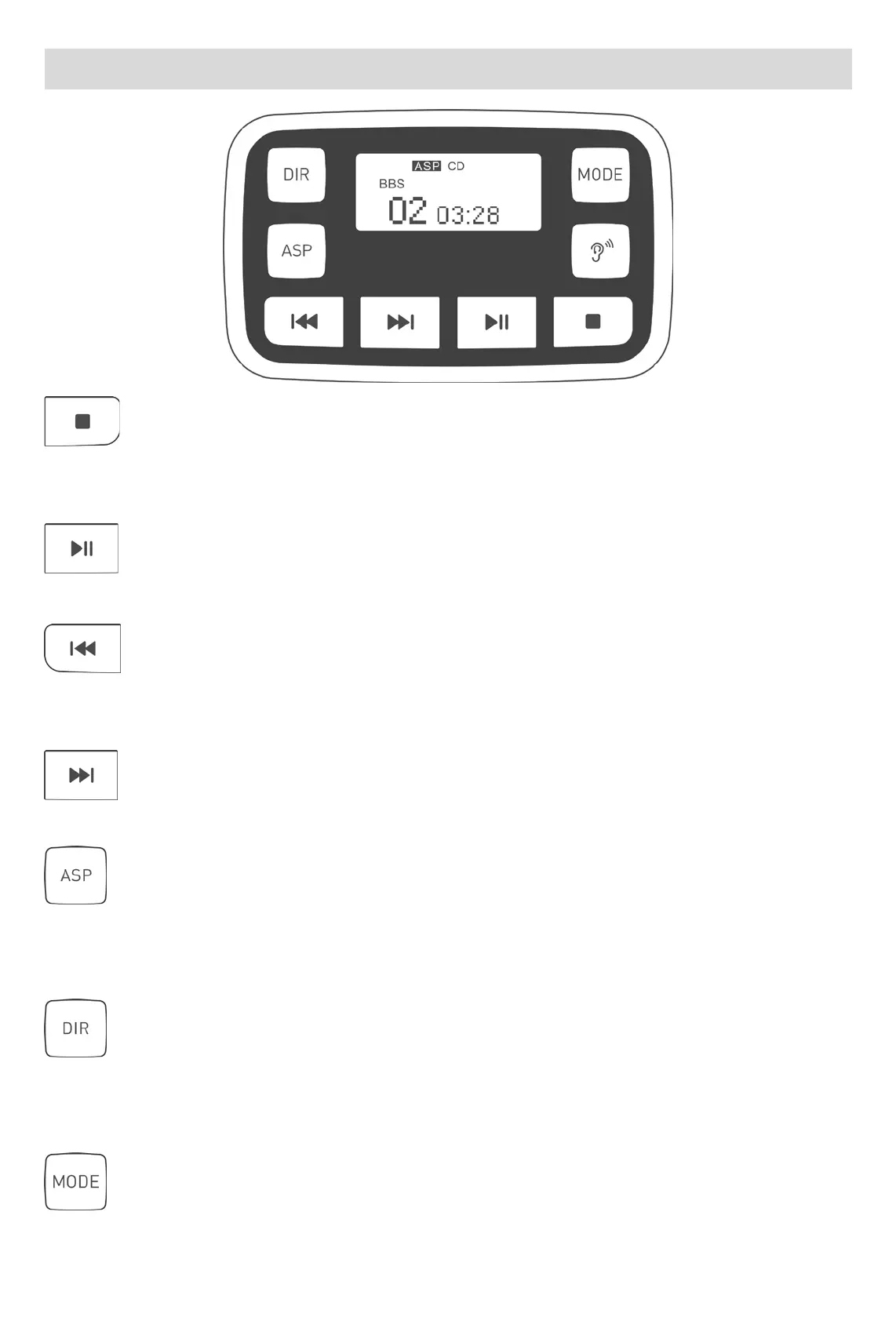
Key function description
: Stop/shut down
Press the power button twice in a short time. After pressing the stop button for a short time, there
is no other operation to automatically shut down within 30s.
: Power on/play/pause
After power is supplied, short press to power on and play. In the playback state, short press pause
: Skip to the previous song/fast rewind
Play status, short press the currently playing song to restart playback, short press twice to skip to
the previous song, long press to rewind the song
: Skip to the next song/fast forward
Play status, short press to skip to the next song, long press fast forward to play the song.
: Automatic shock proof (ASP) function key
Power on by default. The CD disc can turn the shockproof on or off, cancel the shockproof, the
screen ASP font disappears, and the CD disc is shockproof for 40 seconds. MP3 disc playback is
forced to shockproof and shockproof for 120 seconds.
:MP3 disc track area selection play
In the play state, short press the MODE button to select the screen display to implement the DIR
function, short press the DIR button to skip the track area and select to play. The CD disc has no
DIR function, and pressing the DIR button has no effect.
:Play mode
Play status, short press to skip to: single loop playback; ALL all loop playback; DIR track area



 To Next Page