
 Need help?
Do you have a question about the HOUSBAY RS10 and is the answer not in the manual?
Explains battery backup function and requirement to keep plugged in.
Details FCC requirements and user compliance for the device operation.
Cautions users regarding modifications and manual availability.
Lists the power input requirements for the sound machine.
Outlines the core functionalities and capabilities of the device.
Lists all items included in the product packaging for setup.
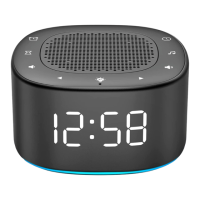
Details the front display, time, and indicators of the sound machine.
Explains the buttons and controls located on the top of the device.
Describes back panel features like dimmer control and power connector.
Details the bottom panel, including the battery compartment and model information.
Guides users through plugging in the adapter and preparing the device for use.
Provides crucial notices regarding display, battery, and power interruption issues.
Guides users through setting the hour and minute on the device display.
Instructions for selecting between 12-hour and 24-hour time formats.
Explains automatic exit from time setup mode and required user actions.
Guides users through setting the desired hour and minute for the alarm.
Details how to choose from various pre-set alarm sounds.
Explains automatic exit from alarm setup mode and required user actions.
How to adjust the volume level for the alarm sound using buttons.
Explains the 5-second trial sound feature for confirming ringtones.
Provides options for stopping or snoozing the alarm when it rings.
How to enable or disable the alarm function on the device.
Instructions on how to activate and deactivate the sound machine feature.
How to control the volume level for the sound machine sounds.
How to cycle through and select from the 18 available sound tracks.
Explains how the device saves and recalls the last sound and volume settings.
Guides on setting the timer to automatically turn off features.
Details how to set, exit, turn off, and check remaining sleep timer duration.
Instructions for turning the nightlight on, off, and changing its color.
How to adjust the brightness of the device display using the dimmer slider.
Information on installing the backup battery and its operational limitations.
This document describes the HOUSBAY RS10 Sound Machine with Alarm Clock, a versatile device designed to assist with sleep and provide timekeeping functionalities. The device combines a sound machine, an alarm clock, and a night light, offering a range of features for a personalized user experience.
The HOUSBAY RS10 primarily functions as a sound machine, offering a selection of 18 soothing sounds to help users relax and fall asleep. These sounds include natural ambient noises and other calming audio tracks. In addition to its sound capabilities, the device integrates an alarm clock with five distinct alarm sounds, allowing users to wake up to their preferred audio. A snooze function is also included for those who need a few extra minutes of sleep. The device also features a night light with seven colorful options, providing ambient lighting that can be adjusted to suit different preferences. For convenience, a sleep timer is incorporated, which can automatically turn off both the night light and the sound machine after a set duration. The time display offers adjustable brightness, ensuring it is comfortable to view in various lighting conditions, and supports both 12-hour and 24-hour formats.
The device is designed for straightforward operation, with clearly labeled buttons on the top panel for various functions.
To set the time, users press the "Time Setting" button. The hour digits will flash, and users can adjust the hour using the "Forward" or "Backward" buttons. Pressing the "Time Setting" button again confirms the hour and allows adjustment of the minute digits in the same manner. A final press of the "Time Setting" button confirms the minute and allows selection of the 12-hour or 24-hour format using the "Forward" or "Backward" buttons. The AM/PM indicator will appear on the display when the 12-hour format is selected. The device will automatically exit the time setup mode if no action is taken within 5 seconds.
Setting an alarm involves a similar process. Users press the "Alarm Setting and ON/OFF" button, and the alarm hour digits will flash. The hour can be adjusted using the "Forward" or "Backward" buttons. Pressing the "Alarm Setting and ON/OFF" button again confirms the hour and allows adjustment of the minute digits. After setting the minutes, another press of the "Alarm Setting and ON/OFF" button allows users to select one of the five wake-up sounds using the "Forward" or "Backward" buttons. A final press confirms the wake-up sound and exits the alarm setting mode. The device will automatically exit the alarm setup mode if no action is taken within 10 seconds.
When the sound machine is off, the alarm volume can be adjusted. Pressing the "Volume -" or "Volume +" buttons will display the current volume level (0-30 adjustable). A 5-second trial sound of the selected alarm ringtone can be played by pressing the "Volume -" or "Volume +" buttons when the sound machine is off, allowing users to confirm their choice in advance.
When the alarm sounds, users have two options. Pressing the "Alarm Setting and ON/OFF" button will stop the alarm, and it will not sound again until the next day. Alternatively, pressing the "Snooze/Nightlight" button will activate the snooze function, causing the alarm indicator to flash and the alarm to sound again after 9 minutes. The alarm will automatically turn off after 30 minutes if no action is taken.
To turn the alarm on, users press the "Alarm Setting and ON/OFF" button. To completely turn off the alarm and remove the alarm indicator from the display, users must press and hold the "Alarm Setting and ON/OFF" button for 2 seconds. When the alarm is turned off this way, it will not sound on the next day.
The sound machine is turned on or off by pressing the "Sound Machine ON/OFF" button. Once on, the volume can be adjusted using the "Volume -" or "Volume +" buttons, with 30 adjustable levels. It's important to note that this volume adjustment only affects the sound machine and does not impact the alarm volume.
With the sound machine on, users can cycle through the 18 available sounds by pressing the "Forward" or "Backward" buttons. The manual provides a list of tracks, including Ocean, Lullaby, Waves, Rain, Thunderstorm, Brook, Shush, Bird chirping, Summer night, Campfire, White Noise 1-5, and Fan 1-3.
The device includes a memory function that saves the last selected sound and volume setting when the sound machine is turned off. These settings will be recalled the next time the sound machine is activated.
The sleep timer allows users to automatically turn off the night light and sound machine after a specified period. By repeatedly pressing the "Sleep Timer" button, users can select durations of 15, 30, 60, 90, or 120 minutes, or choose to turn the timer OFF. The selected sleep timer duration will be displayed on the screen. After setting the timer, users should wait 5 seconds for the device to exit the setup, and the sleep timer indicator will appear. To turn off the sleep timer, press and hold the "Sleep Timer" button for 2 seconds. To check the remaining sleep timer duration, press the "Sleep Timer" button once.
To turn on the night light, press the "Snooze/Nightlight" button. Subsequent presses of this button will cycle through the seven available colors. To turn off the night light, press and hold the "Snooze/Nightlight" button for 2 seconds.
The display brightness can be adjusted using the "Display Dimmer" slider located on the back of the device. This slider allows for a brightness range from 0% to 100%.
The HOUSBAY RS10 is designed with minimal maintenance requirements.
The device includes a CR2032 battery, which is pre-installed in the battery compartment. This battery backup serves solely as a memory function, preserving the TIME and ALARM settings in the event of a power interruption. It is crucial to keep the device plugged into a power outlet for full functionality, as the battery alone will not power the display or trigger preset alarms. If the display is blank after plugging in, users should check that the "Display Dimmer" on the back is set to a high position. If the battery is removed or if there's a power interruption, the TIME and ALARM settings will need to be reset once power is restored.
The device complies with FCC rules, ensuring it does not cause harmful interference and accepts any interference received. Users are advised that any unauthorized modifications could void their authority to operate the equipment. In case of interference, troubleshooting steps include reorienting the antenna, increasing separation from other equipment, connecting to a different circuit, or consulting a technician.
The HOUSBAY RS10 comes with a one-year warranty. For any issues or faulty products, users are encouraged to contact support via email at support@keviec.com, with a commitment to address issues within 24 hours.
An instructional video is available via a QR code provided in the manual, offering a visual guide to setting up and using the product.
In summary, the HOUSBAY RS10 is a user-friendly sound machine and alarm clock combination that offers a variety of features to enhance sleep and daily routines, with straightforward controls and essential backup functionalities.
 General
| Brand | HOUSBAY |
|---|---|
| Model | RS10 |
| Type | Portable Bluetooth Speaker |
| Output Power | 10W |
| Frequency Response | 100Hz-20kHz |
| Battery Capacity | 2000mAh |
| Charging Time | 3 hours |
| Bluetooth Version | 5.0 |
| Waterproof Rating | IPX5 |
| Color Options | Black, Blue, Red |
| Connectivity | Bluetooth |
| Bluetooth Range | 10 meters |
| Speaker Type | Full-range |

 To Next Page