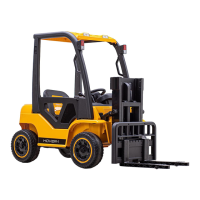
The Hover-1 My First Forklift (model H1-FLFT) is a ride-on toy designed for children aged 3 and up, offering a realistic forklift experience. It features a robust design with a focus on safety and interactive play.
Function Description:
The My First Forklift allows children to drive, steer, and operate a functional fork mechanism, simulating real-world forklift operations. It can be controlled both by the rider using the steering wheel, gas pedal, and levers, and remotely by an adult using the included remote control. The remote control provides comprehensive command over movement (forward, backward, left, right), speed modes, horn, music, and fork operations (up, down). The vehicle is equipped with lights and a music player to enhance the play experience. The primary function is to provide an engaging and educational ride-on toy that introduces children to basic vehicle operation and mechanical functions in a safe, controlled environment.
Important Technical Specifications:
- Battery: 12V/10Ah
- Motor: 80W (dual 40W motors), brushless
- Rider Age Range: 3+
- Max Rider Weight: 66 lbs (30 kg)
- Max Lifting Weight: 25 lbs (11 kg)
- Speed: 3 mph (4.8 km/h)
- Usage Time: Up to 2 hours
- Charge Input: AC: 110V - 220V
- Charge Output: DC: 12V-1000m
- Range: 3 miles
- Dimensions: 57.5" x 24.8" x 39.8″ (146 x 63 x 101 cm)
Usage Features:
The My First Forklift offers a variety of interactive features for an immersive play experience:
- Driving Controls:
- Steering Wheel: Rotates to turn the vehicle left and right.
- Gas Pedal: Press to accelerate the vehicle.
- Throttle/Reverse Lever: Push up to move forward, pull down to reverse.
- Fork Operation:
- Fork Load Up/Down Lever: Push up to lift the load, pull down to lower the load.
- Interactive Dashboard:
- Power On/Off Button: Turns the vehicle on and off.
- Lights Button: Turns the headlights on or off.
- Music Player: Plays sounds, music, and MP3s, and displays battery life. Features buttons to play music tracks and adjust volume (hold to increase/decrease).
- Horn Button: Sounds the horn and adjusts volume (hold to increase/decrease).
- Remote Control (for adult supervision):
- Pairing: The remote needs to be paired with the forklift by turning off the forklift, removing/reinserting remote batteries, pressing and holding the code button on the remote while turning on the forklift, and releasing the code button when the remote flashes.
- Movement: Forward, Backward, Right, Left buttons.
- Speed Modes: Press to cycle through 3 speed modes (Slow, Medium, Fast).
- Fork Control: UP (lifts fork load), DOWN (lowers fork load).
- Horn/Music: Buttons for horn sound and music tracks, with hold functions for volume adjustment.
- Brake: Stops the vehicle.
- Safety Distance: When operating remotely, the distance between children and adults should not exceed 33 feet. The remote control is intended for adult use only.
- Safety Features:
- Seatbelt: Riders must buckle the seatbelt before operation.
- Pre-Ride Checklist: Emphasizes checking battery charge, screw tightness, and overall condition before each ride.
- Helmet Use: Strongly recommends wearing a properly fitted helmet that complies with CPSC or CE safety standards.
- Adult Supervision: Required to reduce the risk of injury, especially when operating near hazards.
- Restricted Environments: Not for use on roadways, near motor vehicles, on steep inclines/steps, near swimming pools, or other bodies of water.
- Single Rider: Only one rider allowed at a time.
- Footwear: Always wear shoes when riding.
Maintenance Features:
Proper care and maintenance are crucial for the longevity and safe operation of the My First Forklift:
- Charging:
- The charging port is located near the seat.
- Always charge the forklift when it is turned off.
- Fully charge the battery before the first use and immediately after each use to maintain capacity.
- Do not turn the vehicle on while charging.
- Do not turn the battery upside down.
- The charger will light up green when fully charged; avoid overcharging.
- If storing for extended periods, pull out the red main line and charge the battery once a month to prolong its life.
- Only use the charger and battery specified by the manufacturer.
- Inspect the charger, battery, and plug for damage before charging; discontinue use if damaged.
- Cleaning:
- Use a dry, soft cloth or non-wax furniture polish to wipe plastic parts.
- Do not use chemical solvents, soap, or water to clean the vehicle.
- Storage:
- Park indoors or cover with a waterproof tarp to prevent water damage.
- Keep away from furnaces, heaters, and direct sunlight to prevent plastic parts from melting.
- When storing, ensure the power is off and all switches are in the "stop" or "off" position.
- Remote Control:
- Remove batteries from the remote control if not used for an extended period to prevent leakage, corrosion, or damage.
- Replace remote control batteries if the vehicle fails to operate at a distance of less than 9 feet.
- General Inspection:
- Before each use, check the forklift for good condition, including the battery, wires, and other parts.
- Ensure all screws are tight and that there are no potential safety hazards.
- Do not ride if any part is damaged; replace damaged parts before riding.
- Repairs: All repairs should be performed by a professional.
- Wet Weather: Avoid riding in wet or snowy weather, as water can damage the motor, circuit system, and battery.

 Need help?

 To Next Page
 General