EasyManua.ls Logo

howen Hero ME40-02V3 - User Manual

howen Hero ME40-02V3
46 pages
Print Icon
To Next Page IconTo Next Page
Loading...
1
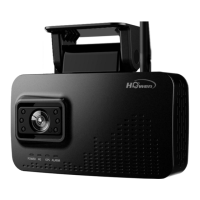
Hero ME40-02V3 Dash Camera
User Manual
Question and Answer IconNeed help?

Do you have a question about the howen Hero ME40-02V3 and is the answer not in the manual?

Summary

Product Overview

Features and Specifications

Key features and physical dimensions of the dash camera.

Getting Started

Initial Setup: Memory and SIM Cards

Installing memory and SIM cards into the device.

Mobile App Connectivity

Connecting the dash camera to a mobile app for configuration.

MDVR Configuration via Mobile App

Video Recording Configuration

General and Main Stream Settings

Configuring general and main stream video recording parameters.

Sub-stream Settings for Live Streaming

Time Settings

Time Zone and DST Configuration

Setting the device's time zone and Daylight Saving Time.

Platform Integration

Device Identification and Terminal Setup

Setting device ID and terminal information for platform connection.

Network Settings for Connectivity

Configuring network settings for server access.

Server Configuration and Protocols

FTP Server and Snapshot Uploads

Setting up FTP for uploads and configuring timed snapshots.

Cellular Dial-Up Configuration

Wi-Fi Network Configuration

Configuring Wi-Fi settings for internet access.

Adding Device to VSS Platform

Network Status Monitoring

Checking the device's network connection status.

Detailed Network Status View

Device Status and Information

General Device Information Display

Displaying general device information like MCU and firmware versions.

Location and Satellite Signal Status

Storage and AI Authorization Status

Displaying storage info and AI authorization status.

AI Function Authorization Details

Physical Installation

Mounting the Device Bracket and Camera

Mounting the device bracket onto the windshield and fixing the device.

Power and Wiring Connections

OBD Port Wiring Method

Alternative wiring method using an OBD cable.

ADAS Camera Adjustment for Calibration

Rear Camera Adjustment

Adjusting the rear camera for optimal view.

Connecting External Devices (I;O, DMS, RS232)

I;O Connection for Vehicle Signals

Connecting I/O for turn signals and panic button.

DMS Camera Installation Guide

System Calibration

DMS Calibration Procedure

Calibrating the Driver Monitoring System (DMS).

ADAS Calibration Initiation

Horizon and Car Center Calibration for ADAS

ADAS Calibration: Horizon and Car Center

ADAS Calibration: Vehicle Dimensions

Setting vehicle width, height, and bumper distance for ADAS.

ADAS Calibration: Camera to Axle Distance

Driver Management

Adding Driver Information to VSS

Adding driver information to the VSS platform.

Driver Photo Requirements and Upload

Releasing Registered Drivers to Device

Releasing registered drivers to the device.

Data Search and Retrieval

Searching Recorded Video Files

Searching for recorded video files based on criteria.

System Settings

Terminal Configuration

Configuring terminal settings like Device ID and Plate Number.

User Account and Password Management

Date, Time, and Time Zone Configuration

Power Management and Operation

Sleep Mode and Wake-up Configuration

Storage Device Management

Audio Settings and Alerts

Serial Port Communication Setup

Configuring serial port settings for external devices.

Parameter Management: Export;Import

Video Recording Options

General Video Recording Settings

Configuring general video settings like TV system and encoding format.

Main Stream Recording Setup

Sub-stream for Live Streaming Setup

Storage Management for Recordings

Configuring storage settings for alarm pre-recording and file protection.

Alarm File Protection Settings

Alarm and Event Handling

Input;Output (I;O) Alarm Configuration

Configuring Input/Output settings for alarms.

I;O Trigger and Linkage Options

Speed Monitoring and Alarm Settings

External Alarm: Geofence Setup

Enabling and configuring external alarms like Geofence.

G-Sensor Based Acceleration Alarms

Voltage Monitoring and Alarm Settings

Driver Monitoring System (DMS) Alerts Configuration

Configuring Driver Monitoring System (DMS) alerts.

ADAS Feature Alert Configuration

Face Recognition and Driver Change Alerts

Additional Settings: Face Info and Speed Test

Compliance and Safety Information

FCC Compliance Statement

Warning statement regarding FCC compliance and potential interference.

RF Exposure Guidelines

Statement on RF exposure guidelines and minimum operating distance.

howen Hero ME40-02V3 Specifications

General IconGeneral
Resolution1920x1080
Frame Rate30fps
Viewing Angle170°
Loop RecordingYes
G-SensorYes
Parking ModeYes
Night VisionYes
StorageMicroSD card, up to 32GB

Related product manuals