MPVI3 OVERVIEW
HP Tuners, LLC
700 Eastwood Lane
Buffalo Grove, IL 60089, USA
REGISTERING YOUR DEVICE
If you are using MPVI3 with the VCM Suite, you will need to register the device with HP
Tuners. This allows you to purchase credits and additional features if needed.
NOTE: If you are using your device with the TDN App, your selected tuner may
purchase credits for you.
The following instructions will walk you through the registration process:
1. Make sure your computer is connected to the Internet.
2. Connect your MPVI3 to your PC using the USB cable.
3. Open VCM Scanner.
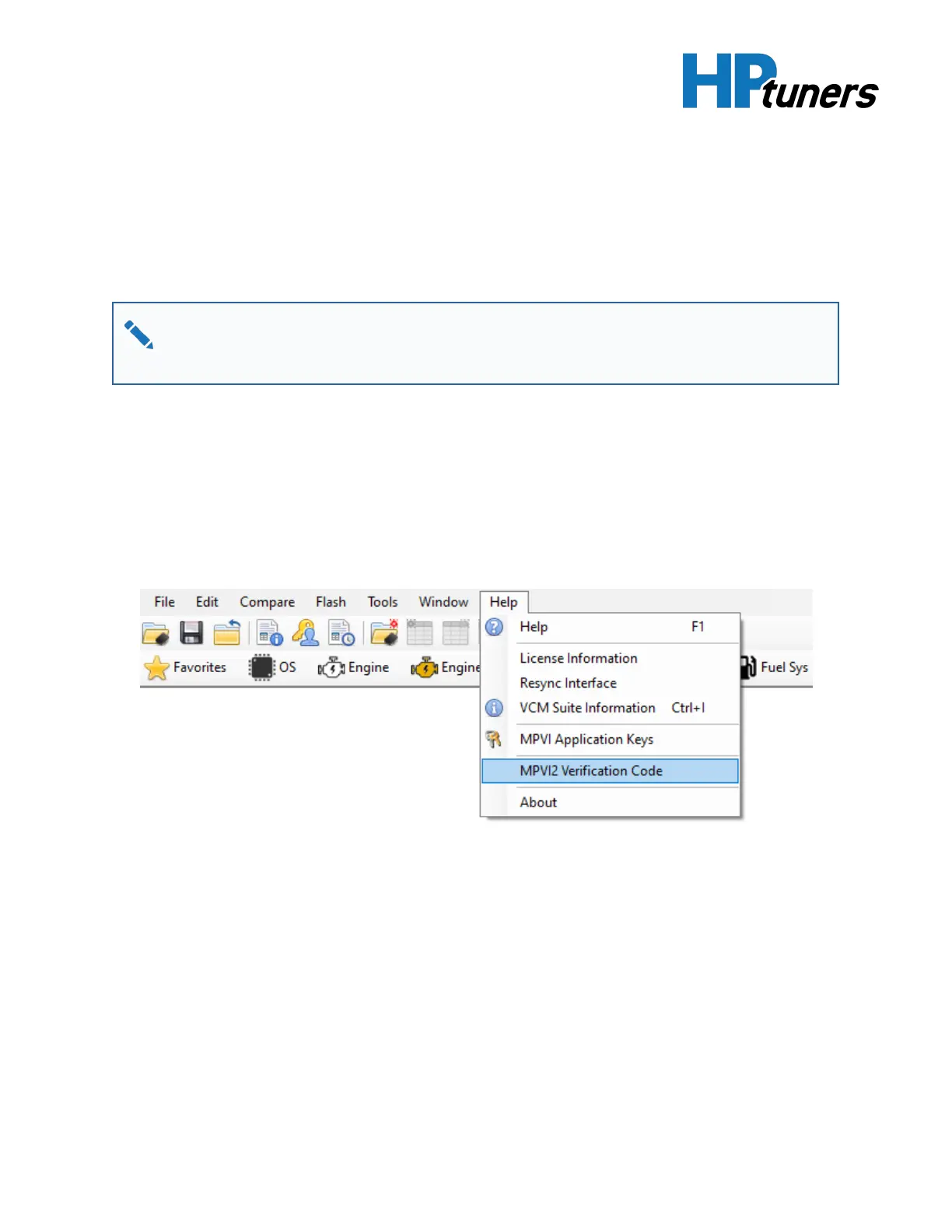
4. In the menu bar, select Help >MPVI3 Verification Code.
5. Write down the serial number and verification IDthat the VCM software gives you
(or keep the window open for cutting and pasting).
6. If you do not already have an account with hptuners.com, create one now.
7. Navigate to the customer account page at https://www.hptuners.com/my-
account/.
Page 8


 To Next Page