EasyManua.ls Logo

HP 3336A - Page 139

HP 3336A
147 pages
Print Icon
To Next Page IconTo Next Page
To Previous Page IconTo Previous Page
Loading...
Model
3336A/B/C
Adjustments
EXT.
REF
IN
-hp-
3336
SPECTRUM
ANALYZER
(LOW
FREQ.)
fe
Prs
Bl
ie
CREED
)
75/
-
+3)
of
sos]
ld
saa}
uposss4
ae
ae
es
ee
ae
ee
~
J[Af
so34U8
75.Q
OUTPUT
MIN
LOSS
IMPEDENCE
MATCHING
PAD
IMHz
LOW
PASS
FILTER
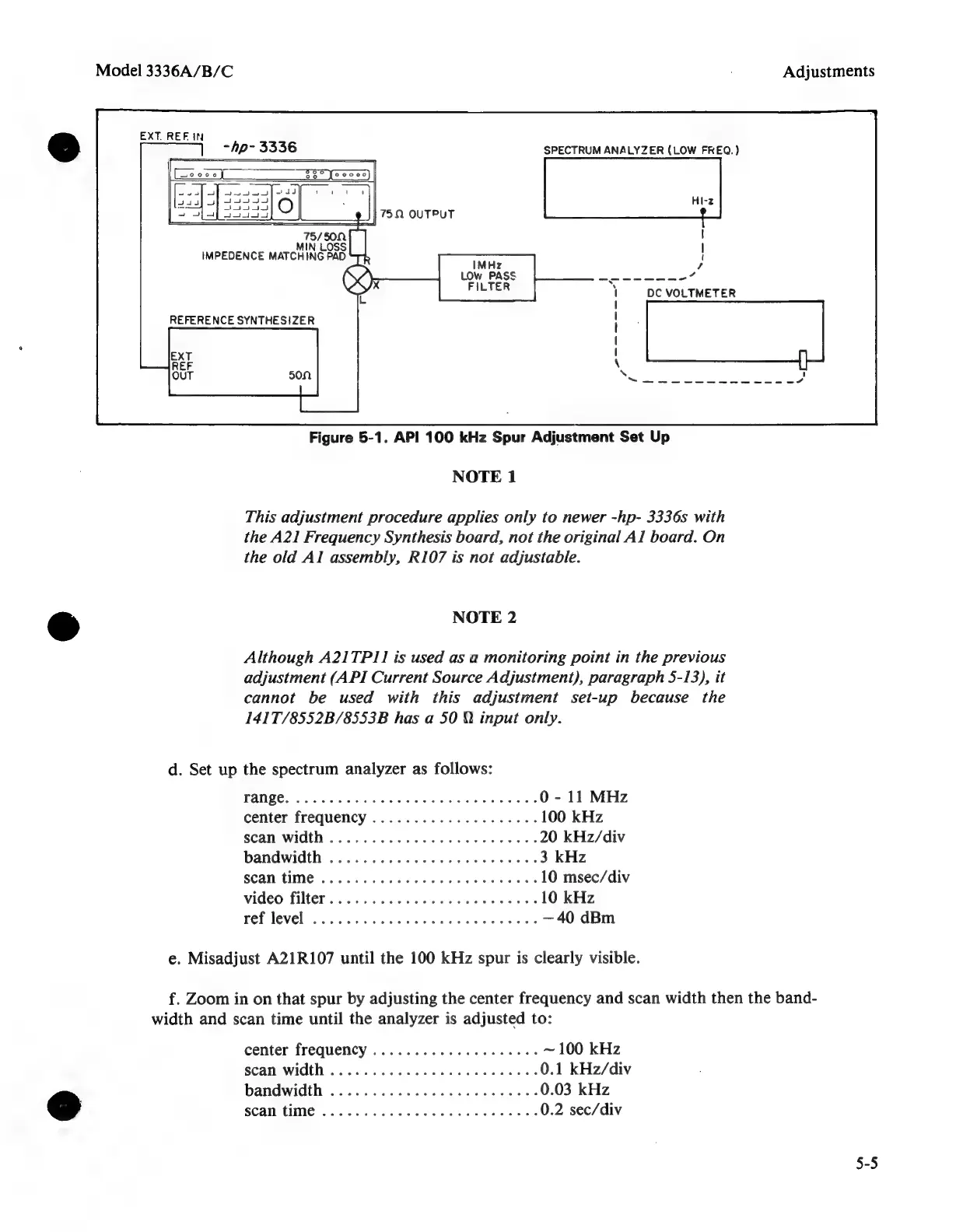
Figure
5-1.
API
100
kHz
Spur
Adjustment
Set
Up
NOTE
1
This
adjustment
procedure
applies
only
to
newer
-hp-
3336s
with
the
A21
Frequency
Synthesis
board,
not
the
original
Al
board.
On
the
old
Al
assembly,
R107
is
not
adjustable.
&
NOTE
2
Although
A21TP11
is
used
as
a
monitoring
point
in
the
previous
adjustment
(API
Current
Source
Adjustment),
paragraph
5-13),
it
cannot
be
used
with
this
adjustment
set-up
because
the
141T/8552B/8553B
has
a
50
Q
input
only.
d.
Set
up
the
spectrum
analyzer
as
follows:
FANE,
6:
sce
heaa
RAR
aN
wee
aie?
0
-
11
MHz
center
frequency
................0005
100
kHz
scan
Width
............
ccc
cee
ee
eee
20
kHz/div
bandwidth
..........
0.0...
cee
eee
3
kHz
scan
time
..........
00.
cece
ee
eee
10
msec/div
video
filter...
0.0...
cece
ee
eee
10
kHz
ref
level
.......
0...
cece
eee
eee
reece
—40
dBm
e.
Misadjust
A21R107
until
the
100
kHz
spur
is
clearly
visible.
f.
Zoom
in
on
that
spur
by
adjusting
the
center
frequency
and
scan
width
then
the
band-
width
and
scan
time
until
the
analyzer
is
adjusted
to:
center
frequency
..................4.
~
100
kHz
scan
Width
............
cece
cece
cece
0.1
kHz/div
bandwidth
................c
cee
eee
0.03
kHz
&
SCAN
(IMG
7s
t0
acts
tows
es
SNe
kh
eee
0.2
sec/div
5-5

Related product manuals