n
D
[3_ca
01101
4.1::`,tV.314=! 1,:r1f4!:7471
100.0.0•
00 0 ea.
0000Y
ru-1
0 0 8 0
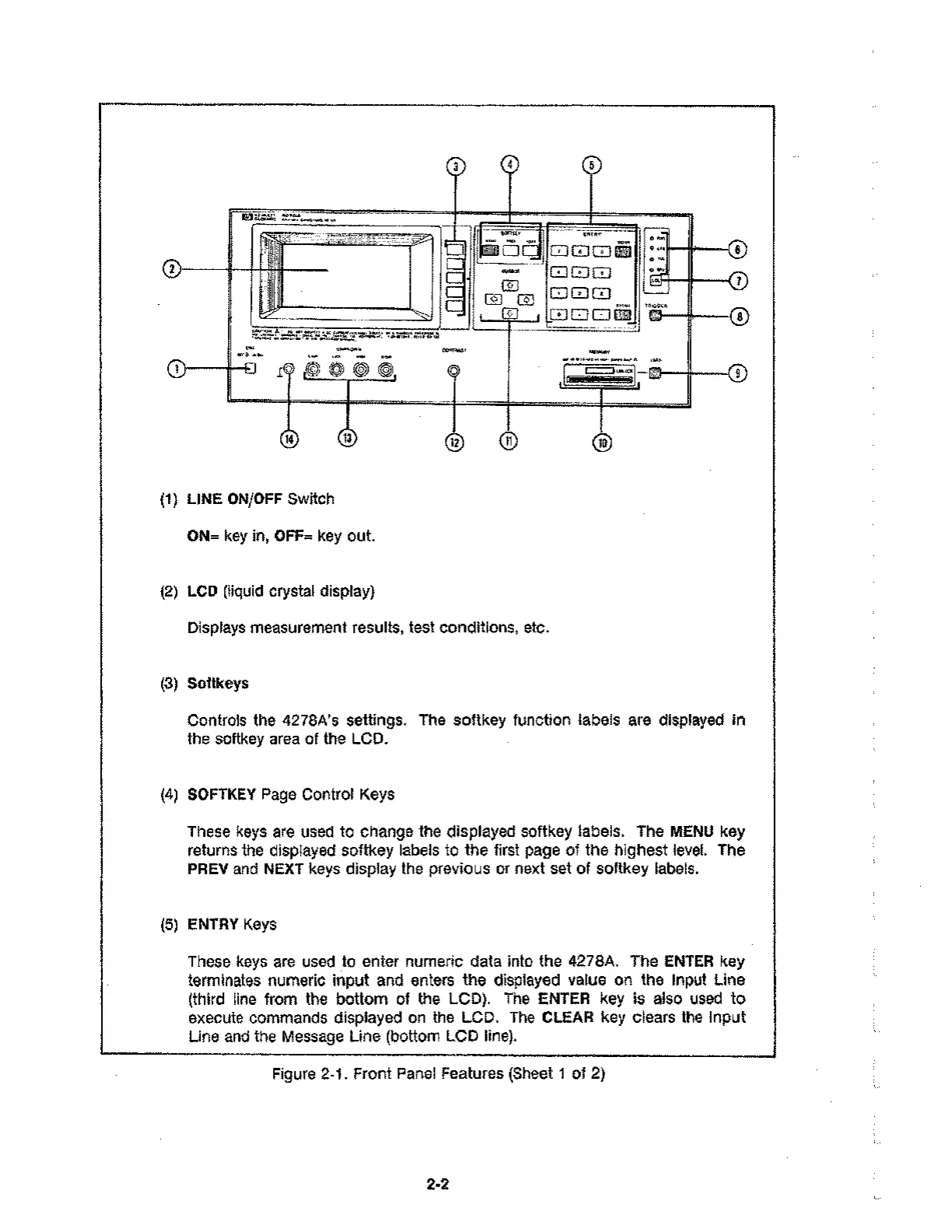
(1) LINE ON/OFF Switch
ON= key in, OFF= key out.
(2) LCD (liquid crystal display)
Displays measurement results, test conditions, etc.
(3) Softkeys
O
CD
0
Controls the 4278A's settings. The softkey function labels are displayed in
the softkey area of the LCD.
(4) SOFTKEY Page Control Keys
These keys are used to change the displayed softkey labels. The MENU key
returns the displayed softkey labels to the first page of the highest level. The
PREV and NEXT keys display the previous or next set of softkey labels.
(5) ENTRY Keys
These keys are used to enter numeric data into the 4278A. The ENTER key
terminates numeric input and enters the displayed value on the Input Line
(third line from the bottom of the LCD). The ENTER key is also used to
execute commands displayed on the LCD. The CLEAR key clears the input
Line and the Message Line (bottom LCD line).
Figure 2-1. Front Panel Features (Sheet 1 of 2)
2-2



 To Next Page