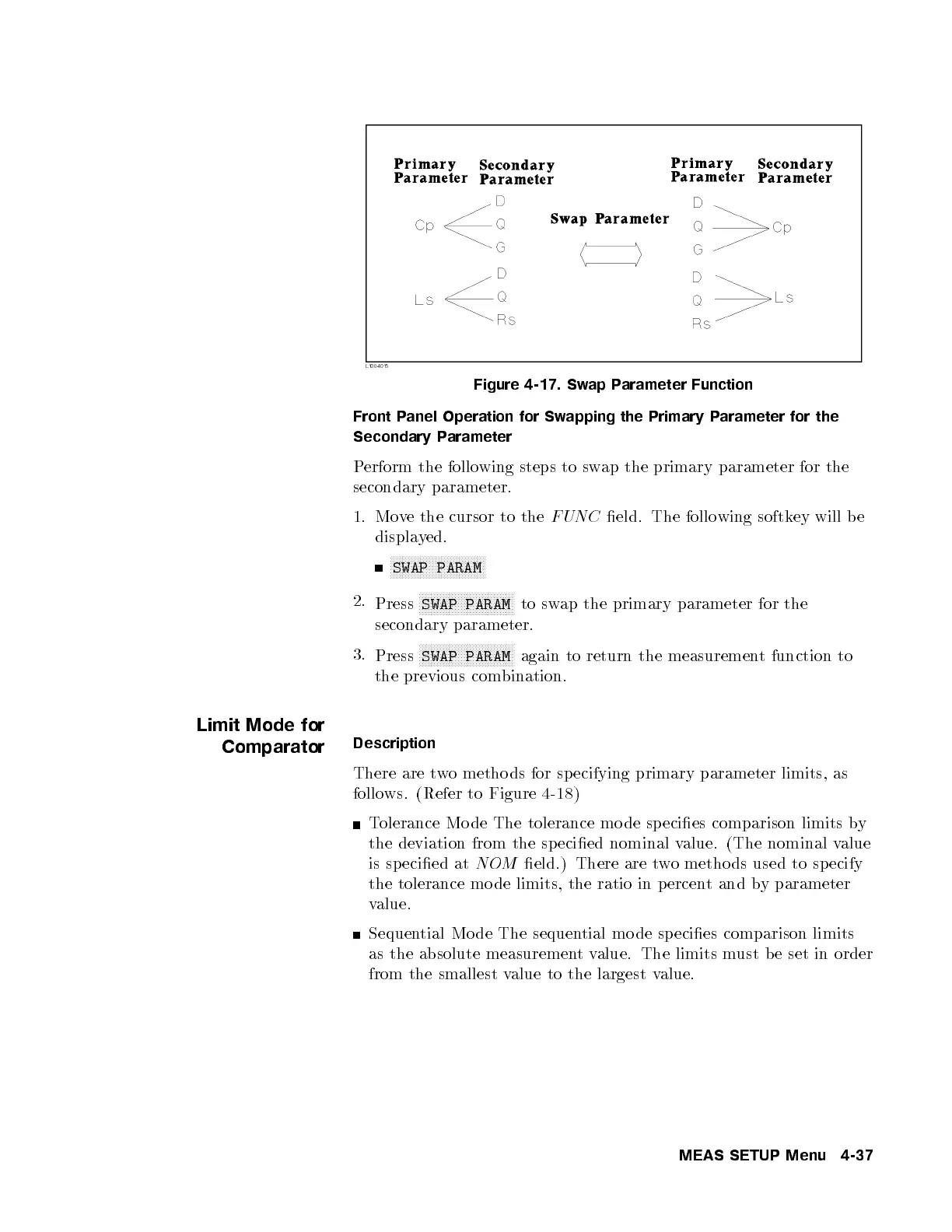
Figure 4-17. Swap Parameter Function
Front Panel Operation for Swapping the Primary Parameter for the
Secondary Parameter
Perform the following steps to swap the primary parameter for the
secondary parameter.
1. Move the cursor to the
FUNC
eld. The following softkey will be
displayed.
NNNNNNNNNNNNNNNNNNNNNNNNNNNNNNNN
SWAP PARAM
2.
Press
NNNNNNNNNNNNNNNNNNNNNNNNNNNNNNNN
SWAP PARAM
to swap the primary parameter for the
secondary parameter.
3.
Press
NNNNNNNNNNNNNNNNNNNNNNNNNNNNNNNN
SWAP PARAM
again to return the measurement function to
the previous combination.
Limit Mode for
Comparator
Description
There are two metho ds for sp ecifying primary parameter limits, as
follows. (Refer to Figure 4-18 )
Tolerance Mo de The tolerance mo de sp ecies comparison limits by
the deviation from the sp ecied nominal value. (The nominal value
is sp ecied at
NOM
eld.) There are two metho ds used to sp ecify
the tolerance mo de limits, the ratio in percen
t and by parameter
value.
Sequential Mo de The sequential mo de species comparison limits
as the absolute measurementvalue. The limits must b e set in order
from the smallest value to the largest value.
MEAS SETUP Menu 4-37



 To Next Page