Line Voltage and
Fuse Selection
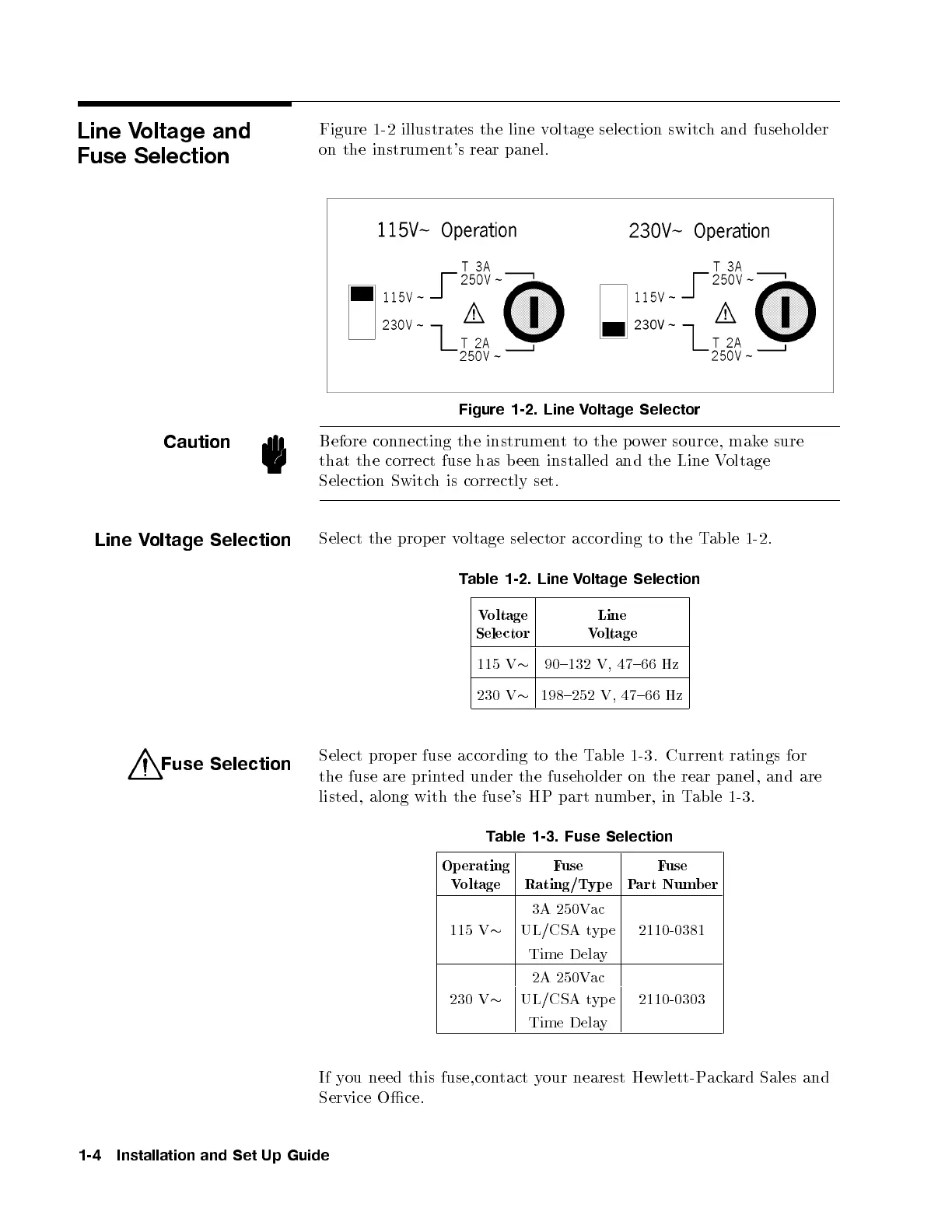
Figure 1-2 illustrates the line voltage selection switch and fuseholder
on the instrument's rear panel.
Figure 1-2. Line Voltage Selector
Caution
Before connecting the instrument to the power source, make sure
that the correct fuse has been installed and the Line Voltage
Selection Switch is correctly set.
Line Voltage Selection
Select the prop er voltage selector according to the Table 1-2 .
Table 1-2. Line Voltage Selection
Voltage
Selector
Line
Voltage
115 V
90{132 V, 47{66 Hz
230 V
198{252 V, 47{66 Hz
Fuse Selection
Select prop er fuse according to the Table 1-3. Current ratings for
the fuse are printed under the fuseholder on the rear panel, and are
listed, along with the fuse's HP part number, in Table 1-3 .
Table 1-3. Fuse Selection
Operating
Voltage
Fuse
Rating/Typ e
Fuse
Part Numb er
3A 250Vac
115 V
UL/CSA typ e 2110-0381
Time Delay
2A 250Vac
230 V
UL/CSA typ e 2110-0303
Time Delay
If you need this fuse,contact your nearest Hewlett-Packard Sales and
Service Oce.
1-4 Installation and Set Up Guide



 To Next Page