14. Use the
CURSOR
arrow keys to move the cursor to the
TEST
MENU
eld.
15. Press the
4
4
5
and the
4
ENTER
5
keys to select the Handler I/F test.
16.
Press the
NNNNNNNNNNNNNNNNNNNNNNNNNNNNNNNN
TEST START
softkey.
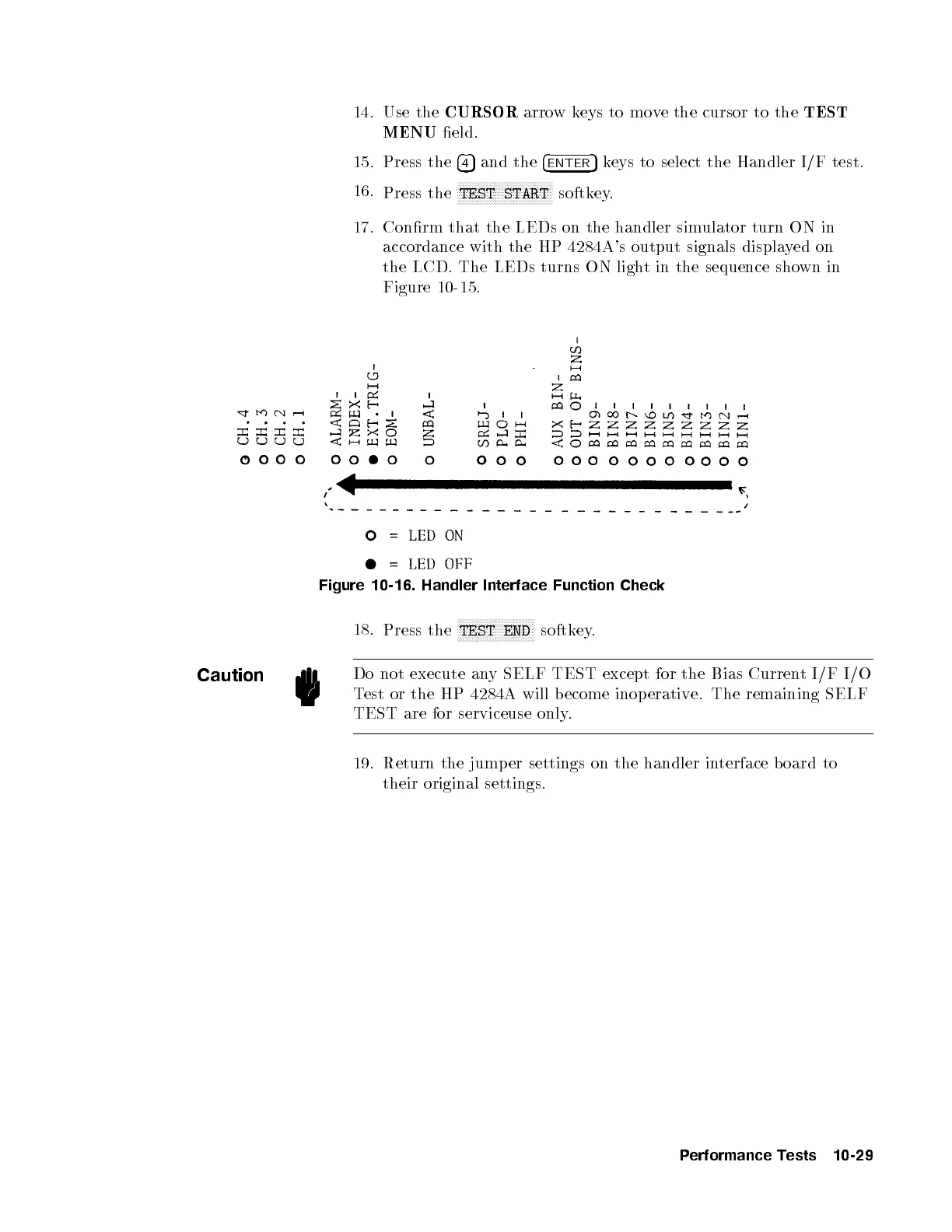
17. Conrm that the LEDs on the handler simulator turn ON in
accordance with the HP 4284A's output signals displayed on
the LCD. The LEDs turns ON light in the sequence shown in
Figure 10-15.
Figure 10-16. Handler Interface Function Check
18.
Press the
NNNNNNNNNNNNNNNNNNNNNNNNNN
TEST END
softkey.
Caution
Do not execute any SELF TEST except for the Bias Current I/F I/O
Test or the HP 4284A will become inop erative. The remaining SELF
TEST are for serviceuse only.
19. Return the jump er settings on the handler interface b oard to
their original settings.
Performance Tests 10-29


 To Next Page