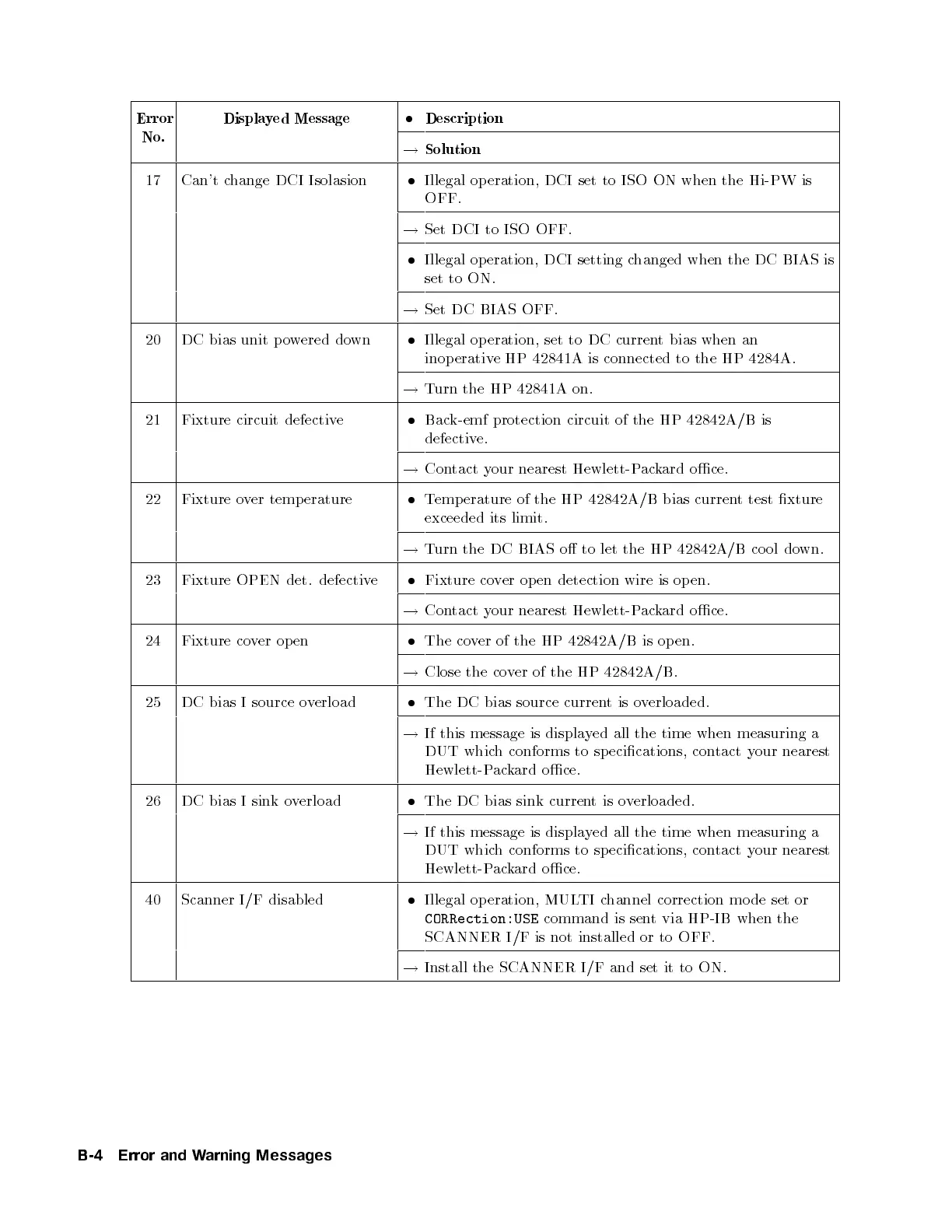
Error
No.
Displayed Message
Description
!
Solution
17 Can't change DCI Isolasion
Illegal op eration, DCI set to ISO ON when the Hi-PW is
OFF.
!
Set DCI to ISO OFF.
Illegal op eration, DCI setting changed when the DC BIAS is
set to ON.
!
Set DC BIAS OFF.
20 DC bias unit p owered down
Illegal op eration, set to DC current bias when an
inop erative HP 42841A is connected to the HP 4284A.
!
Turn the HP 42841A on.
21 Fixture circuit defective
Back-emf protection circuit of the HP 42842A/B is
defective.
!
Contact your nearest Hewlett-Packard oce.
22 Fixture over temp erature
Temp erature of the HP 42842A/B bias current test xture
exceeded its limit.
!
Turn the DC BIAS o to let the HP 42842A/B co ol do
wn.
23 Fixture OPEN det. defective
Fixture cover op en detection wire is op en.
!
Contact your nearest Hewlett-Packard oce.
24 Fixture cover op en
The cover of the HP 42842A/B is op en.
!
Close the cover of the HP 42842A/B.
25 DC bias I source overload
The DC bias source currentisoverloaded.
!
If this message is displayed all the time when measuring a
DUT which conforms to specications, contact your nearest
Hewlett-Packard oce.
26 DC bias I sink overload
The DC bias sink currentisoverloaded.
!
If this message is displayed all the time when measuring a
DUT which conforms to specications, contact your nearest
Hewlett-Packard oce.
40 Scanner I/F disabled
Illegal op eration, MULTI channel correction mo de set or
CORRection:USE
command is sent via HP-IB when the
SCANNER I/F is not installed or to OFF.
!
Install the SCANNER I/F and set it to ON.
B-4 Error and Warning Messages


 To Next Page