Display
The following paragraphs dene the display areas and elds, and
describes the LCD's display pages.
Display Area Definition
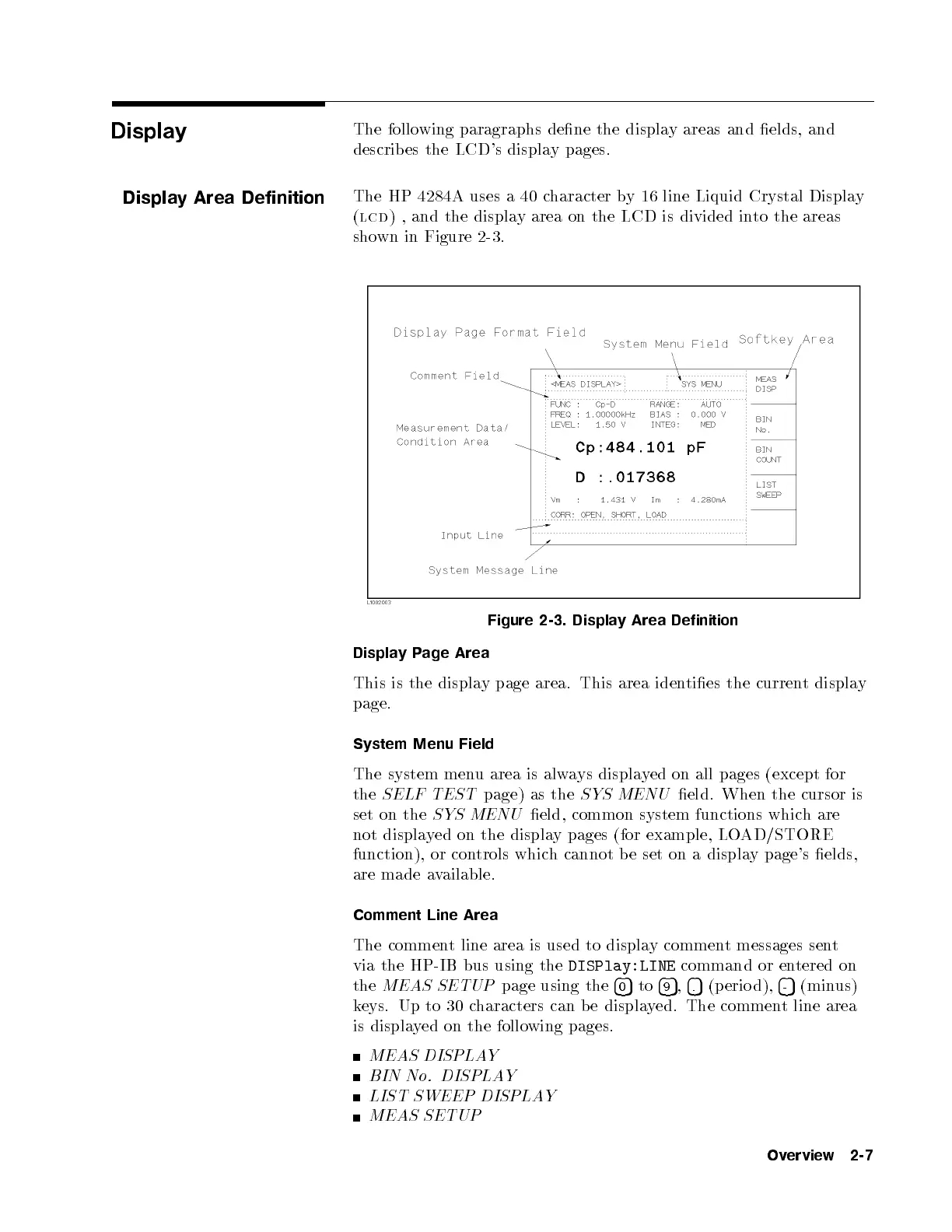
The HP 4284A uses a 40 character by 16 line Liquid Crystal Display
(
lcd
) , and the display area on the LCD is divided into the areas
shown in Figure 2-3.
Figure 2-3. Display Area Definition
Display Page Area
This is the display page area. This area identies the current display
page.
System Menu Field
The system menu area is always displayed on all pages (except for
the
SELF TEST
page) as the
SYS MENU
eld. When the cursor is
set on the
SYS MENU
eld, common system functions which are
not displayed on the display pages (for example, LOAD/STORE
function), or controls which cannot b e set on a displa
y page's elds,
are made available.
Comment Line Area
The comment line area is used to display comment messages sent
via the HP-IB bus using the
DISPlay:LINE
command or entered on
the
MEAS SETUP
page using the
4
0
5
to
4
9
5
,
4
.
5
(p erio d),
4
-
5
(minus)
keys. Up to 30 characters can b e displayed. The comment line area
is displayed on the following pages.
MEAS DISPLAY
BIN No. DISPLAY
LIST SWEEP DISPLAY
MEAS SETUP
Overview 2-7



 To Next Page