units (
NNNNNNNN
Hz
,
NNNNNNNNNNN
kHz
, and
NNNNNNNNNNN
MHz
), and so you can use these softkeys
instead of
4
ENTER
5
to enter the units and enter the data. When
4
ENTER
5
is used, the numeric data is entered with Hz as the default
unit.
Oscillator Level
Description
The HP 4284A's oscillator level can be set as the eectivevalue
(RMS value) of a sine wave of the test frequency from the
HP 4284A's internal oscillator. You can set either the oscillator
voltage level or the oscillator current level. The output imp edance is
100.
Note
The set value of the oscillator current level is the value set when the
measurement contacts (UNKNOWN Terminals) are shorted together.
The set value of the oscillator voltage level is the value set when the
measurement contacts (UNKNOWN Terminals) are op ened.
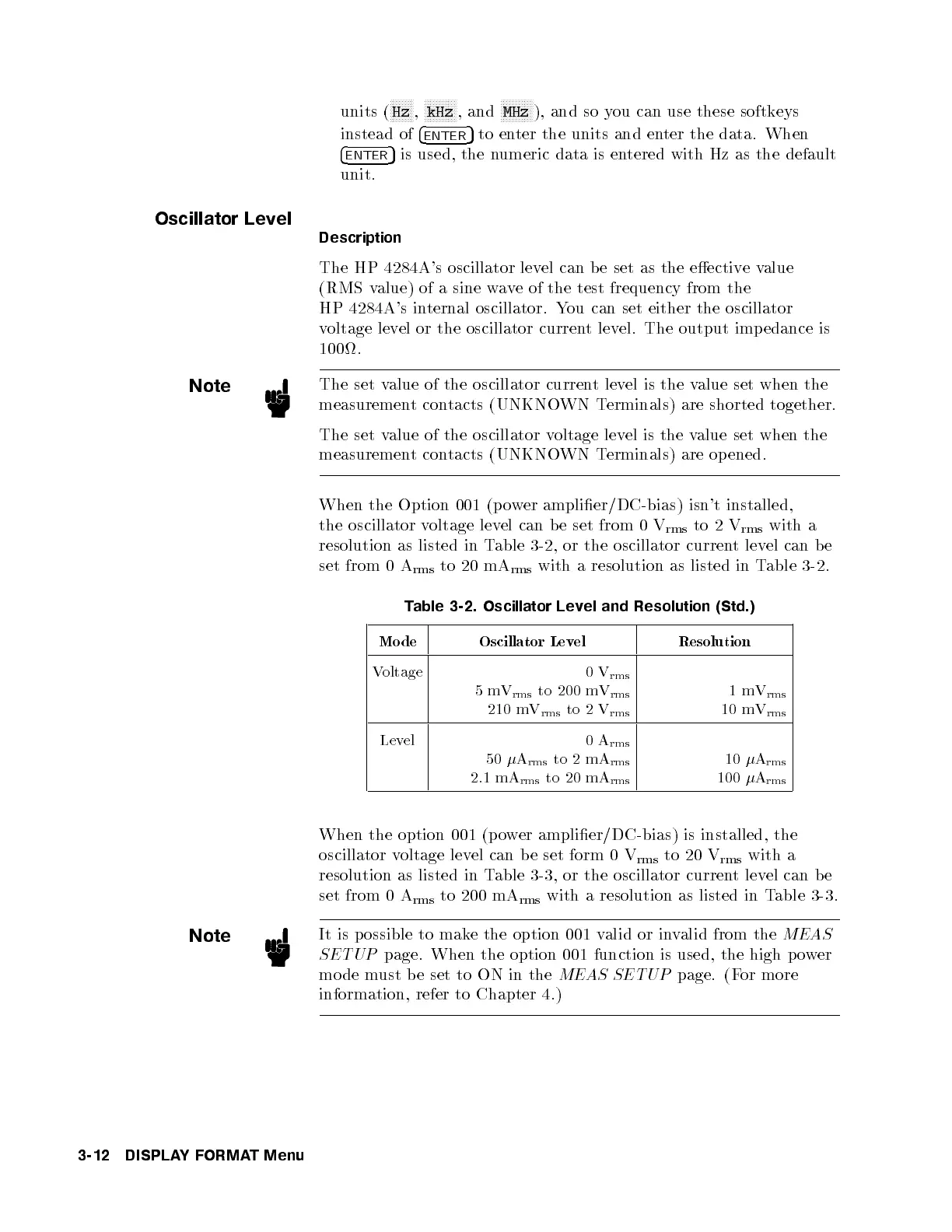
When the Option 001 (p ower amplier/DC-bias) isn't installed,
the oscillator voltage level can b e set from 0 V
rms
to 2 V
rms
with a
resolution as listed in Table 3-2, or the oscillator current level can b e
set from 0 A
rms
to 20 mA
rms
with a resolution as listed in Table 3-2.
Table 3-2. Oscillator Level and Resolution (Std.)
Mode Oscillator Level Resolution
Voltage 0V
rms
5mV
rms
to 200 mV
rms
210 mV
rms
to 2 V
rms
1mV
rms
10 mV
rms
Level 0A
rms
50
A
rms
to 2 mA
rms
2.1 mA
rms
to 20 mA
rms
10
A
rms
100
A
rms
When the option 001 (p ower amplier/DC-bias) is installed, the
oscillator voltage level can be set form 0 V
rms
to 20 V
rms
with a
resolution as listed in Table 3-3, or the oscillator current level can b e
set from 0 A
rms
to 200 mA
rms
with a resolution as listed in Table 3-3.
Note
It is possible to make the option 001 valid or invalid from the
MEAS
SETUP
page. When the option 001 function is used, the high p ower
mo de must b e set to ON in the
MEAS SETUP
page. (For more
information, refer to Chapter 4.)
3-12 DISPLAYFORMAT Menu



 To Next Page