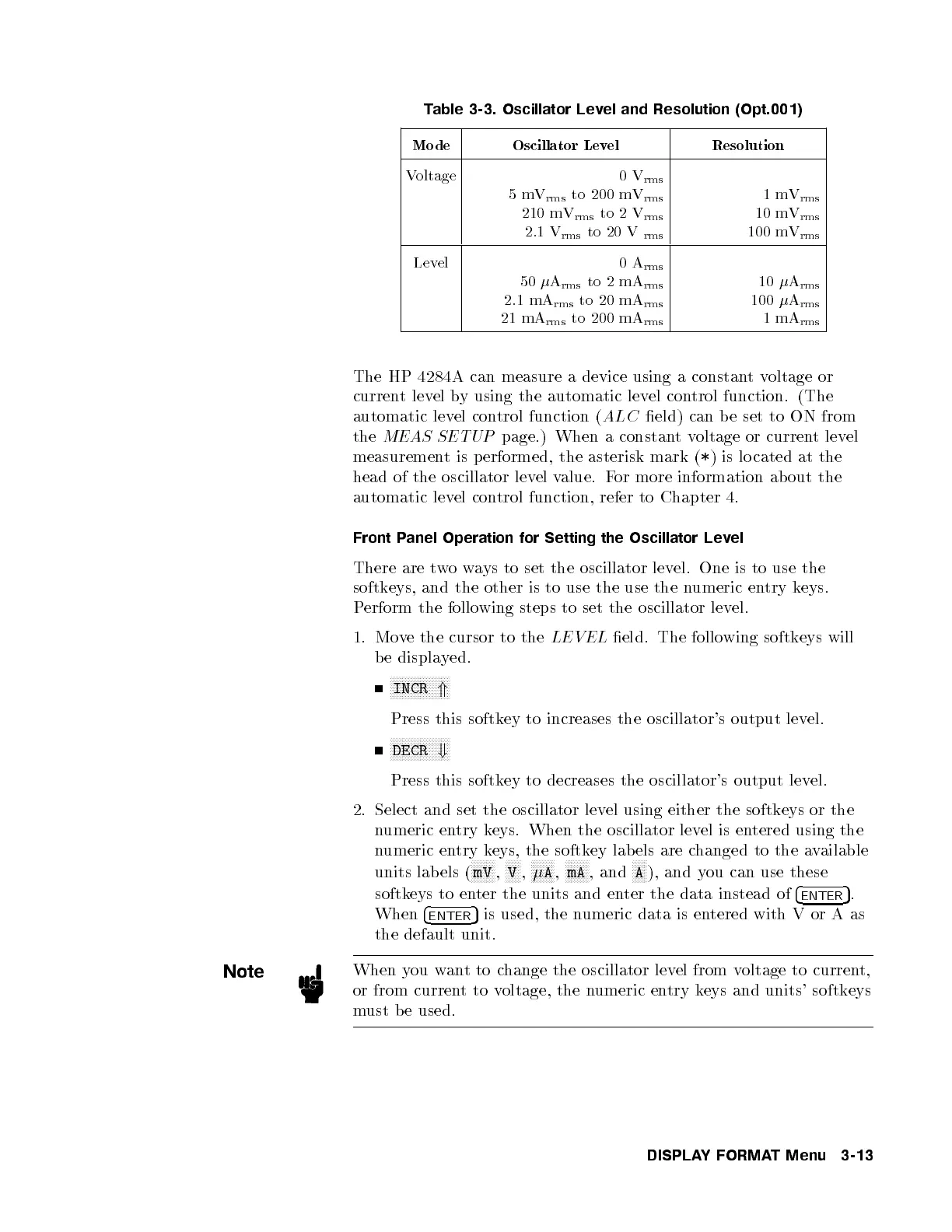
Table 3-3. Oscillator Level and Resolution (Opt.001)
Mode Oscillator Level Resolution
Voltage 0V
rms
5mV
rms
to 200 mV
rms
210 mV
rms
to 2 V
rms
2.1 V
rms
to 20 V
rms
1mV
rms
10 mV
rms
100 mV
rms
Level 0A
rms
50
A
rms
to 2 mA
rms
2.1 mA
rms
to 20 mA
rms
21 mA
rms
to 200 mA
rms
10
A
rms
100
A
rms
1mA
rms
The HP 4284A can measure a device using a constantvoltage or
current level by using the automatic level control function. (The
automatic level control function (
ALC
eld) can b e set to ON from
the
MEAS SETUP
page.) When a constantvoltage or current level
measurement is performed, the asterisk mark (
*
) is lo cated at the
head of the oscillator level value. For more information ab out the
automatic level control function, refer to Chapter 4.
Front Panel Operation for Setting the Oscillator Level
There are twoways to set the oscillator level. One is to use the
softkeys, and the other is to use the use the n
umeric entry keys.
Perform the following steps to set the oscillator level.
1. Move the cursor to the
LEVEL
eld. The following softkeys will
be displayed.
NNNNNNNNNNNNNNNNNNNN
INCR
*
Press this softkey to increases the oscillator's output lev
el.
NNNNNNNNNNNNNNNNNNNN
DECR
+
Press this softkey to decreases the oscillator's output level.
2. Select and set the oscillator level using either the softkeys or the
numeric entry keys. When the oscillator level is entered using the
numeric entry keys, the softkey lab els are c
hanged to the available
units lab els (
NNNNNNNN
mV
,
NNNNN
V
,
NNNNNNNN
A
,
NNNNNNNN
mA
, and
NNNNN
A
), and you can use these
softkeys to enter the units and enter the data instead of
4
ENTER
5
.
When
4
ENTER
5
is used, the numeric data is entered with V or A as
the default unit.
Note
When you wantto change the oscillator level from voltage to current,
or from currenttovoltage, the numeric entry keys and units' softkeys
must be used.
DISPLAYFORMAT Menu 3-13



 To Next Page