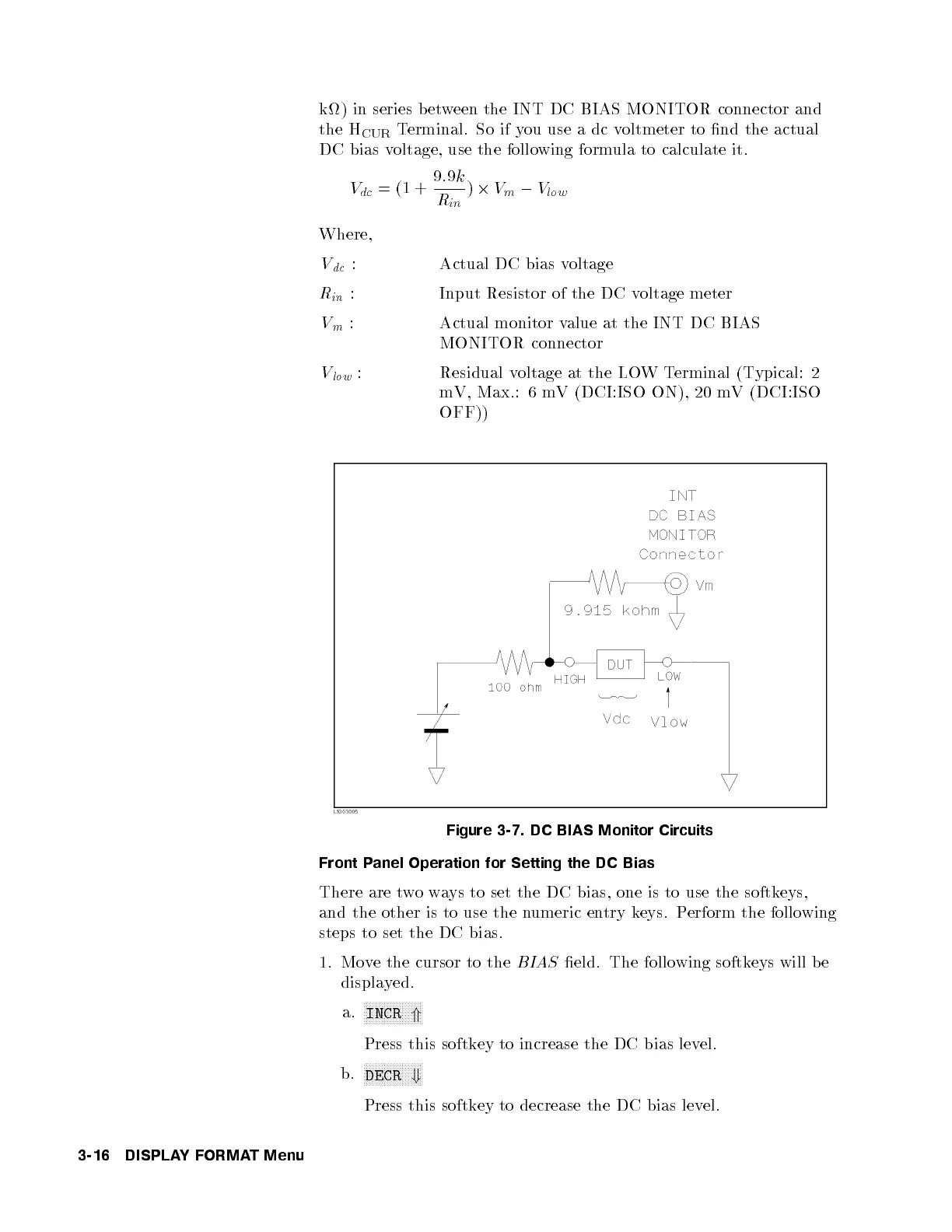
k) in series b etween the INT DC BIAS MONITOR connector and
the H
CUR
Terminal. So if you use a dc voltmeter to nd the actual
DC bias voltage, use the following formula to calculate it.
V
dc
=(1+
9
:
9
k
R
in
)
2
V
m
0
V
low
Where,
V
dc
: Actual DC bias voltage
R
in
: Input Resistor of the DC voltage meter
V
m
: Actual monitor value at the INT DC BIAS
MONITOR connector
V
low
: Residual voltage at the LOWTerminal (Typical: 2
mV, Max.: 6 mV (DCI:ISO ON), 20 mV (DCI:ISO
OFF))
Figure 3-7. DC BIAS Monitor Circuits
Front Panel Operation for Setting the DC Bias
There are twoways to set the DC bias, one is to use the softkeys,
and the other is to use the numeric entry keys. Perform the following
steps to set the DC bias.
1. Move the cursor to the
BIAS
eld. The following softkeys will be
displayed.
a.
NNNNNNNNNNNNNNNNNNNN
INCR
*
Press this softkey to increase the DC bias lev
el.
b.
NNNNNNNNNNNNNNNNNNNN
DECR
+
Press this softkey to decrease the DC bias lev
el.
3-16 DISPLAYFORMAT Menu



 To Next Page