EasyManua.ls Logo

HP 5335A - Page 38

HP 5335A
76 pages
Print Icon
To Next Page IconTo Next Page
To Previous Page IconTo Previous Page
Loading...
Operation
and
Programming
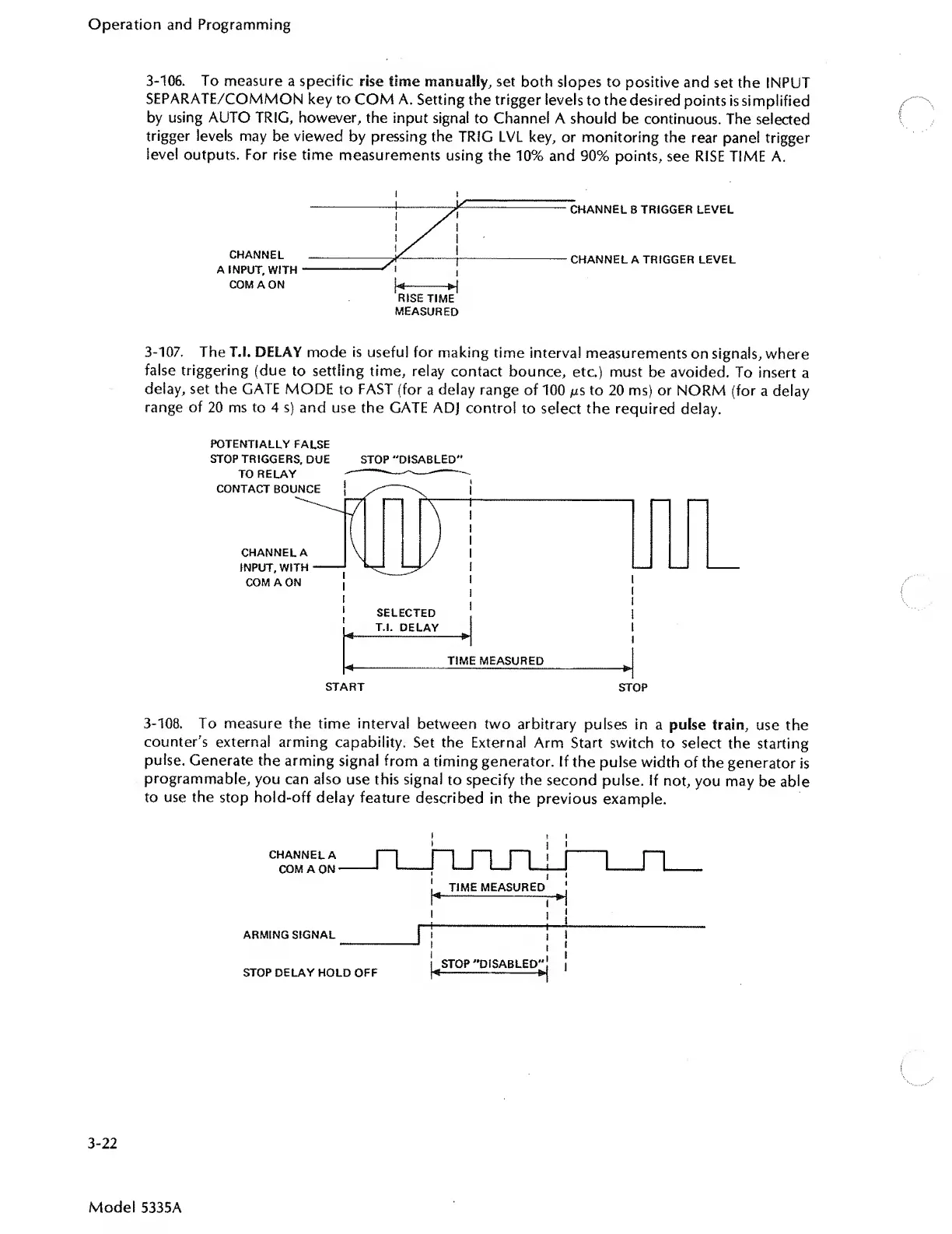
3-106.
To
measure
a
specific
rise
time
manually,
set
both
slopes
to
positive
and
set
the
INPUT
SEPARATE/COMMON
key
to
COM
A.
Setting
the
trigger
levels
to
the
desired
points
is
simplified
by
using
AUTO
TRIG,
however,
the
input
signal
to
Channel
A
should
be
continuous.
The
selected
trigger
levels
may
be
viewed
by
pressing
the
TRIG
LVL
key,
or
monitoring
the
rear
panel
trigger
level
outputs.
For
rise
time
measurements
using
the
10%
and
90%
points,
see
RISE
TIME
A.
i
t
MEASURED
3-107.
The
T.l.
DELAY
mode
is
useful
for
making
time
interval
measurements
on
signals,
where
false
triggering
(due
to
settling
time,
relay
contact
bounce,
etc.)
must
be
avoided.
To
insert
a
delay,
set
the
GATE
MODE
to
FAST
(for
a
delay
range
of
100
jus
to
20
ms)
or
NORM
(for
a
delay
range
of
20
ms
to
4
s)
and
use
the
GATE
ADJ
control
to
select
the
required
delay.
POTENTIALLY
FALSE
STOP
TRIGGERS,
DUE
STOP
“DISABLED'*
TO
RELAY
----—--—
3-108.
To
measure
the
time
interval
between
two
arbitrary
pulses
in
a
pulse
train,
use
the
counter's
external
arming
capability.
Set
the
External
Arm
Start
switch
to
select
the
starting
pulse.
Generate
the
arming
signal
from
a
timing
generator.
If
the
pulse
width
of
the
generator
is
programmable,
you
can
also
use
this
signal
to
specify
the
second
pulse.
If
not,
you
may
be
able
to
use
the
stop
hold-off
delay
feature
described
in
the
previous
example.
CHANNEL
A
COM
A
ON
ARMING
SIGNAL
STOP
DELAY
HOLD
OFF
ruini
i
^
TIME
MEASURED
STOP
“DISABLED"!
!
1
-~-
3-22
Model
5335A

Related product manuals