EasyManua.ls Logo

HP 6296A - Page 39

HP 6296A
61 pages
Print Icon
To Next Page IconTo Next Page
To Previous Page IconTo Previous Page
Loading...
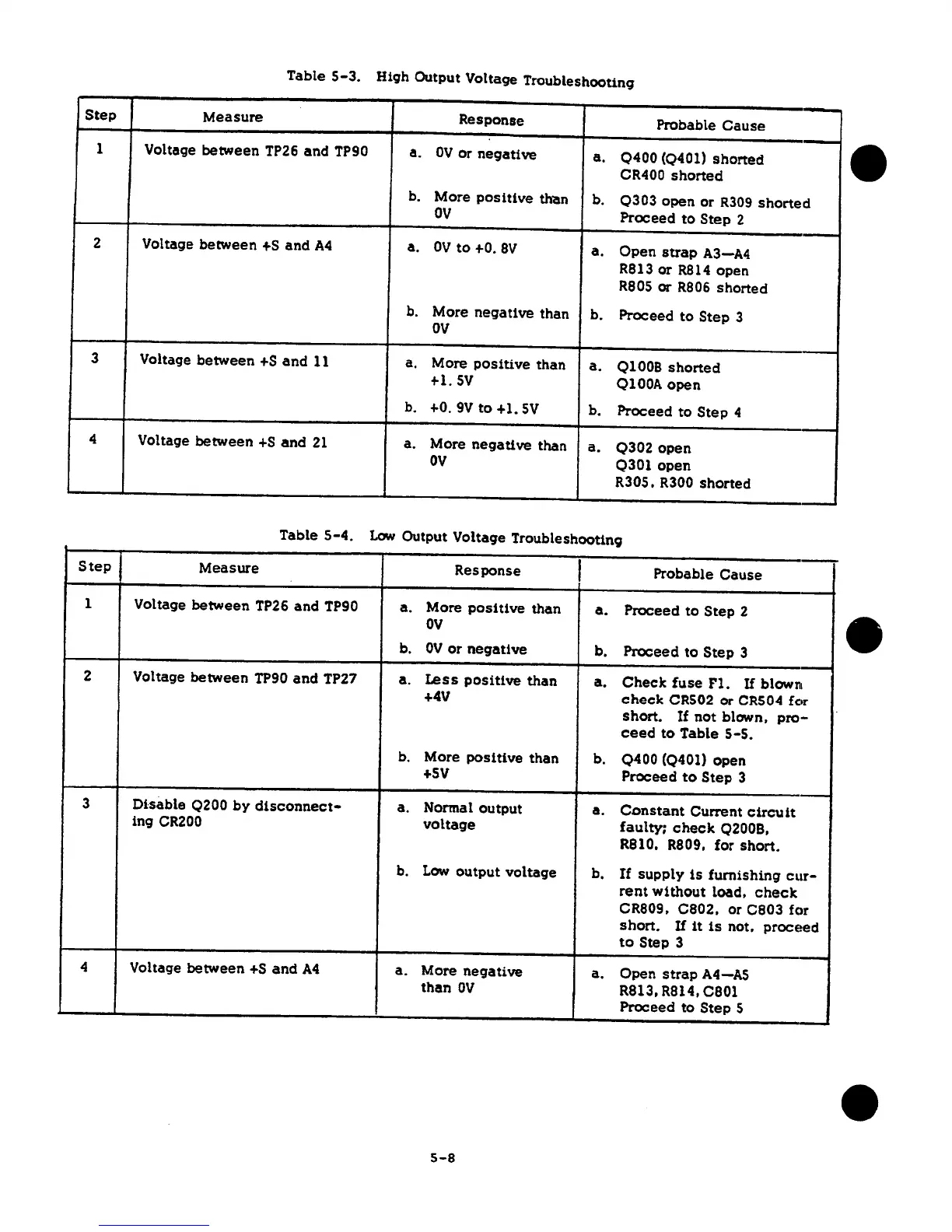
Table
5-3.
Hi9h Output Volta9e Troubleshooting
Step
Measure
Response
Probable
Cause
1
Voltage
between
TP26
and
TP90
a.
OV
or
negative
a.
0400(0401)
shorted
CR400
shorted
b. More
positive
th-an
b.
0303
open
or
R309
shorted
ov
Proceed
to
Step
2
2
Voltage
between
+s
and
A4
a.
OV
to
+O.
8V
a.
Open
strap
A3-A4
R813
or
R814
open
R805
or
R806
shorted
b.
More
negative
than
b.
Proceed
to
Step
3
ov
3
Voltage
between
+S
and
11 a.
More
positive
than
a.
01008
shorted
+l.
5V
OlOOA
open
b. +o.
9V
to
+1.
5V
b.
Proceed
to
Step
4
4
Voltage
between
+s
and
21
a. More
negative
than
a.
0302
open
ov
0301
open
R30S. R300
shorted
Table
5-4.
Low
Output
Voltage Troubleshooting
Step
Measure
Response
I
Probable
Cause
1
Voltage
between
TP26
and
TP90
a.
More
positive
than
a.
Proceed
to
Step
2
ov
b.
OV
or
negative
b.
Proceed
to
Step
3
2
Voltage
between
TP90
and
TP27
a.
Less
positive
than
a.
Chee
le
fuse
Fl.
If
blow111
+4V
check
CRS02
or
CRS04
for
short.
If
not
blown,
pro-
ceed
to
Table
s-s.
b.
More
positive
than
b.
0400
(0401)
open
+sv
Proceed
to
Step
3
3
Disable
Q200
by
disconnect-
a.
Normal
output
a.
Constant
Current
circuit
ing
CR200
voltage
faulty;
check
02008,
R810. R809,
for
short.
b.
Low
output
voltage
b.
If
supply
is
furnishing
cur-
rent
without
load,
check
CR809,
C802,
or
C803
fc>r
short.
If
it
is
not,
proceed
to
Step 3
4
Voltage
between
+S
and
A4
a.
More
negative
a.
Open
strap
A4-AS
than
OV
R813, R814,
C801
Proceed
to
Step
5
5-8

Related product manuals