EasyManua.ls Logo

HP 8444A - Page 14

HP 8444A
26 pages
Print Icon
To Next Page IconTo Next Page
To Previous Page IconTo Previous Page
Loading...
Installation
least
three
inches
of
clearance
around
the
rear
and
both
sides.
Normal
air
circulation
will
maintain
a
reasonable
temperature
within
the
instrument.
2-18.
INSTALLATION
CONNECTIONS
2-19.
A
rack
mounting
kit
is
supplied
for
rack
installation.
Additionally,
a
joining
bracket
kit
(accessory)
can
be
provided
to
secure
the
Tracking
Generator
to
the
Spectrum
Analyzer.
Installation
instructions
are
supplied
with
both
joining
bracket
and
rack
mounting
kits.
2-20.
Electrical
connections
are
provided
by
three
coaxial
cables
and
two
line
power
cords.
Coaxial
cables
connect
Spectrum
Analyzer
FIRST
LO
OUTPUT
to
Tracking
Generator
FIRST
LO
IN-
PUT,
THIRD
LO
OUTPUT
to
THIRD
LO
INPUT
and
SCAN
OUTPUT
to
SCAN
IN/OUT.
Double
shielded
coaxial
cables
are
provided
for
connection
between
local
oscillator
input
and
output
connec-
tors.
Refer
to
Table
1-2
for
description
and
HP
part
number
of
cables
supplied
with
the
Tracking
Generator.
2-21.
STORAGE
AND
SHIPMENT
2-22,
Original
Packaging
2-23.
The
same
containers
and
materials
used
in
factory
packaging
can
be
obtained
through
the
Hewlett-Packard
Sales
and
Service
offices
listed
at
the
rear
of
this
manual.
2-24.
If
the
instrument
is
being
returned
to
Hewlett-Packard
for
servicing,
attach
a
tag
indicat-
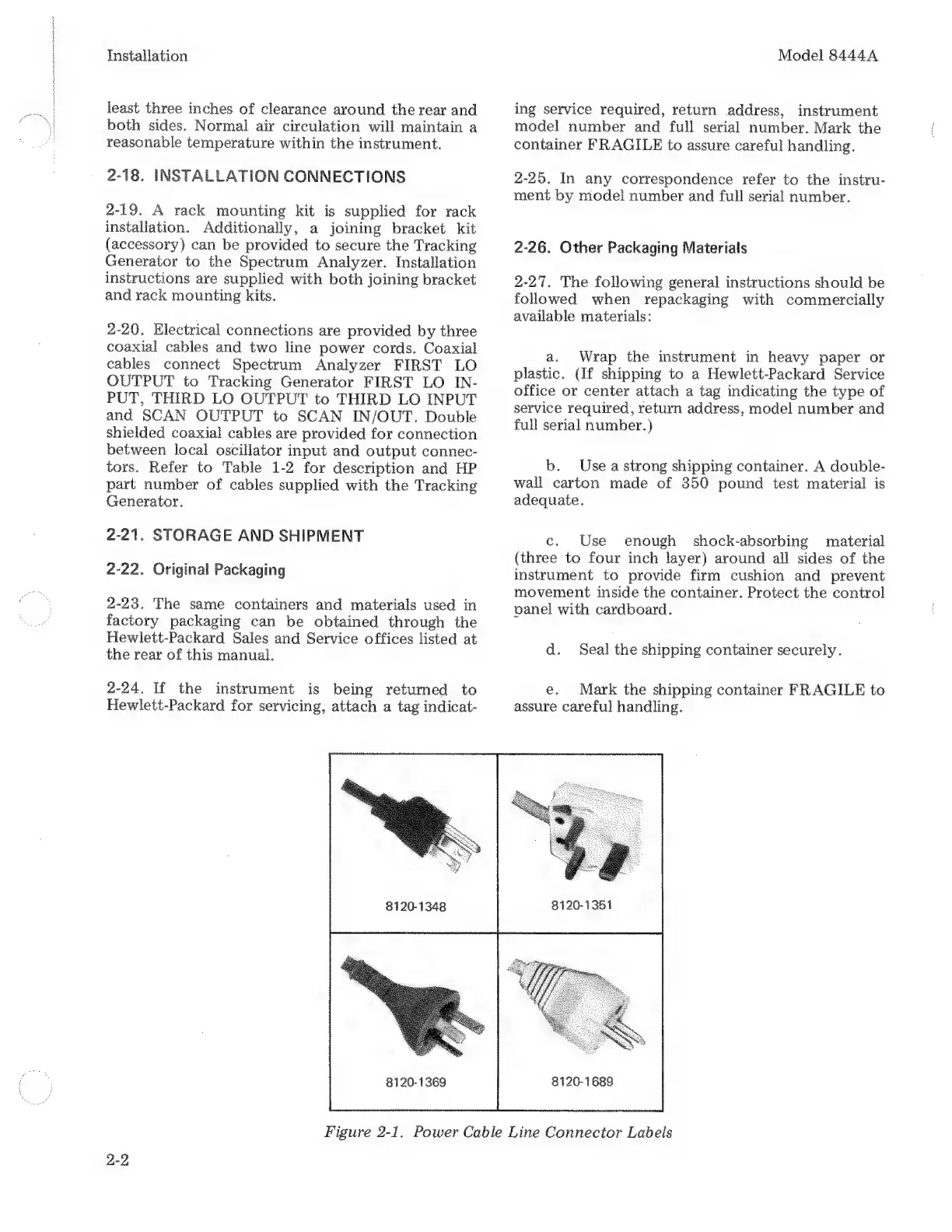
8120-1348
8120-1369
Model
8444A
ing
service
required,
return
address,
instrument
model
number
and
full
serial
number.
Mark
the
container
FRAGILE
to
assure
careful
handling.
2-25.
In
any
correspondence
refer
to
the
instru-
ment
by
model
number
and
full
serial
number.
2-26.
Other
Packaging
Materials
2-27.
The
following
general
instructions
should
be
followed
when
repackaging
with
commercially
available
materials:
a.
Wrap
the
instrument
in
heavy
paper
or
plastic.
(If
shipping
to
a
Hewlett-Packard
Service
office
or
center
attach
a
tag
indicating
the
type
of
service
required,
return
address,
model
number
and
full
serial
number.)
b.
Use
a
strong
shipping
container.
A
double-
wall
carton
made
of
350
pound
test
material
is
adequate.
c.
Use
enough
shock-absorbing
material
(three
to
four
inch
layer)
around
all
sides
of
the
instrument
to
provide
firm
cushion
and
prevent
movement
inside
the
container.
Protect
the
control
panel
with
cardboard.
d.
Seal
the
shipping
container
securely.
e.
Mark
the
shipping
container
FRAGILE
to
assure
careful
handling.
8120-1351
8120-1689
Figure
2-1,
Power
Cable
Line
Connector
Labels

Related product manuals