DRAFT 29
Operation and Service Manual
Performance Tests Procedures
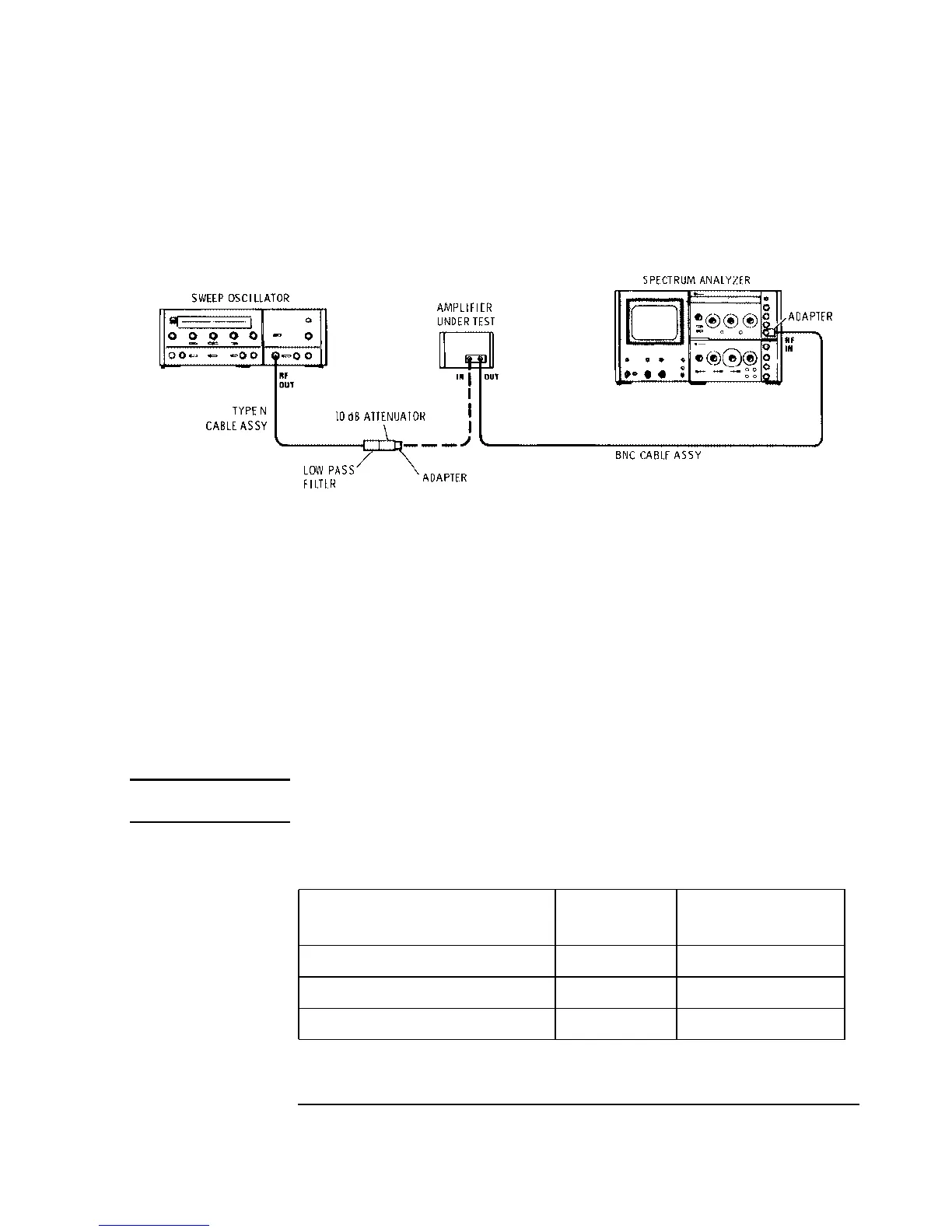
Figure 7 Distortion and Reverse Isolation Test Setup
Procedure:
1 To check distortion, connect the equipment as shown in Figure 7. Set the sweep oscil-
lator for a fixed, 400 MHz CW signal.
For the HP 8447F option H64 low frequency preamp, set the frequency to 10 MHz.
2 Set the spectrum analyzer input attenuator as shown below. Adjust the controls to dis-
play 400 through 1200 MHz.
For the HP 8447F option H64 low frequency preamp, set the controls to display 10
through 30 MHz.
NOTE: The signal into the spectrum analyzer input mixer must be low enough to eliminate
harmonic distortion in the spectrum analyzer.
3 Set the sweep oscillator output level for the following signal levels out of the amplifier
(read on the spectrum analyzer).
4 Note the level of the second harmonic at 800 MHz and the third harmonic at 1200 MHz.
Signal Level
Spectrum Analyzer
Input Attenuation
HP 8447E:
+8 dBm
50 dB
HP 8447F Power Amp:
+8 dBm
50 dB
HP 8447F H64 Low freq preamp:
+10 dBm
50 dB


 To Next Page