Model 8642A/B
Operation
STEP,
INCREMENT SET
Description The values of Signal Generator functions can be stepped up or down by an increment
set value using the Step keys ( [ t I or
1
i I ).
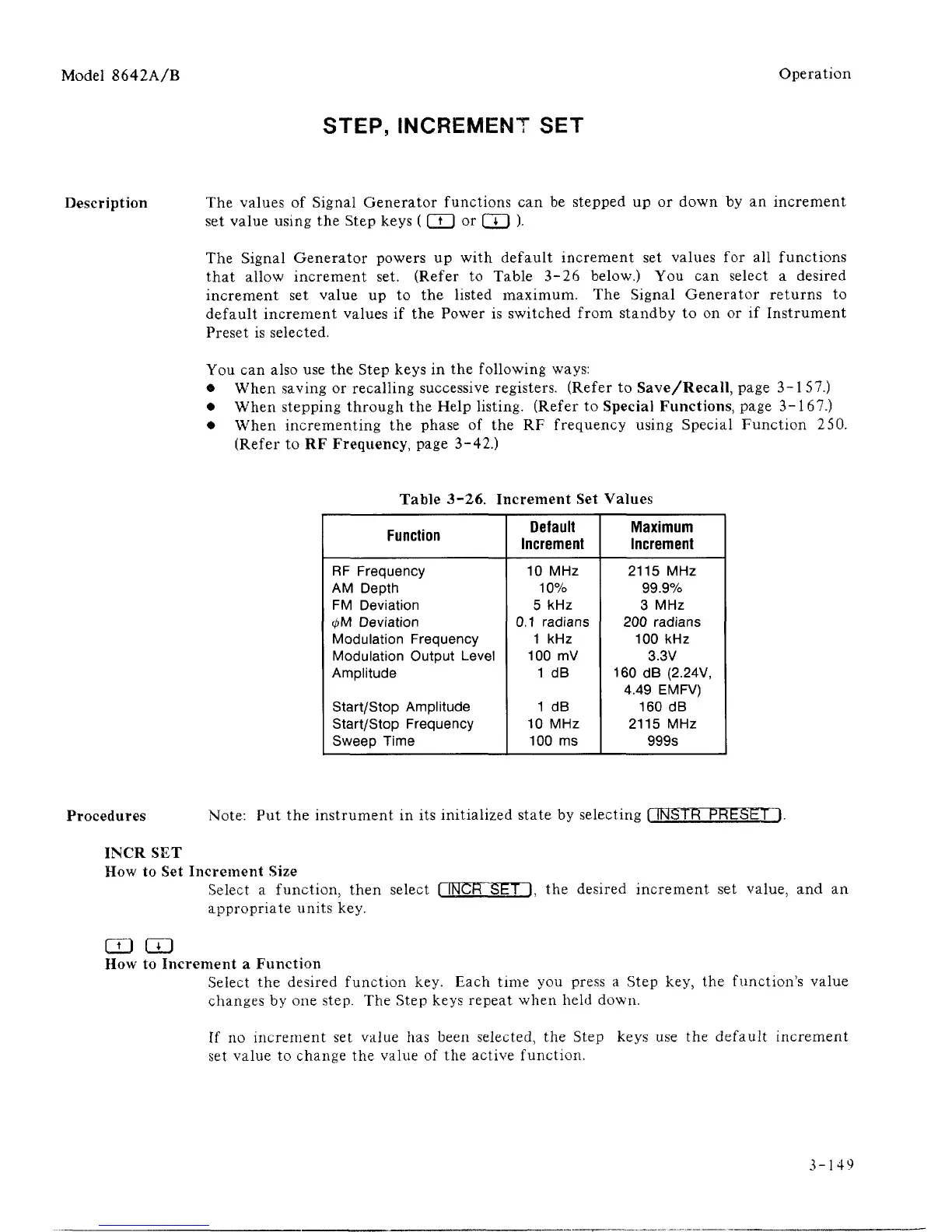
The Signal Generator powers up with default increment set values for all functions
that allow increment set. (Refer to Table 3-26 below.) You can select a desired
increment set value up to the listed maximum. The Signal Generator returns to
default increment values if the Power is switched from standby to on or if Instrument
Preset is selected.
You can also use the Step keys in the following ways:
• When saving or recalling successive registers. (Refer to Save/Recall, page 3-1 57.)
• When stepping through the Help listing. (Refer to Special Functions, page 3-167.)
• When incrementing the phase of the RF frequency using Special Function 250.
(Refer to RF Frequency, page 3-42.)
Table 3-26. Increment Set Values
Function
RF Frequency
AM Depth
FM Deviation
<t>M
Deviation
Modulation Frequency
Modulation Output Level
Amplitude
Start/Stop Amplitude
Start/Stop Frequency
Sweep Time
Default
Increment
10 MHz
10%
5 kHz
0.1 radians
1 kHz
100 mV
1 dB
1 dB
10 MHz
100 ms
Maximum
Increment
2115 MHz
99.9%
3 MHz
200 radians
100 kHz
3.3V
160 dB (2.24V,
4.49 EMFV)
160 dB
2115 MHz
999s
Procedures Note: Put the instrument in its initialized state by selecting I INSTR PRESET I.
INCR SET
How to Set Increment Size
Select a function, then select I INCR SET I. the desired increment set value, and an
appropriate units key.
CD CD
How to Increment a Function
Select the desired function key. Each time you press a Step key, the function's value
changes by one step. The Step keys repeat when held down.
If no increment set value has been selected, the Step keys use the default increment
set value to change the value of the active function.
3-149



 To Next Page