Model 8642A/B
Operation
Knob (cont'd)
Three cursors in the display:
1.
A cursor above a digit and above the first letter of a units specifier, and a cursor
above the first letter of another units specifier:
5 5 5.0 0 0 0 0 0
CT
Z 5 0.0 P
C
1.0 0 ? L
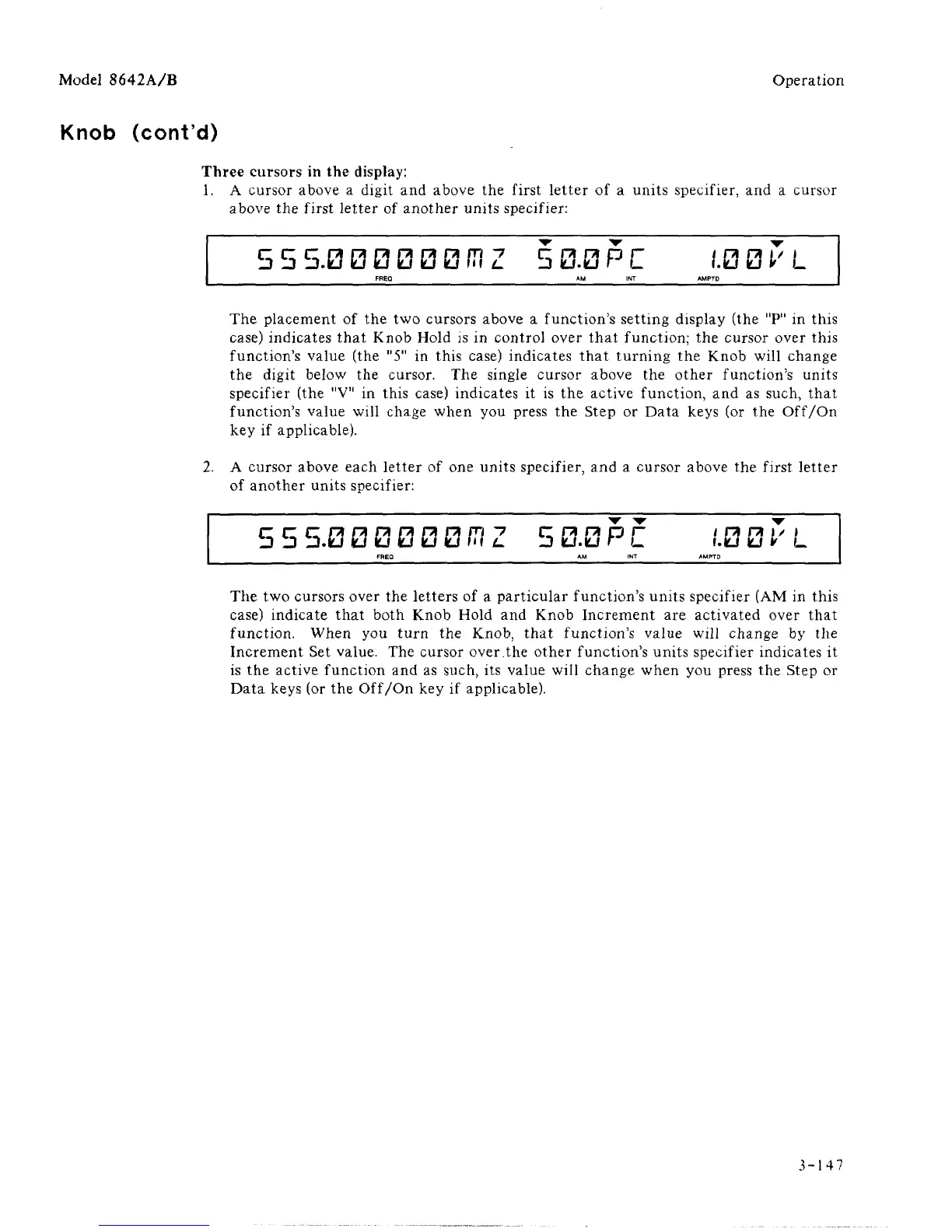
The placement of the two cursors above a function's setting display (the "P" in this
case) indicates that Knob Hold is in control over that function; the cursor over this
function's value (the "5" in this case) indicates that turning the Knob will change
the digit below the cursor. The single cursor above the other function's units
specifier (the "V" in this case) indicates it is the active function, and as such, that
function's value will chage when you press the Step or Data keys (or the Off/On
key if applicable).
2.
A cursor above each letter of one units specifier, and a cursor above the first letter
of another units specifier:
5 5 5.0 0 0 0 0 0 ffl Z 5 0.0 P
C
.'.0 0
V
L
The two cursors over the letters of a particular function's units specifier (AM in this
case) indicate that both Knob Hold and Knob Increment are activated over that
function. When you turn the Knob, that function's value will change by the
Increment Set value. The cursor over.the other function's units specifier indicates it
is the active function and as such, its value will change when you press the Step or
Data keys (or the Off/On key if applicable).
3-147



 To Next Page