Model 8642A/B Performance Tests
PERFORMANCE TESTS
4.
Low Level SWR Setup
Connect the instruments as shown in Figure 4-8 step 2b.
Set the Signal Generator to:
INSTRUMENT PRESET
LEVEL: +16 dBm
FREQUENCY: 4 MHz
Set the HP 8642 to:
INSTRUMENT PRESET
FREQUENCY: 500 MHz
Set up the measuring receiver as follows:
INSTRUMENT PRESET
MODE: RF POWER
DISPLAY MODE: LOG
5.
Low Level SWR, Reference
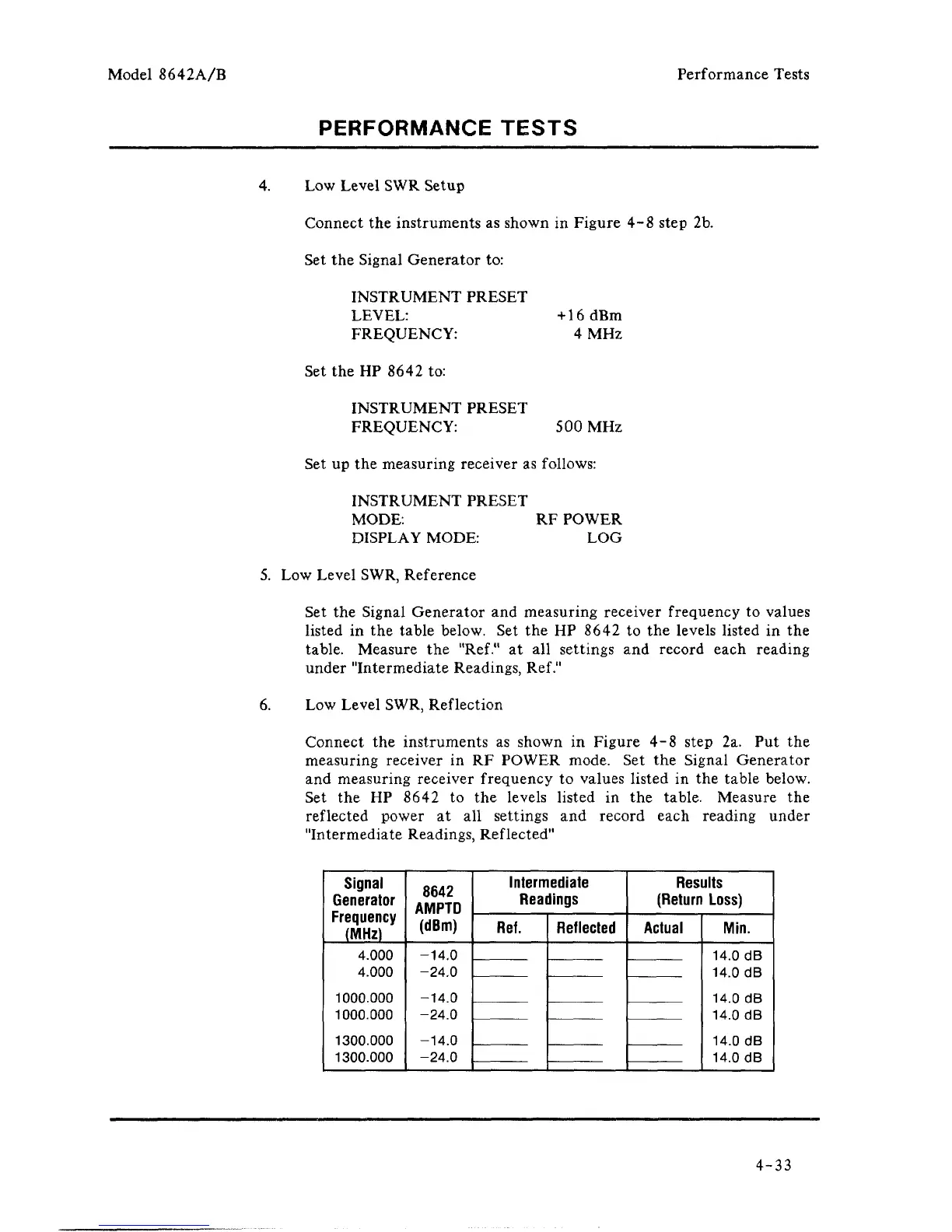
Set the Signal Generator and measuring receiver frequency to values
listed in the table below. Set the HP 8642 to the levels listed in the
table. Measure the
"Ref."
at all settings and record each reading
under "Intermediate Readings, Ref."
6. Low Level SWR, Reflection
Connect the instruments as shown in Figure 4-8 step 2a. Put the
measuring receiver in RF POWER mode. Set the Signal Generator
and measuring receiver frequency to values listed in the table below.
Set the HP 8642 to the levels listed in the table. Measure the
reflected power at all settings and record each reading under
"Intermediate Readings, Reflected"
Signal
Generator
Frequency
(MHz)
4.000
4.000
1000.000
1000.000
1300.000
1300.000
8642
AMPTD
(dBm)
-14.0
-24.0
-14.0
-24.0
-14.0
-24.0
Intermediate
Readings
Ref.
Reflected
Results
(Return Loss)
Actual
Min.
14.0 dB
14.0 dB
14.0 dB
14.0 dB
14.0 dB
14.0 dB
4-33



 To Next Page