Model 8642A/B
Adjustments
Identifying the Contents of the A3
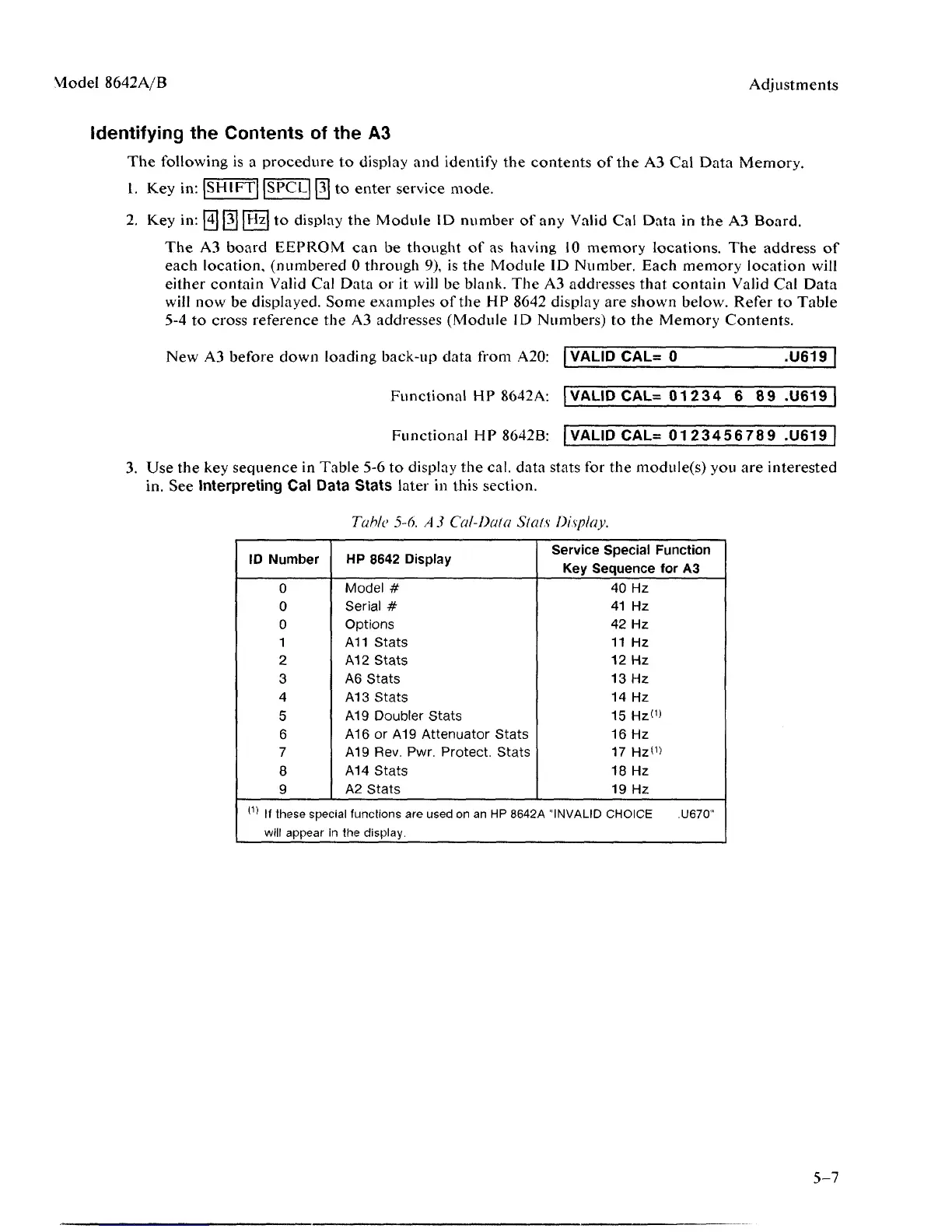
The following is a procedure to display and identify the contents of the A3 Cal Data Memory.
1.
Key in:[SHlFT]|SPCL|[3] to enter service mode.
2.
Key in:
[4] [3
hjz to display the Module ID number of any Valid Cal Data in the A3 Board.
The A3 board EEPROM can be thought of as having 10 memory locations. The address of
each location, (numbered 0 through 9), is the Module ID Number. Each memory location will
either contain Valid Cal Data or it will be blank. The A3 addresses that contain Valid Cal Data
will now be displayed. Some examples of the HP 8642 display are shown below. Refer to Table
5-4 to cross reference the A3 addresses (Module ID Numbers) to the Memory Contents.
New A3 before down loading back-up data from A20: VALID CAL= 0
.U619
Functional HP 8642A: VALID CAL= 01 234 6
8 9
.U619
Functional HP 8642B: VALID CAL= 0123456789 .U619
3.
Use the key sequence in Table 5-6 to display the cal. data stats for the module(s) you are interested
in. See Interpreting Cal Data Stats later in this section.
Table
5-6.
A 3
Cal-Dalo Stats Display.
ID Number
0
0
0
1
2
3
4
5
6
7
8
9
(1)
If these spec
will appear
HP 8642 Display
Model #
Serial #
Options
A11 Stats
A12 Stats
A6 Stats
A13 Stats
A19 Doubler Stats
A16 or A19 Attenuator Stats
A19 Rev. Pwr. Protect. Stats
A14 Stats
A2 Stats
Service Special Function
Key Sequence for A3
40 Hz
41 Hz
42 Hz
11 Hz
12 Hz
13 Hz
14 Hz
15 Hz«>
16 Hz
17 Hz«>
18 Hz
19 Hz
;lal functions are used on an HP 8642A "INVALID CHOICE .U670"
n the display.
5-7



 To Next Page