EasyManua.ls Logo

HP 9825A - Page 24

HP 9825A
56 pages
Print Icon
To Next Page IconTo Next Page
To Previous Page IconTo Previous Page
Loading...
5-8
9825AiB
Diagnostics
o Key Switch Test
The following
display
and printout should be seen.
Check
the keys for
proper
operation
by
pressing each key as it
is
called for by the
display. Remember to press @ before pressing
0.
Leave shift key locked
until
display
reads
Press
8 (to
unlock
shift) before pressing 0 .
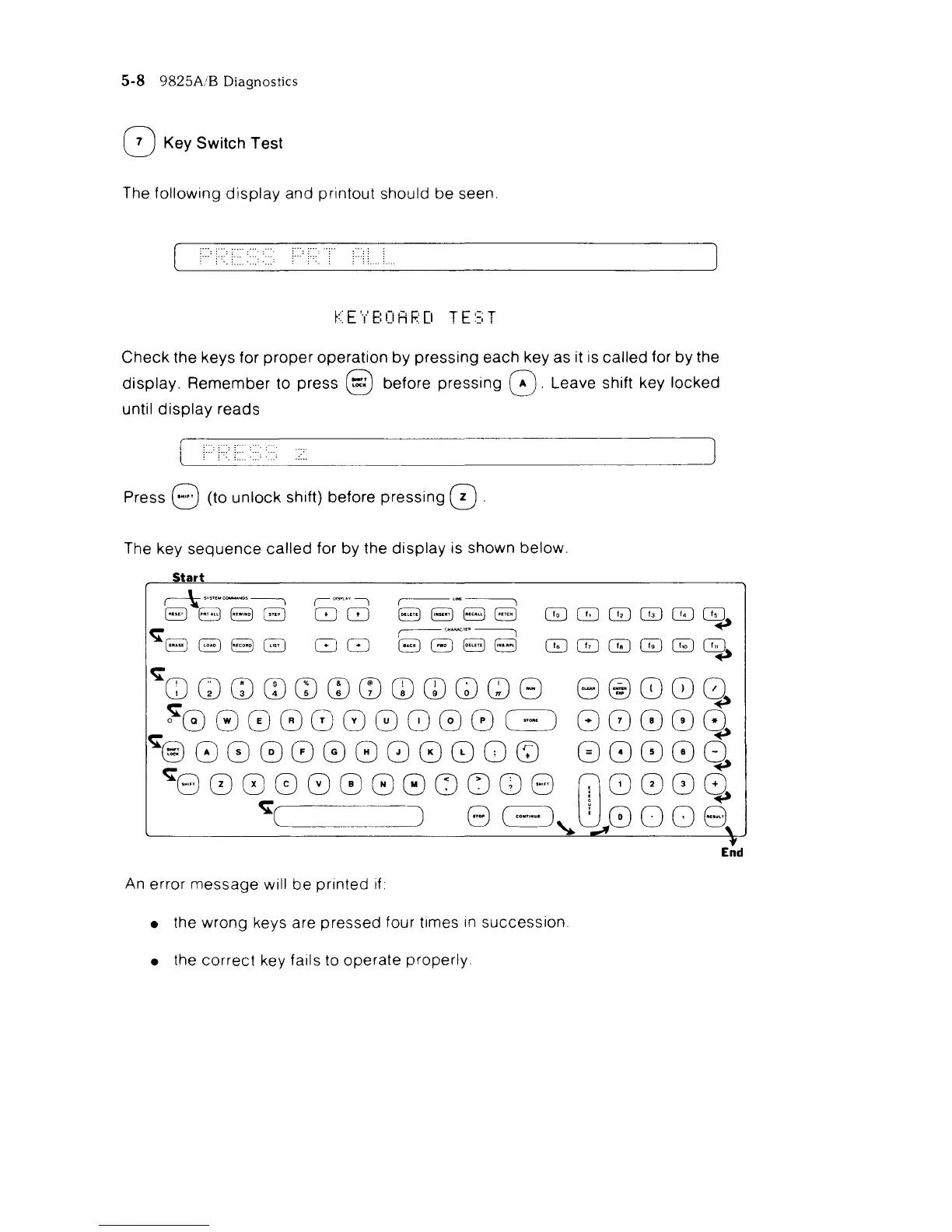
The key
sequence
called
for
by
the
display
is shown below.
Start
c-\-"m.~'''-----,
("'~"I
,-U~~
888B
88
8BBa
GJQJGJGJGJC5d~
<;;
r----
ceAA",,"
~
~
888B
88
8B88
GJGJGJGJ~~
<;;
QQwwmmmmmwwG
8@80Q
~8
0 0 0 8 8 8 8 0 0
c=J
8
(0
8 0 0.
~0000000080Q
0800Q
<;;800880000uCD8
(118088
<;;(
) 8
~~
8 8 0 0 8
End
An
error message will
be
printed
if
the wrong keys are pressed four times
In
succession.
the
correct
key fails to operate properly.

Related product manuals