Need help?
Do you have a question about the HP BH10 and is the answer not in the manual?
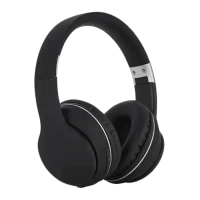
This document describes the HP Bluetooth Headphones (Model: HP BH10), a wireless audio device designed for a comfortable and high-quality listening experience.
The HP Bluetooth Headphones are designed for wireless audio streaming, allowing users to enjoy music without the constraints of cables. They support multiple protocols and feature a low-power 5.0 Bluetooth version for high transmission efficiency. The closed-back design aims to eliminate sound leakage and retain sound details, providing a broad bass feeling. The headphones are also equipped for hands-free calling with simple keystroke operations for answering and hanging up calls. They can connect to two Bluetooth devices simultaneously, allowing for seamless switching between work and entertainment. An AUX IN audio input is available for wired use, which does not require the headphones to be powered on.
The device complies with regulations regarding restricted substances. The document includes a table detailing the presence of Lead (Pb), Mercury (Hg), Cadmium (Cd), Hexavalent Chromium (Cr+6), Polybrominated Biphenyls (PBB), and Polybrominated Diphenyl Ethers (PBDE) in various components (Circuit board, Shell, Wire, Accessories). "o" indicates that the percentage of the restricted substance does not exceed the 100% reference value. A blank cell or "-" indicates an exclusion item.
Changes or modifications not expressly approved by the party responsible for compliance could void the user's authority to operate the equipment. The device complies with Part 15 of the FCC Rules, subject to two conditions: (1) it may not cause harmful interference, and (2) it must accept any interference received, including interference that may cause undesired operation. The equipment has been tested and found to comply with Class B digital device limits, designed to provide reasonable protection against harmful interference in a residential installation. If the equipment causes harmful interference to radio or television reception, users are encouraged to try corrective measures such as reorienting the receiving antenna, increasing separation between equipment and receiver, connecting the equipment to a different circuit, or consulting a dealer/experienced radio/TV technician.

 To Next Page
 General