5
4. Function Button
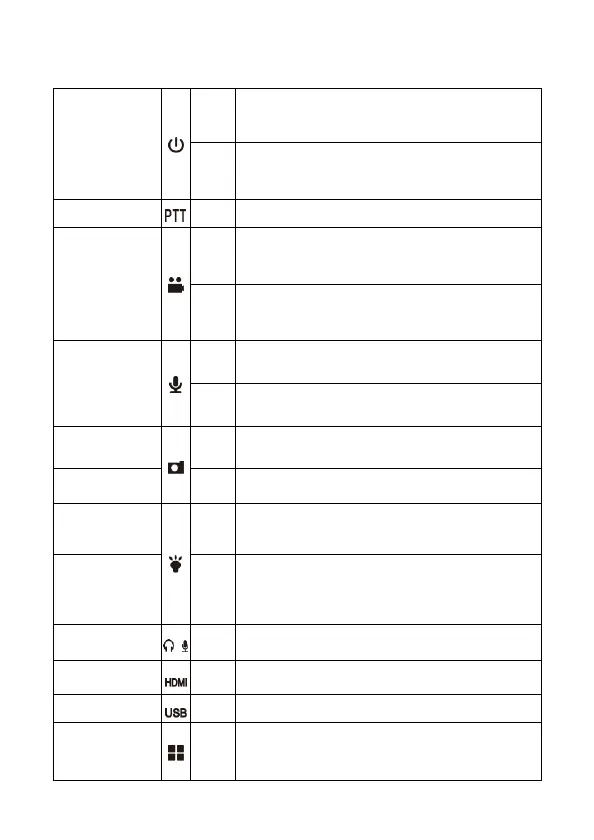
Power
Short
press
In power-on mode, short press to turn on/off LCD.
Long
press
Long press 3 seconds to power on/off.
Intercom
Walkie-talkie connection. (optional)
Video recording
Short
press
In power-
on mode, short press to start or stop video
recording.
Long
press
-
off mode, long press 3 seconds to execute one
button power-on and video-recording function.
Audio recording
Short
press
In standby mode, short press to start or stop audio
recording.
Long
press
In standby mode, long press to switch 1080p and
720p resolution.
Photograph
Short
press
In video-
recording mode, short press to capture
photo..
White light
Long
press
Under any mode, long press to turn on/off white light.
Laser
Short
press
In standby mode, short press to turn on laser light
and point out the target.
IR
Long
press
In standby mode, long press 3 seconds to switch to IR
night version mode.
In power-
off mode, long press 3 seconds for remote
watch pairing. (Remote watch is optional.)
Multi-function
interface
Connect mini camera, 3G/4G WiFi module. (optional)
HDMI
Connect displayer
USB
Data transmission, power charging
Menu/
CONFIRM
Short
press
In standby mode, press to enter Menu setting;
in Menu setting, press to confirm the option.



 To Next Page