EasyManua.ls Logo

HP HP-97 - Page 72

HP HP-97
160 pages
Print Icon
To Next Page IconTo Next Page
To Previous Page IconTo Previous Page
Loading...
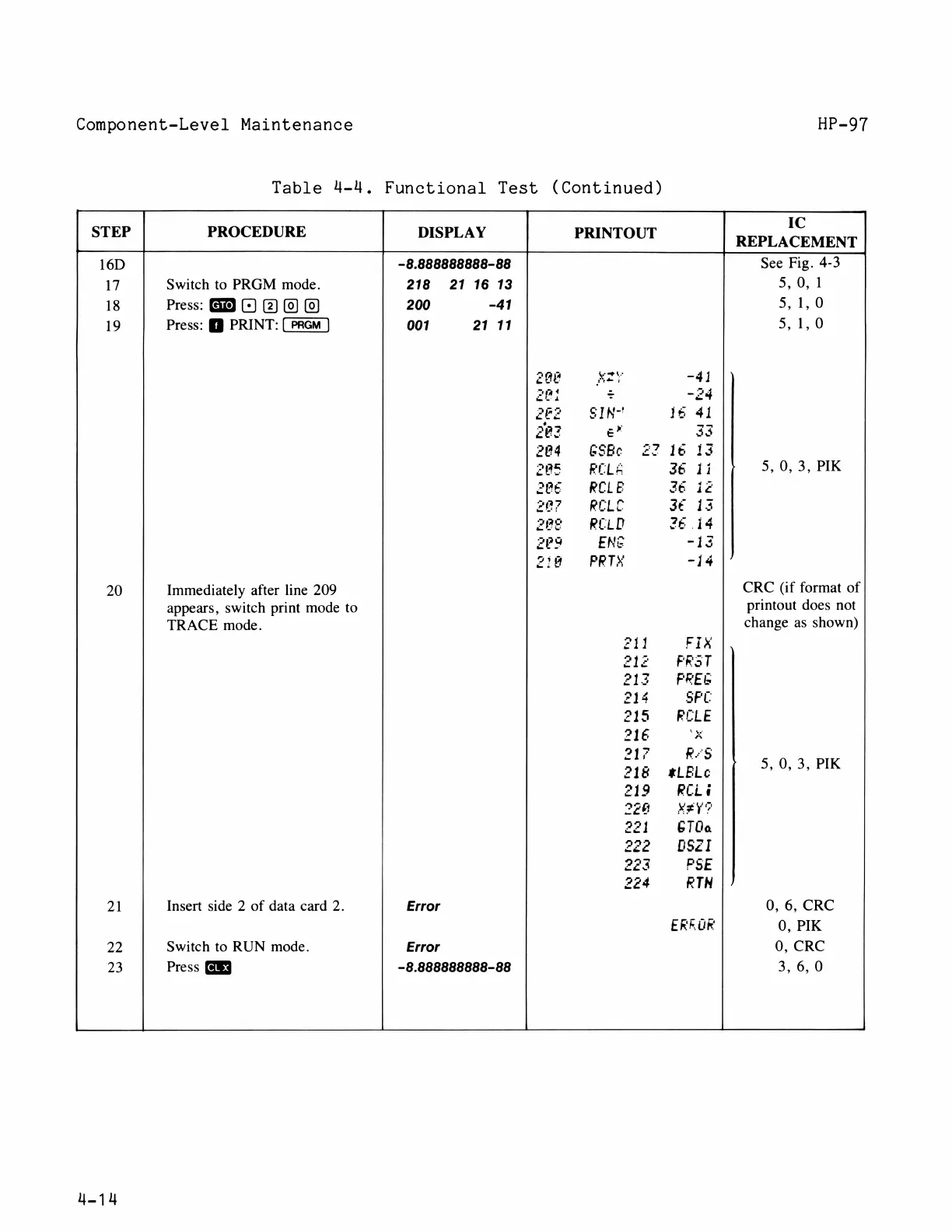
Component-Level
Maintenance
HP-97
Table
U4-U.,
Functional
Test
(Continued)
IC
STEP
PROCEDURE
DISPLAY
PRINTOUT
REPLACEMENT
16D
-8.888888888-88
See
Fig.
4-3
17
Switch
to
PRGM
mode.
218
21
16
13
5,0,1
18
Press:
O
@0
@
200
-41
51,0
19
Press:
)
PRINT:
001
21
11
5,1,0
2ay
vy
-41
20
<
-24
2F2
SIN-
1
41
2ez
e”
33
204
GSBe
22
1&
13
2e5
ROLA
36
1i|;
50,3,
PK
20
RCLE
26
207
RCLE
12
28
RCLD
2L
14
2r9
ENG
-13
24
PRTY
-14
20
Immediately
after
line
209
CRC
(if
format
of
appears,
switch
print
mode
to
printout
does
not
TRACE
mode.
change
as
shown)
211
Fix
21z
FrRAT
2132
FREL
214
SFC
215
RECLE
21€
‘X
217
RS
2;8
sELe
||
503
PK
219
RCL4
2z6
XEY?
221
6T0a
22
0sz1
223
FSE
224
RTN
21
Insert
side
2
of
data
card
2.
Error
0,
6,
CRC
ERRGE
0,
PIK
22
Switch
to
RUN
mode.
Error
0,
CRC
23
Press
-8.888888888-88
3,6,0
414

Table of Contents

Related product manuals