8
What Is in the Box?
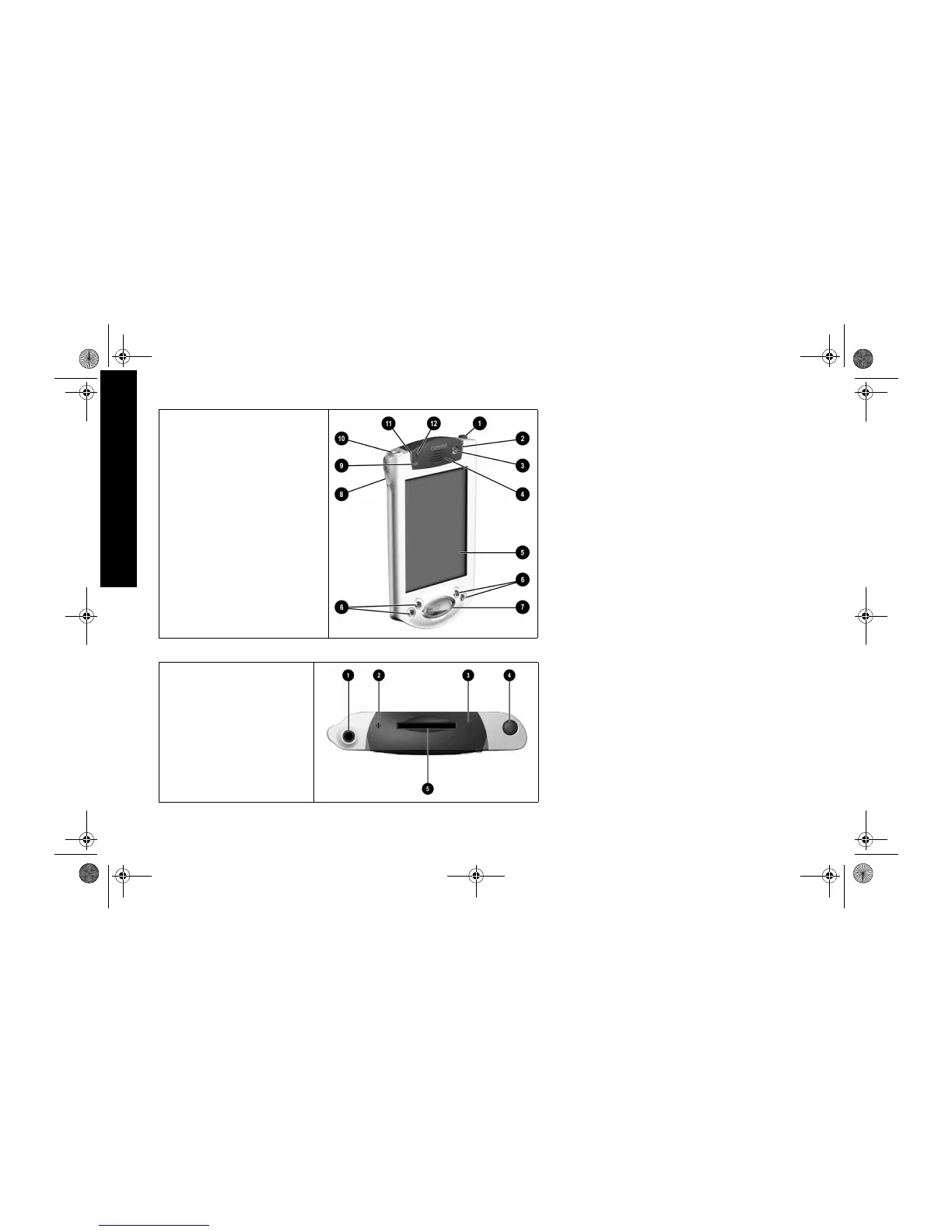
Front Panel
1 Stylus: push to eject, push to lock
2 Power Indicator: amber flash = charging;
amber solid = charged; green = alarm
3 Power Button
4 Speaker: alarms, recordings
5 Color Display
6 Programmable Application Buttons 1-4 (left
to right): navigate to applications, default:
button 1 is Calendar, button 2 is Contacts,
button 3 is Inbox, button 4 is iPAQ Task
7 Navigation Button: scroll through a list
8 Record/Application Button 5
9 Light sensor: adjusts backlight
- Stereo Headphone Jack
q Active Bluetooth Indicator: flashes when
Bluetooth radio is on (Bluetooth models only)
w Microphone
Top Panel
1 Stereo Headphone Jack
2 Microphone
3 Hidden Infrared Port: beams information
with other mobile devices
4 Stylus: push to eject, push to lock
5 Secure Digital (SD) Expansion Slot: holds
a Secure Digital (SD) card
GS 8x5.book Page 8 Friday, February 14, 2003 3:45 PM



 To Next Page