EasyManua.ls Logo

HP Pavilion 595 - User Manual

HP Pavilion 595
7 pages
Print Icon
To Next Page IconTo Next Page
Loading...
Product End-of-Life Disassembly Instructions
Product Category: Personal Computers
Marketing Name / Model
[List multiple models if applicable.]
HP Pavilion Desktop PC 595
Purpose: The document is intended for use by end-of-life recyclers or treatment facilities. It provides the basic instructions
for the disassembly of HP products to remove components and materials requiring selective treatment, as defined by EU
directive 2002/96/EC, Waste Electrical and Electronic Equipment (WEEE).
1.0 Items Requiring Selective Treatment
1.1 Items listed below are classified as requiring selective treatment.
1.2 Enter the quantity of items contained within the product which require selective treatment in the right column, as
applicable.
Item Description
Notes
Quantity
of items
included
in product
Printed Circuit Boards (PCB) or Printed Circuit
Assemblies (PCA)
With a surface greater than 10 sq cm
PCA
1
Batteries
All types including standard alkaline and lithium coin
or button style batteries Lithium Coin Battery on
MB
1
Mercury-containing components
For example, mercury in lamps, display backlights,
scanner lamps, switches, batteries NA
0
Liquid Crystal Displays (LCD) with a surface greater
than 100 sq cm
Includes background illuminated displays with gas
discharge lamps NA
0
Cathode Ray Tubes (CRT)
NA
0
Capacitors / condensers (Containing PCB/PCT)
NA
0
Electrolytic Capacitors / Condensers measuring
greater than 2.5 cm in diameter or height
NA
0
External electrical cables and cords
NA
0
Gas Discharge Lamps
NA
0
Plastics containing Brominated Flame Retardants
weighing > 25 grams (not including PCBs or PCAs
already listed as a separate item above)
NA
0
Components and parts containing toner and ink,
including liquids, semi-liquids (gel/paste) and toner
Include the cartridges, print heads, tubes, vent
chambers, and service stations. NA
0
Components and waste containing asbestos
NA
0
Components, parts and materials containing
refractory ceramic fibers
NA
0
Components, parts and materials containing
radioactive substances
NA
0
Question and Answer IconNeed help?

Do you have a question about the HP Pavilion 595 and is the answer not in the manual?

Overview

The HP Pavilion Desktop PC 595 is a personal computer designed for general use, offering a balance of performance and features suitable for everyday computing tasks. As a desktop PC, it provides a robust platform for various applications, from productivity and web browsing to multimedia consumption and light gaming. The design emphasizes accessibility for maintenance and component upgrades, aligning with end-of-life disassembly guidelines for responsible recycling.

Function Description:

The HP Pavilion Desktop PC 595 serves as a central computing unit, capable of running a wide range of software applications. It processes data, stores information, and facilitates user interaction through connected peripherals such as monitors, keyboards, and mice. Its primary function is to provide a versatile computing environment for home or office use. The internal architecture supports standard components like a motherboard (MB), central processing unit (CPU), memory (RAM), storage drives (HDD/SSD), and expansion cards (PCI cards), allowing for a customizable and upgradeable system. The inclusion of an Optical Disc Drive (ODD) indicates support for disc-based media, which can be used for software installation, data backup, or multimedia playback. The system is designed to be user-friendly, with clear steps provided for accessing internal components for maintenance or upgrades.

Important Technical Specifications:

While specific processor, RAM, and storage configurations are not detailed in the provided document, the general architecture points to a standard desktop PC setup.

  • Motherboard (MB): The core component that connects all other parts. The disassembly instructions indicate the presence of a motherboard, which houses the CPU, RAM slots, and various connectors.
  • Printed Circuit Boards (PCBs) / Printed Circuit Assemblies (PCAs): The document specifies one PCB/PCA with a surface greater than 10 sq cm, indicating the main motherboard or a significant expansion card.
  • Batteries: One battery is included, identified as "All types including standard alkaline and lithium coin or button style batteries Lithium Coin Battery on MB." This typically refers to the CMOS battery on the motherboard, which powers the real-time clock and BIOS settings.
  • Storage: The instructions mention "HDD" (Hard Disk Drive), indicating that the system uses or can accommodate traditional hard drives for data storage. The presence of ODD SATA connectors suggests support for SATA-based storage devices.
  • Optical Disc Drive (ODD): The system includes an ODD, which connects via SATA and requires a power connector. This allows for reading and writing of optical media (CDs, DVDs, and potentially Blu-ray, depending on the specific drive).
  • Expansion Slots: The mention of "PCI card" indicates the presence of PCI or PCIe expansion slots, allowing users to add graphics cards, network cards, or other expansion peripherals.
  • Power Supply Unit (PSU): The system includes a PSU, responsible for converting AC power from the wall outlet into DC power for the internal components. Disassembly instructions detail how to remove the PSU.
  • Connectivity: The presence of "External electrical cables and cords" implies standard power and data connections. "FIO module" likely refers to a Front Input/Output module, providing easily accessible ports like USB, audio jacks, or card readers on the front of the case.

Usage Features:

The HP Pavilion Desktop PC 595 is designed for straightforward operation and offers features typical of a modern desktop computer.

  • Versatile Computing: Capable of handling a range of tasks, from office productivity and internet browsing to multimedia consumption.
  • Expandability: The presence of PCI slots and the ability to add/remove storage drives (HDD) and an ODD suggest that users can customize and upgrade the system to meet evolving needs.
  • Front I/O Access: The "FIO module" provides convenient access to commonly used ports, enhancing user experience by eliminating the need to reach the back of the computer for peripheral connections.
  • Standard Peripherals: Compatible with standard monitors, keyboards, mice, and other USB devices, ensuring broad compatibility and ease of setup.
  • Disc Media Support: The ODD allows for the use of physical media, which can be beneficial for installing legacy software, watching movies, or burning data to discs.

Maintenance Features:

The provided "Product End-of-Life Disassembly Instructions" highlight the design's emphasis on ease of maintenance and component replacement, particularly for recycling purposes. This translates to user-friendly access for general maintenance tasks.
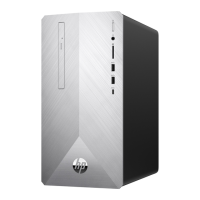
  • Easy Access to Internal Components: The first step in disassembly is to "Remove to lower case from housing," indicating that the main chassis can be opened relatively easily to access internal parts.
  • Tool-Assisted Disassembly: The instructions specify the use of Ph2 and T15 screwdrivers, indicating that standard tools are sufficient for disassembling the system. This makes it accessible for users with basic toolkits.
  • Modular Design: Components like the ODD, HDD, PCI cards, PSU, and motherboard are designed to be individually removable. This modularity simplifies troubleshooting, replacement of faulty parts, and upgrades.
  • Clear Cable Management: While not explicitly stated, the instruction "Pull off all cables on MB" implies that cables are routed in a way that allows for their disconnection, which is crucial for maintenance and component removal.
  • Selective Treatment for Recycling: The document explicitly lists components requiring selective treatment (PCBs, batteries, mercury-containing components, LCDs, CRTs, capacitors, cables, lamps, plastics with BFRs, toner/ink, asbestos, refractory ceramic fibers, radioactive substances). This focus on end-of-life recycling indicates a design that facilitates the responsible disposal and recovery of materials, which also benefits general maintenance by making components identifiable and accessible.
  • Component Identification: The instructions provide specific steps for locating and removing key components, such as loosening screws for the ODD, HDD, side bracket, PCI cover, main bracket, FIO module, MB, and PSU. This detailed guidance helps users identify and work with individual parts.
  • No Mercury, LCD, or CRT: The document explicitly states "NA" (Not Applicable) and "0" for mercury-containing components, LCDs, and CRTs, indicating that this specific model does not contain these hazardous materials, simplifying its disposal and potentially reducing maintenance concerns related to these components.

HP Pavilion 595 Specifications

General IconGeneral
BrandHP
ModelPavilion 595
CategoryDesktop
LanguageEnglish

Related product manuals