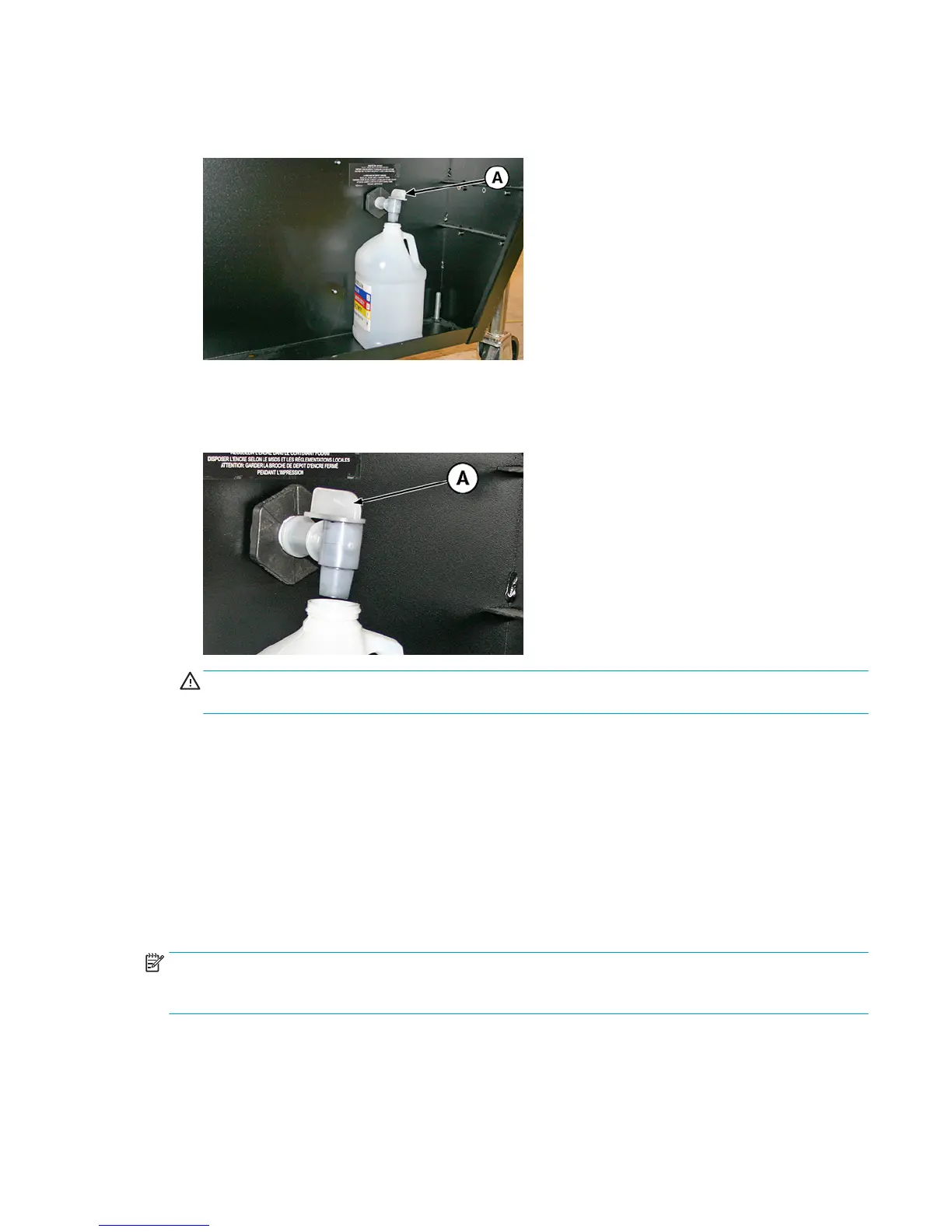
4. Turn the spigot (A in the photo below) to the open position
Figure 10-24 Waste ink bottle and spigot
5. Turn the spigot to the closed position after the waste ink has drained.
Figure 10-25 Waste ink spigot in the closed position
CAUTION: The drain spigot must remain closed during printing and service station use. An open spigot
affects the vacuum level in the service station and will degrade service station performance if left open.
6. To reset the maintenance counter for this task and complete the procedure, press Proceed.
Clean the media thickness sensor
CMYKcm – 250 Hours
CMYKW – 250 Hours
The media thickness sensor is located on the carriage rail, on the user-end behind the rail. Debris on the
media thickness sensor roller can result in inaccurate measurements. Clean the roller to keep the sensor
operating correctly.
NOTE:
Users of printers in California must disregard all references to the Printhead Flush or IPA in the
instructions or when displayed on the control panel. Instead, the alternative cleaning liquid specified at the
beginning of this section must be used.
1. Select from the control panel System> Tools> User Cleaning and Maintenance> 14) Clean Media
Thickness Sensor.
2. Press Proceed to continue.
ENWW
Clean the media thickness sensor 93



 To Next Page