172 Chapter 10 : Web and wireless connections
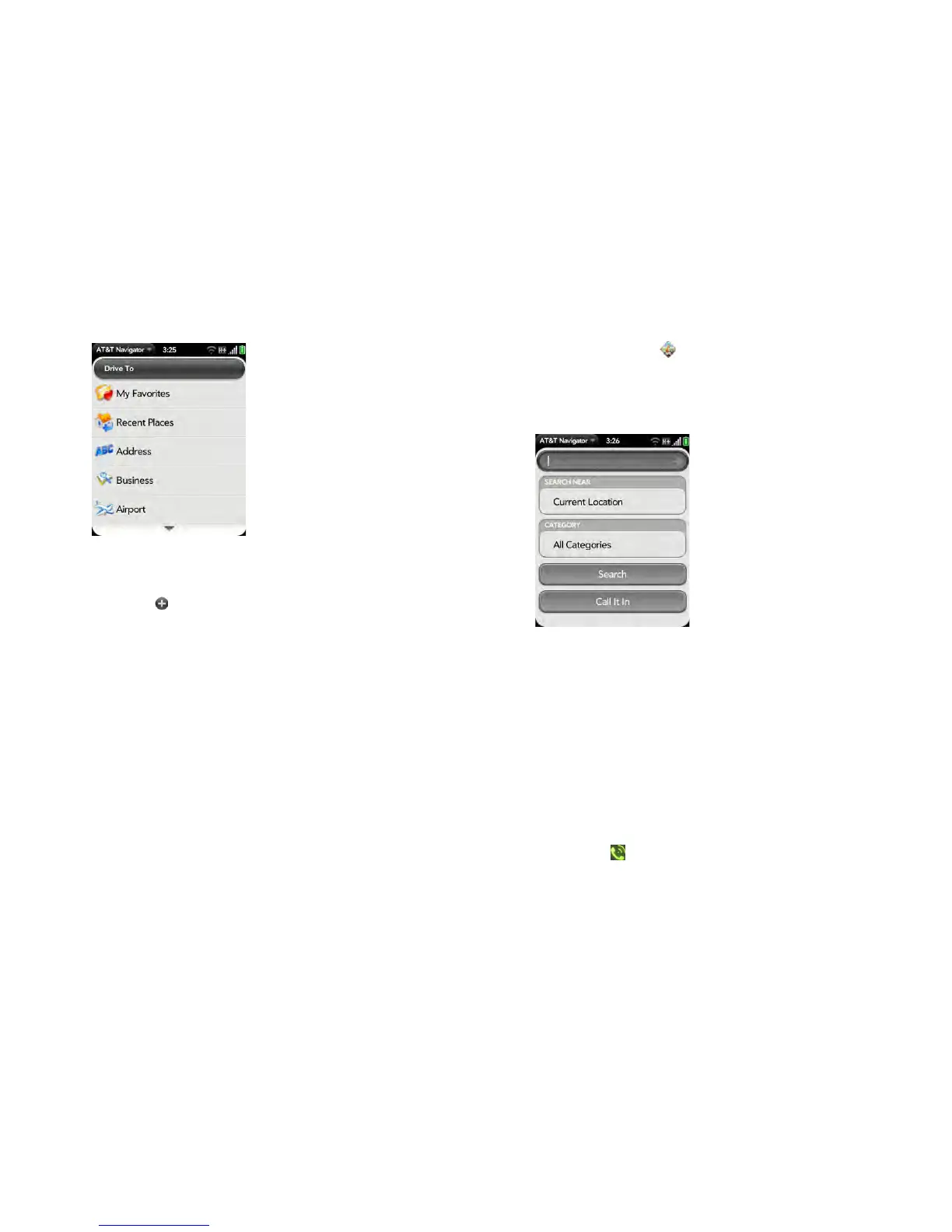
3 Ta p Drive To.
4 Tap one of the following:
My Favorites: Select a destination from your favorites. To add a
favorite, tap , and choose the location you want to add from
Current Location, Recent Places, Address, Business, Airport, or
Contacts.
Recent Places: Select a destination from a list of places you have
visited recently.
Address: Enter a destination address and tap Submit.
Business: Search for a business.
Airport: Select or search for an airport.
Contacts: Select a contact’s address.
Find a location
1 Open AT&T Navigator .
2 If prompted, tap Allow Once to turn on Location Services.
3 Ta p Search.
4 Enter a search term. For example, enter “Cinema” to get a list of
cinemas near you.
5 (Optional) Tap Current Location to change the location of your
search.
6 (Optional) Tap All Categories in the Category field to narrow your
search by service category. For example, you might want to search for
gas stations, banks, or hospitals in an area.
7 Tap one of the following:
Search: A list of search results is displayed.
Call It In: Tap and follow the voice prompts to perform your
search.



 To Next Page