EasyManua.ls Logo

HPA TA 120 - User Manual

Default Icon
20 pages
Print Icon
To Next Page IconTo Next Page
Loading...
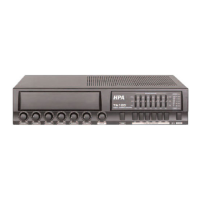
Owner’s Manual
TA 60
TA 120
+12dB
0dB
-12dB
+12dB
0dB
-12dB
125Hz 250Hz 500Hz
GRAPHIC EQUALIZER
1kHz 8kHz
PROTECT
+3
0
-4
-10
-20
ON
OFF
MIN
MAX
2kHz 4kHz
PUBLIC ADDRESS AMPLIFIER
CHANNEL 1
MIN
MAX
CHANNEL 2
MIN
MAX
CHANNEL 3
MIN
MAX
CHANNEL 4
MIN
MAX
CHANNEL 5
MIN
MAX
CHANNEL 6 CHIME
MIN
MAX
POWER
ALL ZONE 1 ZONE 2 ZONE 3 ZONE 4 ZONE 5
+12dB
0dB
-12dB
+12dB
0dB
-12dB
125Hz 250Hz 500Hz
GRAPHIC EQUALIZER
1kHz 8kHz
PROTECT
+3
0
-4
-10
-20
ON
OFF
MIN
MAX
2kHz 4kHz
PUBLIC ADDRESS AMPLIFIER
CHANNEL 1
MIN
MAX
CHANNEL 2
MIN
MAX
CHANNEL 3
MIN
MAX
CHANNEL 4
MIN
MAX
CHANNEL 5
MIN
MAX
CHANNEL 6 CHIME
MIN
MAX
POWER
ALL ZONE 1 ZONE 2 ZONE 3 ZONE 4 ZONE 5
Question and Answer IconNeed help?

Do you have a question about the HPA TA 120 and is the answer not in the manual?

Summary

Introduction

Welcome

Welcomes the user and introduces the TA series mixer-amplifiers.

Unpacking and Installation

Provides guidance on safely unpacking and initially setting up the amplifier.

Features

Front Panel Controls

Rear Panel Controls

Setup

Installation

Instructions for safely installing the amplifier, including ventilation and rack mounting.

Rack Ear Attachment

Step-by-step guide on how to attach the rack ears for mounting.

Wiring Guide

Input Wire and Connectors

Guidelines for selecting and wiring input connectors for balanced and unbalanced signals.

Output Wire and Connectors

Recommendations for choosing appropriate wire sizes for speaker outputs based on distance.

Connections

Speaker Connection

Illustrates how to correctly connect speakers to both High-Z and Low-Z outputs.

Typical Wiring

Shows typical input and output wiring configurations for various audio sources.

Operations

External Equipment Connection

How to connect external processors like equalizers or limiters to the amplifier.

Expansion TA Series

Details how to link multiple TA series units for expanded functionality.

Preannounce Chime

Explains the selectable pre-announce chime types and their setup.

Priority Control

Describes the priority muting function for microphone channels.

Phantom Power

Information on providing phantom power to microphone channels.

Music On Hold

Instructions for connecting and using the Music On Hold feature.

Signal Input Gain Control

How to adjust input sensitivity for different signal sources.

Applications

Block Diagrams

Specifications

Performance

Lists detailed technical specifications for the TA-60 and TA-120.

HPA TA 120 Specifications

General IconGeneral
BrandHPA
ModelTA 120
CategoryAmplifier
LanguageEnglish

Related product manuals