(2)
Digital KeKab
®
Instructions (continued)
© 2010 • HPC, Inc. • Schiller Park, IL • 60176 • USA • www.hpcworld.com
Installing/Changing of Batteries
No. KEKAB-DL65, KEKAB-DL95X,
KEKAB-DL265
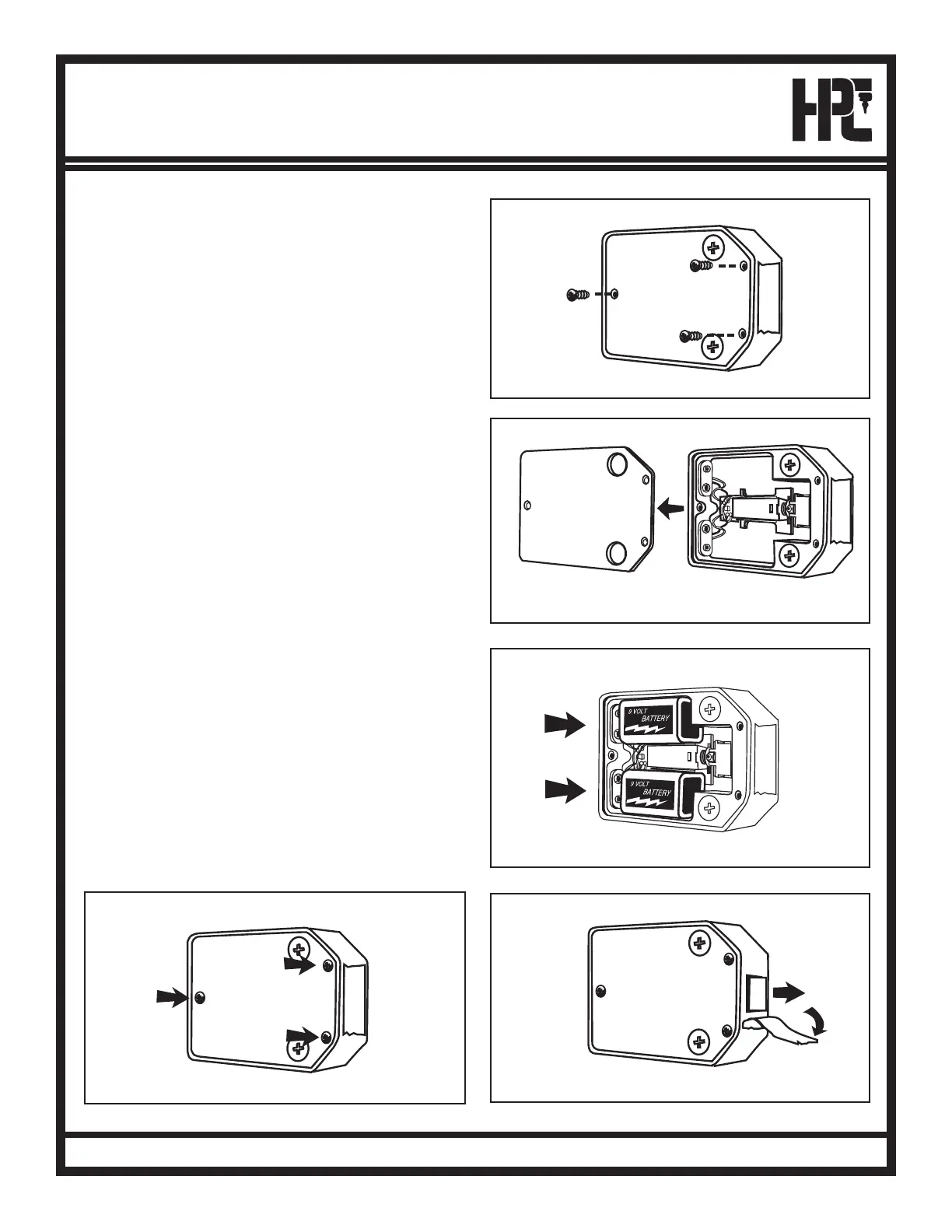
1. Lay cabinet down and open door.
2. Remove (3) small metal screws as indicated in Fig. 1.
NOTE: DO NOT REMOVE (2) LARGE ANCHOR
SCREWS WHICH HOLD LOCK TO KEKAB
®
DOOR!
3. Remove plate. See Fig. 2.
4. Carefully connect (2) 9-volt batteries to receptacles as
shown. See Fig. 3.
5. Replace plate and (3) small screws. See Fig. 4.
6. Remove tape from latch. See Fig. 5.
Fig. 1
Fig. 2
Fig. 3
Fig. 4
Fig. 5
(continued)



 To Next Page