EasyManua.ls Logo

HPE AP-270-MNT-V2 - User Manual

HPE AP-270-MNT-V2
6 pages
Print Icon
To Next Page IconTo Next Page
Loading...
AP-270-MNT-V2 Mount Kit
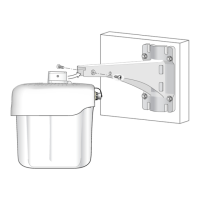
The AP-270-MNT-V2 mount kit can be used for mounting an outdoor AP to a wall or pole.
Package Contents
Item Quantity
AP-270-MNT-V2 Mounting bracket 1
M6 x 20 screw 2
60 cm cable tie 1
6 inches hose clamp 2
Table 1: Package Contents
Customer Supplied Equipment
n
#1 Phillips screwdriver
n
Electric drill with drill bits
n
Anchor bolts, washers, and nuts
Mounting the AP to a Wall
To mount an access point to a wall, follow these steps:
1. Use the mounting bracket as a template, or the dimensions of the mounting bracket on the last
page of the printed installation guide, to mark four mounting points on the wall.
2. Use a drill to make four holes on the four markings from the previous step.
3. Insert an anchor bolt (not included in the package) into each drilled hole.
4. Place the mounting bracket over the anchor bolts and press the bracket against the wall.
5. Place the washers and nut (not included in the package) onto the bolt’s threaded end and tighten
the nut until the mounting bracket is firmly attached to the wall.
AP-270-MNT-V2 Mount Kit
|
Installation Guide 1
AP-270-MNT-V2 Mount Kit
Installation Guide
Question and Answer IconNeed help?

Do you have a question about the HPE AP-270-MNT-V2 and is the answer not in the manual?

Overview

The AP-270-MNT-V2 Mount Kit is an accessory designed for securely installing outdoor Access Points (APs) onto various surfaces, including walls, corners, and poles. This kit facilitates the physical deployment of APs in outdoor environments, ensuring stability and proper positioning for optimal wireless coverage.

Function Description:

The primary function of the AP-270-MNT-V2 Mount Kit is to provide a robust and versatile mounting solution for outdoor APs. It acts as an intermediary between the AP and the mounting surface, allowing for secure attachment and orientation. The kit is designed to be compatible with specific AP models, ensuring a precise fit and reliable installation. Its versatility in supporting different mounting scenarios—wall, corner, and pole—makes it suitable for a wide range of outdoor deployment needs.

Important Technical Specifications:

The kit includes several components essential for its function:

  • AP-270-MNT-V2 Mounting bracket: This is the core component that interfaces with both the AP and the mounting surface. It is designed with specific dimensions and attachment points to ensure compatibility and structural integrity.
  • M6 x 20 screw (Quantity: 2): These screws are used to attach the AP to the mounting bracket, providing a secure connection. The M6 designation indicates a metric screw with a 6mm nominal diameter, and 20mm refers to its length.
  • 60 cm cable tie (Quantity: 1): A cable tie is included for cable management, allowing installers to neatly secure cables to the mounting bracket, preventing clutter and potential damage.
  • 6 inches hose clamp (Quantity: 2): These clamps are specifically for pole mounting applications. The 6-inch size indicates their capacity to accommodate poles within a certain diameter range, typically 4 to 6 inches (100 to 150 mm).

Customer Supplied Equipment:

For a complete installation, certain tools and additional hardware are required, which are not included in the kit:

  • #1 Phillips screwdriver: Essential for tightening the M6 x 20 screws and the hose clamps.
  • Electric drill with drill bits: Necessary for creating pilot holes when mounting to a wall or corner, ensuring proper placement of anchor bolts.
  • Anchor bolts, washers, and nuts: These are crucial for wall mounting, providing the secure attachment of the mounting bracket to the wall. The specific type and size of these components will depend on the wall material and desired load-bearing capacity.
  • Samsung corner mount adapter (for corner mounting): This specialized adapter is required when mounting the AP to a corner and must be purchased separately. It provides the necessary interface for the AP-270-MNT-V2 mounting bracket to attach to a corner.

Usage Features:

The AP-270-MNT-V2 Mount Kit offers distinct usage features depending on the mounting scenario:

Mounting the AP to a Wall:

  • Template-based marking: The mounting bracket itself can be used as a template to mark four precise drilling points on the wall, simplifying the initial setup. Alternatively, dimensions provided in the installation guide can be used.
  • Secure anchoring: After drilling holes, anchor bolts (customer-supplied) are inserted, and the mounting bracket is placed over them. Washers and nuts are then used to firmly secure the bracket to the wall, ensuring a stable installation.
  • Cable management: A cable tie is provided to fasten cables to the mounting bracket, maintaining a tidy and organized installation.

Mounting the AP to a Corner:

  • Requires a separate adapter: This method necessitates the use of a Samsung corner mount adapter, which must be acquired independently. This adapter serves as the primary attachment point to the corner.
  • Bracket attachment to adapter: The AP-270-MNT-V2 mounting bracket is then mounted onto the Samsung corner mount adapter, creating a secure and stable corner installation.
  • AP attachment and cable management: Similar to wall mounting, the AP is attached to the bracket using M6 x 20 screws, and cables are managed with the provided cable tie.

Mounting the AP to a Pole:

  • Hose clamp mechanism: Two 6-inch hose clamps are provided to secure the mounting bracket to a pole. These clamps are threaded through specific slots on the bracket, designed to accommodate different pole shapes (round or square).
  • Adjustable for pole diameter: The hose clamps support poles with a diameter ranging from 4 to 6 inches (100 to 150 mm), offering flexibility for various pole sizes.
  • Screw driver tightening: A Phillips screwdriver is used to tighten the hose clamps, ensuring a firm grip on the pole.
  • AP attachment and cable management: Once the bracket is secured to the pole, the AP is attached using the M6 x 20 screws, and cables are fastened with the cable tie.

General Usage Features:

  • Ease of assembly: The instructions are clear and step-by-step, guiding the installer through the process of attaching the AP to the mounting bracket and then securing the bracket to the chosen surface.
  • Secure attachment of AP: In all mounting scenarios, the AP is securely slid into an opening on the mounting holder and then fastened with two M6 x 20 screws, preventing accidental dislodgement.
  • Versatility: The kit's ability to support wall, corner, and pole mounting makes it a highly adaptable solution for diverse outdoor deployment requirements.
  • Cable organization: The inclusion of a cable tie promotes neat cable routing, which is crucial for outdoor installations to protect cables from environmental factors and maintain a professional appearance.

Maintenance Features:

While the AP-270-MNT-V2 Mount Kit itself does not require specific ongoing maintenance, its design contributes to the overall maintainability of the AP installation:

  • Durable construction: The mounting bracket and associated hardware are designed for outdoor use, implying resistance to weather elements and corrosion, which minimizes the need for frequent replacement or repair.
  • Secure fastening: The use of screws, anchor bolts, and hose clamps ensures a tight and stable installation, reducing the likelihood of the AP becoming loose over time due to vibrations or environmental stress. This stability helps in maintaining the AP's optimal performance and reduces the need for re-adjustments.
  • Cable management: By allowing cables to be neatly secured, the kit helps protect them from physical damage, wear and tear, and exposure to elements, thereby extending their lifespan and reducing the need for cable repairs or replacements.
  • Accessibility for service: The design allows for the AP to be securely mounted while still being accessible for any future servicing or replacement, as the attachment mechanism is straightforward to engage and disengage with standard tools.

In summary, the AP-270-MNT-V2 Mount Kit is a comprehensive and adaptable solution for deploying outdoor APs, emphasizing secure installation, versatility across different mounting surfaces, and practical cable management to ensure long-term reliability and performance in outdoor environments.

HPE AP-270-MNT-V2 Specifications

General IconGeneral
BrandHPE
ModelAP-270-MNT-V2
CategoryRacks & Stands
LanguageEnglish