The HSAJET MiniKey MKHP4 is an advanced, user-friendly inkjet controller designed for various printing applications. It offers a compact and versatile solution for managing print jobs with high efficiency and precision.
Function Description
The MiniKey controller is designed to manage inkjet printing operations. It allows users to create, store, and execute print jobs, including text, barcodes, graphics, and counters. The device supports real-time printing, data logging, and print queue management. It can be connected to multiple print heads, offering flexibility for different printing needs. The MiniKey also features remote operation capabilities via Ethernet and RS232 connections, allowing for external PC software to create and upload print jobs.
Important Technical Specifications
Performance:
- Number of pens: Up to 4 pens.
- Printing speed: 35 m/min at 600 dpi.
- Resolution: Up to 600 dpi.
- Print length: 2700mm.
Hardware:
- Encoder: Quadrature encoder supported for accurate measurement of speed.
- Power supply: 85-240V AC.
- Connectivity:
- I/O - sensor connection (SUBD 9p, F).
- USB connector.
- LAN network connection (RJ45).
- RS232 Serial connection (SUBD9pF).
- Head 2 connector, support for extra head (2 pen).
- Encoder connection (SUBD 9pF).
- ON/OFF switch.
- Mains power connections 85-265-VAC.
Dimensions:
- The controller unit measures approximately 186.70mm in width, 107mm in height, and 77mm in depth.
Installation Environment:
- Installation Area: Indoors.
- Ambient Temperature: 10 - 40 degrees C.
- Humidity: 95% RH or less and free of condensation.
- Surrounding Area: Must be free from:
- Oil mist and dust.
- Metal shavings, oil, water or other foreign materials.
- Radioactive materials.
- Combustible materials.
- Harmful gases and liquids.
- Excessive vibration.
- Chlorides.
- Direct sunlight.
- Open flames.
Usage Features
User Interface:
- Touch screen: Provides an intuitive interface for operation.
- Keyboard: Features dedicated keys for various functions including:
- Return to main menu or cancel edit.
- Print mode on/off.
- Edit input keys and numeric keypad (shortcuts 1-9 only).
- Edit space and icon-bar show/hide/up.
- Accept edit, select and confirm.
- Menus/Lists/Edit manoeuvre.
- Edit input keypad select (shifted chars, special chars and symbols).
- Edit menu delete (backspace) key.
- Display: Shows print status, settings, and job information.
Printing Capabilities:
- Text, barcode and graphical objects: Supports a wide range of content for printing.
- Static, counter, date/time, shift codes and system content: Allows for dynamic data printing.
- Prompts: Facilitates user interaction during print job execution.
- Real-time printing: Ensures immediate output of print jobs.
- Data logging: Records print data for tracking and analysis.
- Print queue: Manages multiple print jobs efficiently.
Configuration Options:
- Multiple heads: The MiniKey can be ordered with various print head configurations, including one or two remote heads, or integrated 1-pen or 2-pen heads. Combinations such as 1 x 1-pen head, 1 x 2-pen head, 2 x 1-pen heads, 1-pen + 2-pen heads, and 2 x 2-pen heads are available.
- Mechanical Setup:
- Controller installation: The controller should be installed close to the conveyor, with the cable no longer than 5m.
- Head placement: The print head should be placed on the conveyor so that the "sole" is as close as possible to the media (box/paper). A distance of no more than 1mm is recommended. 0.5mm is optimal.
- Nozzle orientation: Nozzles must be 90 degrees exactly in relation to the print direction. If the angle is not exactly 90 degrees, slanted print and overlap will occur with 2, 3 or 4 pen heads. The head must be absolutely parallel to the media.
- Sensor setup: Install the start sensor so it senses only the product start. Distance from the sensor to the head should be more than if you run faster.
- Encoder connection: Optional for accurate printing. Two types of encoders are supported: encoder with hollow shaft and encoder with shaft. The encoder should be positioned parallel with the conveyor, and the wheel must be perfectly round. Standard encoders are 5000 PPR (Pulse per round) with a wheel circumference of 200mm.
Testing and Diagnostics:
- Hardware test: Users can check the input/output channels and hardware connections through the settings menu. The "Test I/O" screen displays the status of input 1, input 2, output 1, output 2, start switch, encoder A, and encoder B. When a signal is ON, the corresponding small bulb will light up.
Maintenance Features
Safety Instructions:
- Controller usage: The MiniKey is a controller unit for inkjet printing and should only be used for its intended purpose. Avoid strong shocks or vibrations.
- Installation: Install the MiniKey in the recommended installation environment only.
- Print head usage: Only use the MiniKey with Mini print heads. If a different type of print head is used, the print head will be destroyed.
- Power supply: Only use the MiniKey with the original power supply. Wrong voltage level will destroy the controller or cause it to malfunction. Connect the power supply to input voltage 85-265 VAC.
- Wiring: Follow the wiring instructions in the installation manual carefully. Wrong wiring could destroy the controller unit.
- Electric shock prevention: To avoid electric shock, do not change pen/cartridge with power on. If the pen auto switch in the print head has been disabled, shut down MiniKey properly before turning off the power supply. Power loss during normal operation may result in memory card write failure and data loss.
- Cleaning: Do not clean controllers with strong solvents.
- Liquid spills: Do not let liquids get in touch with any electrical parts.
- Repair: The MiniKey is only to be repaired by trained personnel.
- Disassembly: Turn off and disconnect the power before disassembling the controller.
Optional Parts for Maintenance and Expansion:
- Telescope mount kit: For mounting the print head.
- Bridge for HP-printheads w/2 slides: For specific print head configurations.
- Head mount for HP-printhead (for bridge): Additional mounting option.
- Sensor mount for bridge: For mounting sensors.
- Encoder mount for bridge and encoder bracket: For encoder installation.
- Encoder: For accurate measurement of speed.
- Encoder wheel: Component of the encoder system.
- Photo Sensor, fibre and optic transmitter: For detecting objects.
- Sensor mount for base: For mounting sensors.
- Ink cartridge: Consumable for printing.
The MiniKey is designed for ease of use and maintenance, with clear instructions for installation, operation, and troubleshooting. For product support, users are advised to contact their local distributor.

 Need help?
 General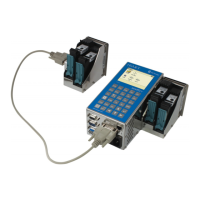

 To Next Page