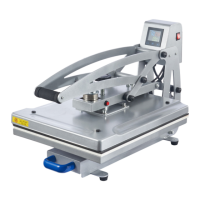
This document describes a heat press machine, available in two models: CH1702A and CH1702B. This device is designed for transferring designs onto various substrates using heat and pressure. It is primarily used for heat transfer applications on items like caps, hats, cotton clothing, linen fabric, chemical fiber fabric, pillows, and typical white non-cotton fabrics.
Function Description:
The heat press machine operates by applying controlled heat and pressure to a substrate, facilitating the transfer of designs from heat transfer paper. Users place their design on the substrate, cover it with protective materials, and then lower the heated platen onto the substrate. The machine's digital display allows for precise control over temperature and time, ensuring optimal transfer results for different materials. An emergency stop button is provided for immediate cessation of heating if needed.
Important Technical Specifications:
| Model |
CH1702A |
CH1702B |
| Rated Power |
1600 W |
2600 W |
| Input Power |
110-120 V~ 60 Hz |
220-240 V~ 50 Hz |
| Timer Range |
0-999 sec. (16½ min.) |
0-999 sec. (16½ min.) |
| Max. Temperature |
400°F |
205°C |
| Heating Area |
15¾×19¾ in. |
40×50 cm |
| Net Weight |
79 lb. |
36 kg |
Usage Features:
- LCD Display: Features a clear LCD display that shows current temperature, time settings, and a batch count.
- Temperature and Time Control: Users can easily increase or decrease temperature and timer settings using dedicated buttons.
- Pressure Adjustment Knob: Allows for precise adjustment of pressure, turning clockwise to increase and counterclockwise to reduce.
- Sliding Base: The base slides out for easy placement and removal of substrates, enhancing safety and convenience.
- Pressure Lever: Used to lower and raise the platen, applying and releasing pressure.
- Emergency Stop Button: Located on the side of the platen, this button provides an immediate stop to heating in case of an emergency.
- Protective Materials: Comes with a protective cloth, a protective silicone mat, and a heat-resistant foam mat to ensure proper transfer and protect the substrate and platen.
- Nonslip Foot Pads: Ensures stability of the machine during operation.
- Closure Magnets: Helps secure the platen when closed.
Operation Steps:
- Lift the pressure lever and slide out the base.
- Place the foam mat (E) on the base, followed by the silicone mat (D).
- Lay the clean, dry, flat, and well-positioned substrate over the silicone mat.
- Position the heat transfer paper (design facing down) on the substrate, ensuring full contact and centering.
- For best results, cover the heat transfer paper with the protective cloth (C).
- Slide the base back in and lower the platen using the pressure lever.
- Adjust pressure using the adjustment knob if needed.
- Connect to a compatible and well-grounded power supply (avoid 3-to-2 prong adapters or ungrounded power strips).
- Turn on the press (power switch to 'I'). The LCD will display default settings (e.g., 35 seconds at 400°F).
- Adjust temperature using the start button and ▲/▼ buttons.
- Adjust timer setting using the start button and ▲/▼ buttons.
- Press the start button a third time to begin heating and design transfer. The timer will count down, and an audible signal will sound when complete.
- Raise the platen and slide out the base to remove the finished product.
- Carefully remove the transfer paper and allow the substrate to cool.
- Make further adjustments to pressure, temperature, and timer for subsequent transfers.
- For flattening dried prints, reheat the press, lightly spray prints with clean water, and press again.
- After use, remove mats and close the platen.
- Turn off the press (power switch to 'O') and disconnect from power.
Settings for Common Materials:
- Cap/Hat (40 Sec., 330-350°F / 180-190°C): Use reverse-printed heat transfer paper. Keep the front of the cap/hat taut. Use medium pressure.
- Cotton Clothing (30 Sec., 320-360°F / 160-180°C): Use AW light heat transfer paper (reverse format). Ensure non-heat-resistant parts (e.g., plastic buttons) do not touch the platen. Use high pressure. Peel transfer paper quickly after printing to prevent sticking.
- Linen Fabric (30 Sec., 320-360°F / 160-180°C): Use reverse-printed heat transfer paper. Ensure non-heat-resistant parts do not touch the platen. Use high pressure.
- Chemical Fiber Fabric (20 Sec., 300-320°F / 150-160°C): Use reverse-printed heat transfer paper. Ensure non-heat-resistant parts do not touch the platen. Use medium pressure.
- Pillows / Typical White Non-Cotton Fabric (50 Sec., 340°F / 190°C): Use reverse-printed heat transfer paper. Ensure non-heat-resistant parts do not touch the platen. Use high pressure.
Maintenance Features:
- Safety First: Always unplug the machine and ensure it has completely cooled before any cleaning, maintenance, or repair.
- Regular Inspection: Check for wear or damage after each use and repair or replace problematic parts. Never replace parts with non-identical ones.
- Cleaning: Periodically clean the exterior with a dry towel. If a damp towel is necessary, unplug the machine, avoid getting water on electronic components, and allow the cleaned area to dry completely before next use. Never immerse in water or use caustic chemicals/harsh abrasives.
- Storage: Store the heat press in a cool, dry place, out of direct sunlight, and inaccessible to children. If storing for an extended period, close the platen.
Troubleshooting:
- Burnt or blurry images: Decrease operating time, temperature, and/or pressure.
- Faded or colorless images: Increase operating time, temperature, and/or pressure.
- Use ONLY as instructed and for intended purposes.
- Connect to stable, grounded 3-prong power outlets. Ensure secure plugs and surge protection. Avoid placing other electrical devices on the same circuit. Do not use 3-to-2 prong adapters or ungrounded power strips. If using an extension cord, ensure it can handle the power without overheating and do not coil it.
- DO NOT allow unfamiliar persons, children, or those with compromised physical/mental capabilities to operate without training and supervision. Exercise caution around bystanders/pets. Store out of reach of children.
- DO NOT use while tired or under the influence of drugs, alcohol, or medication.
- Keep work area clean and well lit.
- DO NOT operate in areas with explosive or flammable gases, liquids, or dust. Keep away from explosive materials (gasoline, ethanol, lighters, batteries, chargers, firecrackers, aerosol cans). Exercise caution near fabric objects to avoid ignition. Keep a fire extinguisher nearby.
- Heat substrates ONLY on heat-resistant mats on the sliding base. Close the press completely before heating. Do not hold the substrate in your hand or against your body.
- DO NOT touch heated areas with bare skin until cool. Never touch plates while in use. Use the handle and extreme care when removing products. Wear heat-resistant gloves.
- DO NOT place other objects on the device.
- DO NOT get the device wet or operate with wet hands.
- Always adjust time and temperature appropriately for materials. Be careful not to confuse Celsius and Fahrenheit.
- DO NOT leave unattended during use.
- Always unplug before cleaning, servicing, or storage. Do not move by pulling the power cord.
- DO NOT operate if damaged or malfunctioning. Repair or replace problematic components before further use.


 To Next Page
 General