159 Photos, videos, and music
Trimming an MP3 ringtone
The Music app has a built-in ringtone trimmer. You can trim an MP3 song and set a
part of it as your ringtone.
1. On the Playback screen, press MENU, and then tap More > Set as ringtone >
Trim the ringtone.
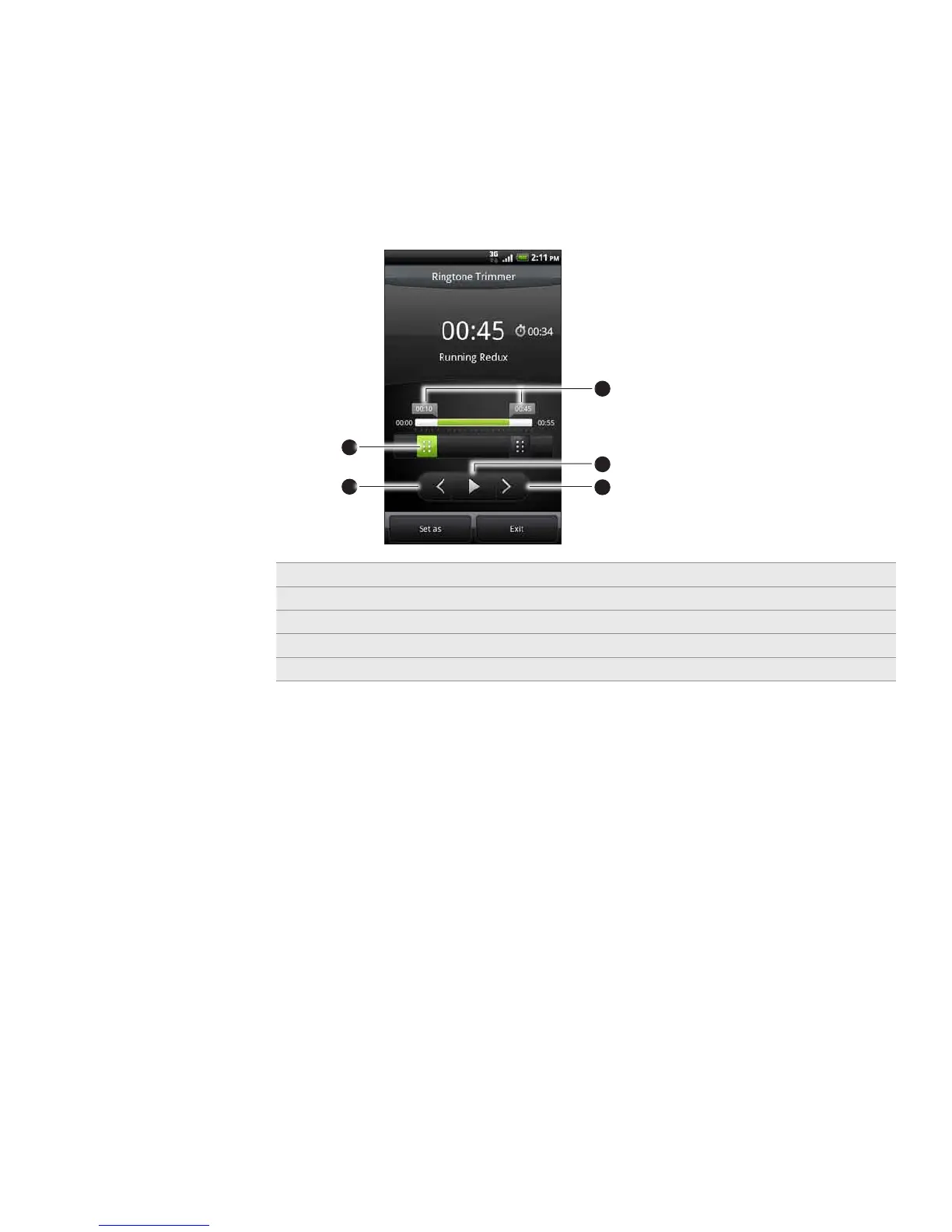
2. Use the onscreen controls to trim your ringtone.
2
3
4
5
1
1 Trim sliders
2 Left button
3 Right button
4 Play/Pause button
5 Markers. (These show where the ringtone starts and ends.)
To trim, you can:
First drag the two trim sliders approximately to the part where you want the
ringtone to begin and end.
Then tap the right and left arrow buttons to more precisely set the start and
end points of the ringtone.
3. After you’ve finished trimming, tap Set as. Then choose whether to set the
trimmed song as your Phone ringtone or Contact ringtone.
Checking if the song was added as a ringtone
From the Home screen, press MENU and then tap Settings.
On the Settings screen, tap Sound > Phone ringtone. The song should be in the
ringtone list and selected.
1.
2.



 To Next Page