

EasyManua.ls Logo

Htzsafe HB-4040S - User Manual

Htzsafe HB-4040S
6 pages
Print Icon
To Next Page IconTo Next Page
Loading...
Wireless Alarm Receiver
User Manual
Question and Answer IconNeed help?

Do you have a question about the Htzsafe HB-4040S and is the answer not in the manual?

Summary

Configuration List

System Components and Usage

Indicator Light Functionality

Indicator light is red when powered on and flashes when in setting mode.

Speaker Functionality

Speaker alarms for 5 seconds when a detector is triggered.

Backup Battery Compartment

Compartment for 4 AA 1.5V batteries, providing 100 hours of backup power.

Operation Instructions

Adding Detectors to Receiver

Step 1: Power on the receiver. Subsequent steps detail pairing mode activation, detector triggering, and confirmation.

Entering Pairing Mode

Press and hold the ON/OFF button for 5 seconds until the indicator light flashes.

Detector Pairing Confirmation

Trigger the detector to pair, then trigger again to confirm successful addition.

Deleting Detectors

Press and hold ON/OFF and Tone buttons for 10 seconds until a long beep to delete all detectors.

Switching Ring Tones

Press the 'Tone Button' once to cycle through 4 available ring tones.

Technical Parameters

Overview

The Wireless Alarm Receiver is a device designed to receive signals from detectors and trigger an alarm. It comes with a user manual and installation accessories.

System Components and Usage

The receiver features an Indicator Light and a Speaker. The Indicator Light turns red when the device is powered on and flashes when it is in setting mode. The Speaker emits an alarm for 5 seconds when a detector is triggered.

On the back of the device, there is a Power Tone Button, an ON/OFF switch, and a Backup Battery Compartment.
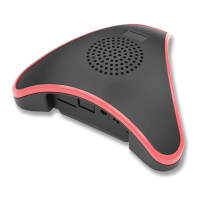
  • Power: This is the power jack for DC5V input.
  • ON/OFF: This switch turns the wireless alarm receiver on or off. It also functions as a set button to add or delete detectors.
  • Tone Button: This button allows users to switch between four optional ring tones.
  • Backup Battery Compartment: This compartment holds four AA 1.5V batteries, which can power the receiver continuously for up to 100 hours if AC power is lost.

Operation Instructions

Adding Detectors

  1. Step 1: Power on the wireless alarm receiver using the power adapter.
  2. Step 2: Press and hold the "ON/OFF" button for 5 seconds. Release the button when the indicator light starts flashing.
  3. Step 3: Trigger the detector (e.g., a solar and wireless photoelectric beam sensor). A bleep prompt and the indicator light stopping its flashing indicate that the detector has been successfully added to the wireless alarm receiver.
  4. Step 4: Trigger the detector again to confirm its successful addition.

Deleting Detectors

  1. Step 1: Power on the wireless alarm receiver using the power adapter.
  2. Step 2: Press and hold both the "ON/OFF" button and the "Tone Button" simultaneously for 10 seconds. Release the buttons when a long bleep is heard. This action will delete all previously added detectors.

Switching Ring Tones

  1. Step 1: Power on the wireless alarm receiver using the power adapter.
  2. Step 2: Ensure that detectors have already been added to the receiver.
  3. Step 3: Press the "Tone Button" once to cycle through the four available ring tones.

Technical Specifications

  • Dimensions: 162mm (width) x 52mm (height)
  • Working Voltage: DC5V
  • Working Current:
    • Static Current: 20mA
    • Alarming Current: 180mA
  • Wireless Frequency: 433MHz FSK+FHSS
  • Backup Battery: 4 pieces AA 1.5V batteries (not included in the package)

Htzsafe HB-4040S Specifications

General IconGeneral
BrandHtzsafe
ModelHB-4040S
CategoryReceiver
LanguageEnglish