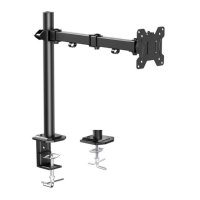
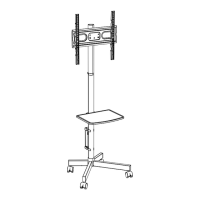
The Huanuo HNSS8 is a monitor desk mount designed to provide flexible and ergonomic positioning for a single monitor. It supports both C-clamp and grommet mounting options, making it versatile for various desk setups.
Function Description:
The primary function of the Huanuo HNSS8 is to securely hold a computer monitor above a desk surface, allowing for a wide range of adjustments in height, tilt, swivel, and rotation. This helps users achieve an ergonomic viewing angle, reduce neck and eye strain, and free up valuable desk space. The mount utilizes a gas spring mechanism for smooth and effortless adjustments, ensuring the monitor stays at the desired height once set.
Important Technical Specifications:
- Weight Capacity: The mount is designed to support monitors weighing between 4.4 lbs (2 kg) and 19.8 lbs (9 kg). It is crucial not to exceed this maximum weight to prevent failure of the mount and potential damage or injury.
- VESA Compatibility: The HNSS8 is compatible with VESA patterns of 75x75mm (3x3 inches) and 100x100mm (4x4 inches). If a monitor has a VESA pattern greater than 100x100mm or less than 75x75mm, or no mounting holes at all, it is not compatible with this mount. For monitors up to 27 inches with incompatible VESA patterns, Huanuo offers universal VESA bracket kits (HUMUA1 or HUMUA4) as an alternative solution.
- Desk Thickness (C-Clamp): The manual illustrates a C-clamp mounting method that accommodates various desk thicknesses, though specific dimensions are not provided for the C-clamp itself, it shows adjustable parts [X] and [Y] for different desktop thicknesses.
- Desk Thickness (Grommet): For grommet mounting, the desk hole diameter should be between 0.4 inches (10mm) and 2 inches (50mm).
- Rotation: The monitor can rotate 360 degrees, allowing for landscape or portrait orientation. The arm itself also offers 360 degrees of rotation around the pole.
- Swivel: The arm can swivel 180 degrees at the monitor attachment point and 360 degrees around the pole.
- Tilt: The monitor can be tilted up and down, with an adjustment mechanism to control the tension and hold the desired angle.
- Gas Spring: The mount incorporates a high-pressure gas spring for dynamic height adjustment. The tension of this gas spring is adjustable to match the monitor's weight. The tension is preset at 8.8-11 lbs (4-5kg) and requires adjustment if the monitor's weight falls outside this range.
- Materials: While not explicitly stated, typical monitor mounts are constructed from steel, aluminum, and plastic components for durability and aesthetics.
Usage Features:
- Ergonomic Adjustments: The HNSS8 offers extensive adjustability to optimize viewing comfort. Users can easily change the monitor's height, tilt, swivel, and rotation to suit their posture and task.
- Two Mounting Options:
- C-Clamp Mounting: This method is suitable for desks where drilling a hole is not desired or possible. It clamps directly to the edge of the desk.
- Grommet Mounting: This option provides a more permanent and flush installation by utilizing an existing desk grommet hole or requiring a new one to be drilled.
- Cable Management: Integrated cable clips (05) and cable covers (04) along the arm help to route and conceal cables, contributing to a cleaner and more organized workspace.
- Easy Installation: The manual provides clear, step-by-step instructions for assembly and installation, including detailed diagrams for both mounting types.
- Tension Adjustment: The gas spring tension can be adjusted using an Allen key (F) to ensure the monitor stays at the desired height without drifting up or down. Clockwise rotation reduces tension (for lighter monitors), while counter-clockwise rotation increases tension (for heavier monitors). This adjustment should only be performed after the monitor is attached to the mount.
- Tilt Adjustment: The tilt angle can be adjusted and secured using an Allen key (F) to tighten or loosen the bolts, allowing the monitor to hold its desired vertical angle.
- Rotation Adjustment: The monitor can be rotated 360 degrees for portrait or landscape viewing, particularly suitable for monitors with a centered gravity.
- Safety Warnings: The manual emphasizes critical safety information, including weight restrictions, the importance of securing bolts firmly, and warnings about the high-pressure gas spring.
Maintenance Features:
- Tension Adjustment: The gas spring tension is a key maintenance feature, allowing users to recalibrate the mount's holding power if the monitor's weight changes or if the arm starts to drift. This ensures the mount continues to function optimally over time.
- Bolt Tightening: The manual repeatedly stresses the importance of ensuring all bolts are secured firmly during installation and adjustment. Regular checks of these bolts can prevent loosening and maintain the mount's stability.
- Gas Spring Handling: Users are warned against dismantling the high-pressure gas spring without professional assistance, highlighting a specific maintenance consideration for this component. If the product is abandoned, it should be returned to the manufacturer or professional agencies for proper disposal.
- Replacement Parts: The manual advises contacting customer service for replacement parts if any are damaged or defective, indicating support for maintaining the product's integrity.
In summary, the Huanuo HNSS8 is a robust and adaptable monitor desk mount designed for single-monitor setups, offering comprehensive adjustability and user-friendly features for an enhanced ergonomic experience. Its dual mounting options, effective cable management, and adjustable gas spring mechanism make it a practical solution for various home and office environments.

 Need help?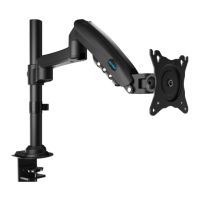

 To Next Page
 General