
 Need help?
Do you have a question about the Huawei AF15 and is the answer not in the manual?
Configure camera settings to use volume buttons as shutter for the remote.
Describes the horizontal and vertical rotation capabilities of the selfie stick clamp.
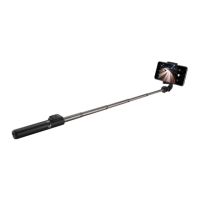
This document is a user manual for the Huawei AF15 Bluetooth Selfie Stick and Tripod Stand, model number 55030005.
The Huawei AF15 is a versatile device that combines the functionality of a selfie stick with a tripod stand. It allows users to capture photos and videos from various angles and distances, either handheld as a selfie stick or stationary as a tripod. The device features a Bluetooth remote control for convenient photo capture.
Pairing the Selfie Stick: To pair the device with a smartphone, users need to press and hold the remote control for 2 seconds to power it on. A green indicator light will start blinking, signaling it's in pairing mode. Users then enable Bluetooth on their phone, search for "AF15" in the list of available devices, and tap to pair. The Bluetooth range is up to 10m in an open area. If the remote control restarts (e.g., due to battery removal), or if pairing issues occur, users may need to manually unpair and re-pair the device, or power off and restart the remote control before attempting to pair again.
Using the Selfie Stick's Clamp: The clamp, which holds the smartphone, can be opened and rotated 180 degrees to position the phone for use. After use, it should be rotated back 180 degrees to its original folded position for storage. The clamp also offers rotational flexibility for optimal camera angles: it can rotate 360 degrees horizontally and 225 degrees vertically.
Camera Settings for Shutter Function: If pressing the remote button only focuses the camera but doesn't take a picture, users should check their phone's camera settings. Specifically, they should navigate to "Camera > Settings > Volume button function" and select "Shutter" to ensure the volume buttons (and thus the remote control) trigger the photo capture.
Replacing the Battery of the Remote: The remote control is powered by a CR2025 Lithium coin battery. The manual provides visual instructions for replacing this battery. Users are guided through a three-step process to access and replace the battery.
Battery Life Management: The included battery is capable of taking over 30,000 photos. To conserve battery life, the remote control is designed to enter sleep mode after 3 minutes of inactivity and power off completely after 6 hours of being unused. This automatic power management helps extend the life of the remote's battery.
 General
| Brand | Huawei |
|---|---|
| Model | AF15 |
| Category | Cell Phone Accessories |
| Language | English |

 To Next Page