Your Device at a Glance
Before you start, let's take a look at your new device.
• To power on your device, press and hold the power button until the
screen turns on.
• To power off your device, press and hold the power button, and
then touch .
• To restart your device, press and hold the power button, and then
touch .
• Press and hold the power button for 10 or more seconds to forcibly
restart your device.
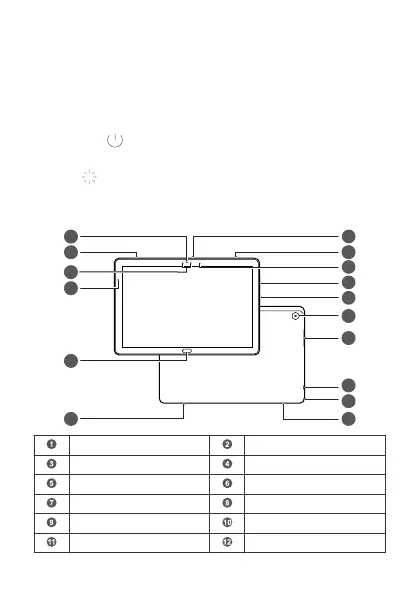
Front camera Speaker
Proximity sensor Ambient light sensor
Fingerprint scanner Headset jack
USB-C port Card tray
Rear camera Power button
Volume button Status indicator
English
1



 To Next Page