1
Your device at a glance
Before you start, let's take a look at your new device.
•
To power on your device, press and hold the power button
until the screen turns on.
•
To power off your device, press and hold the power button,
and then touch
.
• To force your device to restart, press and hold the power
button until your device vibrates.
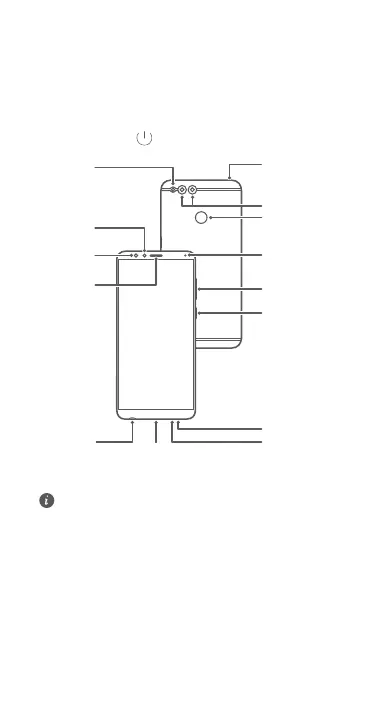
Micro USB port
Headset
connector
Primary
microphone
Speaker
Secondary
microphone
Fingerprint
scanner
Volume
button
Status
indicator
Light
sensor
Flash
Front
camera
Earpiece
Power
button
Dual-lens
camera
E
n
g
l
i
s
h



 To Next Page