
 Need help?
Do you have a question about the Huawei FreeBuds 4 and is the answer not in the manual?
Open the case and hold the button for 2s until the indicator flashes white to enter pairing mode.
Press and hold the case button for 10s until the indicator flashes red to reset the earphones to pairing mode.
Manage volume, playback, calls, and noise canceling using swipe, tap twice, and press-and-hold gestures on the earbuds.
Scan the QR code to download and install the HUAWEI AI Life app for more features and customization.
Place the earphones in the charging case and close it to start charging automatically.
Use a USB-C cable to connect to the charging case to recharge its battery.
 General
| Control type | Touch |
|---|---|
| Headset type | Binaural |
| Product type | Headset |
| Plug and Play | Yes |
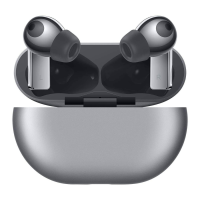
| Product color | Silver |
| Wearing style | In-ear |
| Country of origin | China |
| Recommended usage | Calls/Music |
| Bluetooth version | 5.2 |
| Bluetooth profiles | A2DP, AVRCP, HFP |
| Connectivity technology | True Wireless Stereo (TWS) |
| Driver unit | 14 mm |
| Ear coupling | Intraaural |
| Microphone type | Built-in |
| Number of microphones | 3 |
| Battery type | Built-in battery |
| Battery capacity | 30 mAh |
| Continuous audio playback time | 4 h |
| Storage temperature (T-T) | -20 - 45 °C |
| Operating temperature (T-T) | 0 - 35 °C |
| Sustainability certificates | RoHS |
| Cables included | USB Type-C |
| Battery life | 240 min |
| Recommended gender | Boy/Girl |
| Harmonized System (HS) code | 85183000 |
 Weight and Dimensions
| Width | 16.8 mm |
|---|---|
| Height | 41.4 mm |
| Charging case weight | 50 g |
| Left earpiece weight | 5 g |
| Charging case dimensions (W x D x H) | 58 x 21.2 x 58 mm |





 To Next Page
