Need help?
Do you have a question about the Huawei VNS-L31 and is the answer not in the manual?
General guidelines for using the device safely.
Precautions regarding medical device interference.
Advice to prevent hearing damage from high volumes.
Warnings about using the device in hazardous environments.
Safety guidelines for using the device while driving.
Recommended conditions for device operation and storage.
Precautions for child usage and potential hazards.
Guidelines and risks associated with using accessories.
Safety instructions for charging the device.
Critical warnings for battery handling and disposal.
Instructions for cleaning and maintaining the device and accessories.
Information on the availability and reliance for emergency calls.
Guidance on proper disposal of the device and batteries.
Compliance with regulations on hazardous materials.
Compliance information related to EU regulations.
RF specification compliance for body-worn usage.
Information on Specific Absorption Rate (SAR) compliance.
Specific Absorption Rate (SAR) values for European compliance.
Declaration of device compliance with EU directives.
Information on the declaration of conformity for the device.
Specific restrictions for the 2.4 GHz band in Norway.
Compliance with US Federal Communications Commission rules.
Specific Absorption Rate (SAR) values for FCC compliance.
Statement of compliance with FCC rules.
List of trademarks and permissions granted.
General notices regarding product features and software.
Disclaimer regarding third-party software functionality and support.
General disclaimer for the manual's content and liability.
Compliance with laws governing product import and export.
Information on how personal data is protected.
This document serves as a Quick Start Guide for the HUAWEI P9 lite, providing essential information on its functions, usage, and maintenance.
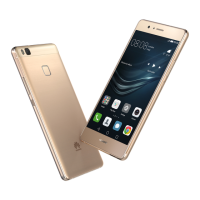
The HUAWEI P9 lite is a mobile phone designed for everyday communication and various smart functionalities. It features a camera for capturing photos, a fingerprint scanner for secure identification, and connectivity options like Wi-Fi and mobile data for internet access. The device also includes standard phone components such as a microphone, speaker, headset jack, and a Micro USB port for charging and data transfer. Specific models (VNS-L31 and VNS-L21) also support NFC for short-range wireless communication.
Getting Started: To begin using the HUAWEI P9 lite, follow the instructions provided in the guide for setting up your phone. It's crucial not to insert or remove a SIM card while the phone is powered on. When handling the SIM ejector pin, exercise caution to avoid injury or damage to the phone, and store the pin safely away from children.
Powering On/Off and Restarting: To turn the phone on or off, press and hold the power button. If you need to forcibly restart the phone, press and hold the power button until the device vibrates.
Fingerprint Identification: The HUAWEI P9 lite offers fingerprint identification as a secure method for unlocking the device and other functions. To enroll your fingerprint, navigate to "Settings > Fingerprint ID > Fingerprint management" and follow the on-screen instructions. Ensure that the fingerprint sensor and your fingers are dry and clean during the enrollment process for optimal performance.
Locking and Unlocking the Screen: To lock the screen, press the power button. The screen will automatically lock itself after a specified period of inactivity. To turn on the screen when it's off, press the power button. You can unlock the screen by sliding your finger in any direction. For quick access to commonly used applications without fully unlocking the screen, swipe up from the bottom of the screen.
Camera Usage: The device is equipped with a camera for capturing images. To use the camera, touch the "Camera" icon. Frame the scene you wish to capture, and the camera will either focus automatically or allow you to touch the screen to focus on a specific object. To take a photo, touch the designated button. The camera also supports different capture modes and settings, which can be accessed by swiping left or right on the screen.
Internet Connection: The HUAWEI P9 lite can connect to the internet via Wi-Fi or a mobile data network. To access connectivity options, swipe down from the status bar to open the notification panel. From there, you can touch the "↑↓" icon to turn mobile data on or off. To configure Wi-Fi settings, touch and hold the Wi-Fi icon, which will direct you to the Wi-Fi settings screen where you can turn on Wi-Fi and connect to a network.
General Cleaning and Care: To ensure the longevity and proper functioning of your HUAWEI P9 lite and its accessories, keep them dry. Avoid using external heat sources like microwave ovens or hair dryers to dry the device. Do not expose the device or accessories to extreme heat or cold, as these environments can interfere with proper function and pose fire or explosion hazards. It's also important to avoid collisions, which can lead to malfunctions, overheating, fire, or explosions.
Cleaning Procedures: Before cleaning or performing any maintenance on the device, stop using it, close all applications, and disconnect all connected cables. Use a clean, soft, and dry cloth to clean the device and accessories. Do not use chemical detergents, powders, or other chemical agents such as alcohol and benzene, as these substances can damage parts or present a fire hazard.
Battery Safety and Replacement: The device has a built-in, non-removable battery. Do not attempt to remove the battery yourself, as this may damage the device. If the battery needs replacement, take the device to an authorized service center. To prevent short circuits, injuries, or burns, do not connect battery poles with conductors like keys, jewelry, or other metal materials. Keep the battery away from excessive heat and direct sunlight, and do not place it on or in heating devices, as batteries may explode if overheated. Do not attempt to modify or remanufacture the battery, insert foreign objects into it, or immerse it in water or other liquids, as this can lead to fire, explosion, or other hazards. If the battery leaks, ensure the electrolyte does not contact your skin or eyes; if contact occurs, flush with clean water and consult a doctor. Immediately stop using the device and remove the battery if you notice deformation, color change, or overheating during charging or storage. Do not put batteries in fire, as they may explode. Dispose of used batteries according to local regulations to prevent fire, explosion, or other hazards. Do not allow children or pets to bite or suck the battery, as this can result in damage or explosion. Avoid smashing or piercing the battery, or exposing it to high external pressure, which can lead to short circuits or overheating. Do not drop the device or battery, as impacts, especially on hard surfaces, can cause damage. If the device's standby time significantly shortens, replace the battery.
Charger Safety: For pluggable devices, ensure the socket-outlet is installed near the device and is easily accessible. Unplug the charger from electrical outlets and the device when not in use. Do not drop the charger or subject it to impact. If the power cable is damaged (e.g., exposed or broken cord, loose plug), stop using it immediately to prevent electric shocks, short circuits, or fire. Do not touch the power cord or the device/charger with wet hands, as this can lead to short circuits, malfunctions, or electric shocks. If the charger has been exposed to water, other liquids, or excessive moisture, take it to an authorized service center for inspection. Ensure the charger meets the requirements of Clause 2.5 in IEC60950-1/EN60950-1/UL60950-1 and has been tested and approved according to national or local standards. Connect the device only to products with the USB-IF logo or with USB-IF compliance program completion.
Other Important Maintenance Notes: Do not use the device's camera flash directly in the eyes of people or pets, as this can cause temporary vision loss or eye damage. Avoid touching the device's antenna, as this can reduce communication quality. Do not allow children or pets to bite or suck the device or accessories, as this may result in damage or explosion. Do not place magnetic stripe cards (e.g., credit cards, phone cards) near the device for extended periods, as they may be damaged. Do not dismantle or remanufacture the device and its accessories, as this voids the warranty and releases the manufacturer from liability for damage. In case of damage, contact an authorized service center. If the device screen is broken in a collision, immediately stop using it and do not touch or attempt to remove broken parts; promptly contact an authorized service center.
 General
| Model | VNS-L31 |
|---|---|
| Also known as | Huawei P9 Lite |
| Dimensions | 146.8 x 72.6 x 7.5 mm |
| Weight | 147 g |
| Processor | HiSilicon Kirin 650 |
| CPU | Octa-core (4x2.0 GHz Cortex-A53 & 4x1.7 GHz Cortex-A53) |
| GPU | Mali-T830 MP2 |
| RAM | 2GB/3GB |
| Internal Storage | 16 GB |
| Expandable Storage | microSD, up to 256 GB (uses SIM 2 slot) |
| Front Camera | 8 MP, f/2.0 |
| Operating System | Android 6.0 (Marshmallow), upgradable to 7.0 (Nougat), EMUI 4.1 |
| SIM | Single SIM (Nano-SIM) or Dual SIM (Nano-SIM, dual stand-by) |
| Network | GSM / HSPA / LTE |
| Colors | Black, White, Gold |
| WLAN | Wi-Fi 802.11 b/g/n, Wi-Fi Direct, hotspot |
| Bluetooth | 4.1, A2DP, LE |
| NFC | Yes (market dependent) |
| Radio | FM radio |
| USB | microUSB 2.0 |
| Sensors | Fingerprint (rear-mounted), accelerometer, proximity, compass |
| Display | 5.2 inches, 1080 x 1920 pixels |
| Main Camera | 13 MP, f/2.0 |
| Battery | 3000 mAh |
| GPS | Yes, with A-GPS, GLONASS |

 To Next Page