EasyManua.ls Logo

Huawei VPC620 - User Manual

Huawei VPC620
14 pages
Print Icon
To Next Page IconTo Next Page
Loading...
1
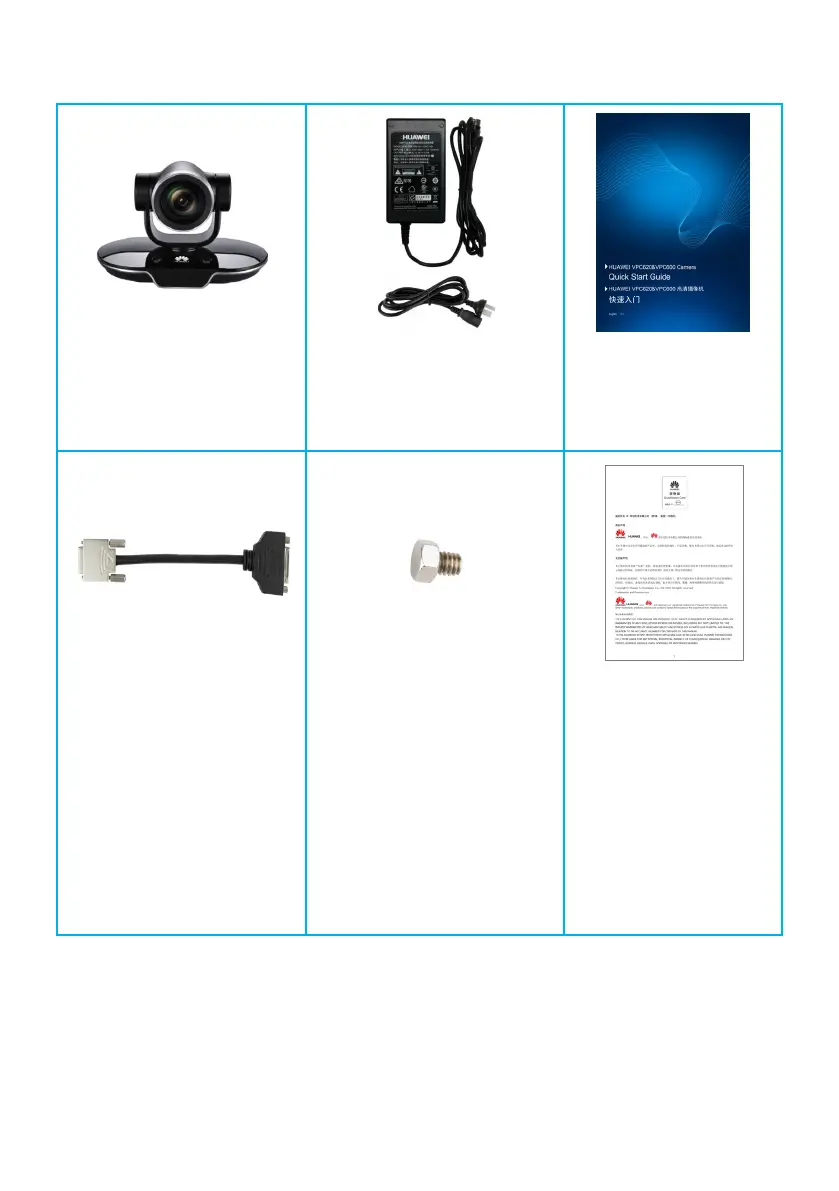
Packing List
Camera
Power adapter and power cable
Note: Their specifications are
different in different countries.
Quick Start Guide
HD-VI to DVI cable
Used to convert the HD-VI
port of the camera to a
standard DVI port (female
connector). Connect this cable
to an endpoint through a
double male connector DVI
cable.
1/4"-20UNC-7 mm screw
Used to fix a support.
Certificate of Compliance
& Safety Precautions &
Warranty Card
Issue: 12 (2018-03-20)
http://www.huawei.com
Copyright © Huawei Technologies Co., Ltd. 2018. All rights reserved.

Questions and Answers

  • A
    Alejandra MorganAug 10, 2025
    How to fix blurry video on my Huawei Webcam?
    • C
      Christopher BrownAug 10, 2025
      If the Huawei Webcam video is unclear or the camera fails to focus automatically after powering on, it could be due to a few reasons. The lens surface might be dirty, or the camera may not be in autofocus mode. To enable autofocus, access the camera control page via the remote, select 'Adjust Focus', and use the direction keys to set the camera to autofocus. Also, ensure the object is at least 0.7 meters away from the camera and that the camera shooting angle is properly set.
  • T
    Tammy NormanAug 14, 2025
    What to do if Huawei VPC620 video is not displayed?
    • K
      kara47Aug 15, 2025
      If you're not seeing video from your Huawei Webcam on the display connected to the HD video terminal, several things could be wrong. First, ensure the HD video terminal and the camera are connected correctly. Also, verify the input and output settings on the HD video terminal. The HD video terminal might not support the camera's video format, or the display may not support the video output format set on the HD video terminal.
  • A
    Amy HodgesAug 20, 2025
    Why does Huawei Webcam video stop displaying after working for a while?
    • V
      velasqueztimothyAug 20, 2025
      If the display stops showing video from the Huawei Webcam after it has been working, check the camera's working environment. Make sure the cables are securely connected, the voltage is stable, and heat is dissipated properly.
  • J
    Jeffrey GrayAug 26, 2025
    Why PTZ control not working on Huawei Webcam?
    • F
      Frank SotoAug 26, 2025
      You may not be able to use PTZ to control the Huawei Webcam from an HD video terminal if the serial connection between the camera and the HD video terminal is incorrect, or if the serial port of the HD video terminal or the camera type is set incorrectly.
  • S
    Sara ReyesAug 29, 2025
    Why can't I control my Huawei Webcam after connecting it?
    • D
      Dawn King DDSAug 30, 2025
      If you cannot control the Huawei Webcam after connecting it, start by checking the cables and their connections to ensure they are normal. Confirm that the keyboard can properly control the first camera. If the first camera works, but others don't, check the cable length, ensuring it doesn't exceed 50 meters. If the problem continues, try restarting the keyboard and the cameras.
  • G
    Gary GarzaSep 4, 2025
    What to do if Huawei Webcam fails startup diagnosis?
    • B
      Briana BurnsSep 4, 2025
      If your Huawei Webcam fails its startup diagnosis and exhibits symptoms like failing to start, abnormal PTZ noise, or a blank screen, it might be due to using a nonstandard power adapter. Ensure you're using a standard adapter that provides a 12 V DC output. Also, check if the connector at the low-voltage side of the camera's power adapter has been reconstructed or if the cable of this power connector has been extended. If the cable of the camera adapter is not long enough, extend the cable of the power socket instead of the adapter's cable.

Huawei VPC620 Specifications

General IconGeneral
BrandHuawei
ModelVPC620
CategoryWebcam
LanguageEnglish