EasyManua.ls Logo

HUAYUAN MAM860 - User Manual

HUAYUAN MAM860
17 pages
Print Icon
To Next Page IconTo Next Page
Loading...
MAM860 (IV)
Oil-Free Scroll Air Compressor Controller
Operation Manual
Question and Answer IconNeed help?

Do you have a question about the HUAYUAN MAM860 and is the answer not in the manual?

Summary

Introduction to the Controller

Controller Overview

Introduces the microcomputer controller for intelligent automatic operation of oil-free scroll air compressors.

Description of Control Panel Keys

Start Key Functionality

Initiates compressor operation in standby or connection modes.

Stop Key Functionality

Halts compressor operation and connection control.

Load;Unload and Version Display Key

Manages compressor load/unload states and displays software version.

Confirm Key for Data Input

Confirms and saves input data during setup.

Navigation Keys (Up;Down)

Used for scrolling through menus and adjusting data values.

Shift Key for Data Editing

Moves the cursor to the next data bit during modification.

Enter Key for Menu Access

Accesses sub-menus or initiates setup mode for current menu.

Return;Reset Key Functions

Exits menus, returns to previous screens, or resets faults.

Controller Status Display and Operation

Initial Power-On Interface

Displays 'Welcome to Scroll Compressor' upon initial power-up.

Main Operating Interface

Shows temperature, pressure, host, and equipment status after a 5-second delay.

Menu Navigation and Selection

Accessed via Down key; lists parameter categories for selection.

Viewing Running Parameters

Voltage and Air End Current Data

Displays voltage and current readings for the air end.

Running Time Parameters

Shows total and current running times for the compressor.

Maintenance Parameter Access

Provides access to maintenance-related parameter information.

Fault and Status Information

Displays historical faults, current faults, and communication status.

Host and Fan Current Details

Shows specific current values for the host and fan.

User Parameters Configuration

Pressure and Temperature Presets

Configures loading/unloading pressure and fan temperature settings.

Start;Stop Delay Presets

Defines delays for compressor start, stop, and restart operations.

Operation Mode Presets

Sets operating modes, communication, and host selection for the controller.

Double Rotation Time Setting

Sets rotation time for hosts in double-machine mode.

Local;Remote Control Mode

Configures whether the compressor can be controlled locally or remotely.

Loading Mode Selection

Sets automatic or manual control for compressor loading and unloading.

Communication Method Configuration

Configures communication protocols and network settings.

Communication Address Settings

Sets the communication address for networked operation.

Host Selection (Single;Double)

Selects between single-host or double-host control.

Single-Host Operation Mode

Specifies which host (No.1 or No.2) to use in single-host mode.

Connection Role (Host;Slave)

Defines the role of the machine as host or slave in networked operation.

Network Rotation Time

Sets the time for machines to rotate working duty in connected operation.

Number of Connected Machines

Specifies the total number of compressors in the network.

Connection Pressure Limits

Sets upper and lower pressure limits for network control.

Connection Delay Setting

Sets the wait time for sending continuous control commands.

Language Selection

Allows selection of the display language.

User Password Management

Allows modification of user password after verification.

Manufacturer Parameters

Air End Current and Temperature Settings

Configures current limits, warning, and shutdown temperatures for Air Ends.

Shutdown Pressure and Air End Time

Sets shutdown pressure limits and modifies Air End 1 running time.

Maintenance Timer Reset

Resets maintenance timers for oil filter, separator, air filter, and oil.

Maximum Use Time Warnings

Sets warning thresholds for the use time of filters and oil.

Air End 2 Running Time

Modifies the total running time of Air End 2.

Fault History Reset Procedure

Resets the fault history records by entering a specific password.

Air End 2 Temperature Warnings

Configures warning and shutdown temperatures for Air End 2.

Manufacture Date and Number

Records the manufacture date and equipment number.

Phase Sequence Protection Control

Enables or disables phase sequence protection for the compressor.

Frequency Selection Setting

Selects the operating power frequency (50Hz/60Hz) for the compressor.

Connection Method Options

Sets the connection method to Advanced or Compatible.

Voltage Protection Settings

Configures high and low voltage shutdown protection.

Low Temperature Protection

Sets the minimum exhaust temperature to prevent starting.

Time Limit Shutdown Function

Sets a time limit for compressor operation, with shutdown on expiry.

Runtime Warning Shutdown

Shuts down the machine with a warning if runtime exceeds set maximums.

MODBUS Communication Control

Enables or disables parameter setting via MODBUS protocol.

Parameter 1 Configuration

Allows setting and saving manufacturer parameters.

Current Unbalance Protection Setting

Sets threshold for phase current unbalance to prevent shutdown.

Open-Phase Protection Timing

Sets time for open-phase protection; disables if set above a threshold.

Maintenance Usage Time Reset

Resets usage timers for oil filter, separator, air filter, and lubricating oil.

Adjustment Parameters Calibration

Air End 1 Current Calibration (Phases A, B, C)

Calibrates phase A, B, C currents for Air End 1 using standard values and coefficients.

Air End 1 Present Current Display

Displays real-time sampled and calibrated current for Air End 1.

Air End 2 Current Calibration (Phases A, B, C)

Calibrates phase A, B, C currents for Air End 2 using standard values and coefficients.

Air End 2 Present Current Display

Displays real-time sampled and calibrated current for Air End 2.

Standard Temperature Calibration

Calibrates exhaust temperature using standard values and coefficients.

Temperature Calibration and Present Value

Calibrates temperature, compensates zero deviation, and displays present value.

Standard Pressure Calibration

Calibrates exhaust pressure using standard values and coefficients.

Pressure Calibration and Present Value

Calibrates pressure, sets zero display, and shows present pressure value.

Standard Voltage Calibration

Calibrates voltage using standard values and coefficients.

Voltage Calibration and Present Value

Calibrates voltage, applies zero offset, and displays present voltage.

Current Update Rate Setting

Sets the update rate for current display (DEBUG/WORK mode).

LED Number Display Setting

Sets the number of LEDs displayed (e.g., 3LED).

Operation Authority and Password Management

User Password Permissions

Allows modification of all user parameters.

Factory Sales Password Permissions

Allows modification of user parameters, passwords, and some factory parameters.

Factory Password Permissions

Allows modification of user, factory, and sales parameters.

Factory Super Password Permissions

Allows modification of specific factory parameters after verification.

Overview

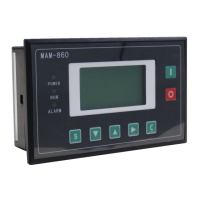
The MAM860 (IV) is an oil-free scroll air compressor controller designed for intelligent automatic operation of air compressors. It features a microcomputer controller that enables automatic pressure control, real-time display of failure messages, protection shutdown, and networking group control. The LCD screen displays four lines of text, allowing operators to set parameters and monitor the compressor's operating status through a user-friendly interface.

Function Description:

The controller manages various aspects of the air compressor's operation, including starting and stopping, loading and unloading, and monitoring critical parameters like temperature, pressure, and current. It supports both single-host and double-host operation modes, offering flexibility in deployment.

Key Functions:

  • Start/Stop Control: The "Start key" initiates operation when the compressor is in standby mode or, in connection mode, starts the host compressor and activates connection control. The "Stop key" halts operation when the compressor is running or, in connection mode, stops the host and connection control. A long press of the "Stop key" in shutdown state displays software version information.
  • Load/Unload Control: The "Load/Unload key" (S) functions as a load/unload key when the compressor is running. In setup mode, it serves as a confirmation key to save input data.
  • Navigation and Data Modification: The "Down key" and "Up key" are used to move the scroll bar when viewing parameters. When modifying data, they act as "Dec key" and "Inc key" respectively, to decrease or increase the flashing data value.
  • Menu and Setup Access: The "Shift key" (►) moves the blinking cursor to the next bit during data modification. As an "Enter key," it accesses lower-level menus or enters setup mode if no lower-level menu exists, causing data to flash.
  • Return and Reset: The "Return key" (C) exits setup mode, returns to the previous menu, or the main interface. A long press (5 seconds) of this key resets faults during a fault shutdown.
  • Automatic Operation: The controller provides automatic pressure control, ensuring the compressor operates within desired pressure ranges.
  • Fault Management: It displays real-time failure messages and initiates protection shutdowns when necessary.
  • Networking Group Control: The controller supports connecting multiple air compressors for coordinated operation, with one serving as a host and others as slaves, managing start, stop, loading, and unloading based on air pressure.

Usage Features:

The MAM860 (IV) offers a comprehensive set of user-configurable parameters to adapt to various operational requirements.

User Parameters:

  • Pressure and Temperature Preset:
    • Single Load/Unload: Sets loading and unloading pressures for single-host operation (e.g., Single Load: 00.50MPa, Single Unload: 00.90MPa).
    • Fan Start/Stop Temperature: Defines the exhaust temperatures at which the fan starts and stops (e.g., Fan Start Temperature: 0080°C, Fan Stop Temperature: 0070°C).
    • Double Load/Unload: Sets loading and unloading pressures for double-host operation (e.g., Double Load: 00.60MPa, Double Unload: 00.80MPa).
  • Start/Stop Delay Preset:
    • Air End 1/2 Delay: Sets the start time delay for Air End 1 and 2, during which overload protection is temporarily disabled to avoid impulse current during motor start (e.g., 0006 s).
    • Load Delay: Time delay before the compressor loads after starting (e.g., 0005 s).
    • Stop Delay: Time delay after the release valve opens before the host stops (e.g., 0010 s).
    • Restart Delay: Delay before restarting the machine after shutdown to prevent frequent motor starts (e.g., 0008 s).
    • Double Delay: Minimum wait time between control commands in double-machine mode (e.g., 0030 s).
    • Double Rotation: In double-machine mode, sets the time after which the working machine rests and the idle machine starts (e.g., 0002H).
  • Operation Mode Preset:
    • Start/Stop Mode: Configures whether the compressor can be started/stopped locally or remotely (Local/Remote).
    • Loading Mode: Determines if loading/unloading is manual or automatic based on pressure (Auto/Manual).
    • Communication Method: Enables or disables communication, sets the controller as a slave for MODBUS protocol, or enables networking for multiple compressors (No/Computer/Connection).
    • Communication Code: Sets the communication address for networking or host computer communication (0001, range 0-16 for connection, 0-99 for host computer).
    • Host Selection: Allows selection between single-host or double-host control (Single/Double).
    • Single-host Operation: Specifies which host (No.1 or No.2) is optional.
  • Connection Parameter Preset:
    • Connection Status: Defines if the machine acts as a host or slave in a networked setup (Host/Slave).
    • Rotation Time: Sets the working time within the allowable pressure range before machines rotate in turn (e.g., 0099 hrs).
    • Number of Connected Machines: Specifies the total number of air compressors in the network (0000).
    • Connection Lower/Upper Pressure Limit: Sets pressure thresholds for loading/starting (Lower: 00.00MPa) and unloading/stopping (Upper: 00.00MPa) in a networked system.
    • Connection Delay: Wait time for continuously sending control commands twice by the host (e.g., 0050 s).
  • Language Selection: Allows choosing the display language (Chinese).
  • User Password: Enables modification of the user password after verification (****).

Maintenance Features:

The controller provides extensive maintenance parameters, accessible after verifying the manufacturer password.

Manufacturer Parameters:

  • System Parameters:
    • Air End 1/2 Current: Sets maximum allowable motor overload current for Air End 1 and 2, triggering a delay shutdown if exceeded (e.g., Maximum allowable motor overload current / 1.2).
    • Temperature 1/2 Warning/Shutdown: Sets warning and shutdown temperatures for Air End 1 and 2 (e.g., Warning: 105°C, Shutdown: 110°C).
    • Shutdown Pressure: Sets the air supply pressure threshold for fault shutdown (e.g., 1.00MPa).
    • Maximum Unload Pressure: Defines the maximum allowable unloading pressure (e.g., 0.80MPa).
    • Air End 1/2 Time: Allows modification of the total running time for Air End 1 and 2 (e.g., 000000 hrs).
    • Fault History Reset: Clears fault history by entering a specific code (e.g., 8888).
    • Manufacture Date/Number: Records the manufacturing date and equipment number (e.g., 9999-99-99, 99999999).
    • Phase Sequence Protection: Enables or disables phase sequence protection (Disable/Enable).
    • Frequency Selection: Selects the working power frequency (50Hz/60Hz), affecting current detection accuracy.
    • Connection Method: Alternate setting (Advanced/Compatible).
    • High/Low Voltage: Sets voltage thresholds for protection shutdown (e.g., 0000V; 0000 disables the function).
    • Low Temperature Protection: Prevents starting if exhaust temperature is too low (e.g., -0005°C).
    • Time Limit: Sets a maximum running time, after which the machine shuts down with a "use error" report (e.g., 0000 hrs; 0000 disables the function).
    • Warning Shutdown: Sets the time limit for components (oil filter, separator, air filter, lubricating oil, grease, belt) before a "too long warning" shutdown (e.g., 0010 hrs).
    • Communication Preset: Allows host computer to set parameters via MODBUS protocol (On/Off).
    • Parameter 1: User-settable value within the manufacturer parameter interface (0000).
    • Current Unbalancedness: Sets the threshold for unbalance protection, triggering shutdown if exceeded (e.g., 0010; ≥15 disables protection).
    • Open-phase Protection: Sets the time for open-phase protection (e.g., 000.0 s; ≥20 seconds disables protection).
  • Maintenance Parameter Reset:
    • Oil Filter/Separator/Air Filter/Lubricating Oil: Displays total use time and allows resetting when new components are used (e.g., 0000 hrs).
  • Maximum Use Time Preset:
    • Oil Filter/Separator/Air Filter/Lubricating Oil: Sets maximum use time for components, triggering a warning if exceeded (e.g., 9999 hrs; 0000 disables warning).

Adjustment Parameters:

These parameters are used for calibrating the controller's sensors and are typically modified by authorized personnel.

  • Air End 1/2 Current Calibration (Phases A, B, C):
    • Standard Current: Enter a standard current value for calibration. The controller calculates and saves a coefficient based on the detected current (e.g., 0000).
    • Coefficient: Enter the calculated coefficient. The displayed current is the sampled value multiplied by this coefficient (e.g., 1.000).
    • Present Current: Displays the real-time sampled and calibrated current value (e.g., ****A).
  • Standard Temperature Calibration:
    • Standard Temperature: Enter a standard temperature value for calibration. The controller calculates and saves a temperature coefficient (e.g., 0000°C).
  • Coefficient: Enter the calculated coefficient. The displayed temperature is the sampled value minus zero deviation, multiplied by this coefficient (e.g., 1.000).
  • Zero: Compensates for hardware zero deviation (e.g., 0000°C).
  • Present Temperature 2: Displays the real-time sampled and calibrated temperature value (e.g., 0000°C).
  • Standard Pressure Calibration:
    • Standard Pressure: Enter a standard pressure value for calibration. The controller calculates and saves a pressure coefficient (e.g., 00.00MPa).
    • Coefficient: Enter the calculated coefficient. The displayed pressure is the sampled value multiplied by this coefficient (e.g., 1.000).
    • Zero: If air supply pressure is below this value, it displays 0.00MPa (e.g., 00.00MPa).
    • Present Pressure: Displays the real-time sampled and calibrated pressure value (e.g., 00.00MPa).
  • Standard Voltage Calibration:
    • Standard Voltage: Enter a standard voltage value for calibration. The controller calculates and saves a voltage coefficient (e.g., 0000V).
    • Coefficient: Enter the calculated coefficient. The displayed voltage is the sampled value minus zero, multiplied by this coefficient (e.g., 1.000).
    • Present Voltage: Displays the real-time sampled and calibrated voltage value (e.g., 0000V).
  • CURR MODE: Sets the update rate of current display (DEBUG/WORK). DEBUG mode updates fast, WORK mode updates slowly.
  • LED NUM: Set to 3LED.

Operation Authority and Password Management:

The controller implements a multi-level password system to manage access and modification rights.

  • User Password: Allows modification of all user parameters.
  • Factory Sales Password: Allows modification of all user parameters, user passwords, some factory parameters, and factory sales passwords.
  • Factory Password: Allows modification of all user parameters, user passwords, some factory parameters, factory sales passwords, and related current settings in adjustment parameters.
  • Factory Super Password: After entering the factory parameter interface and verifying the super password again, users can modify specific factory parameters such as "Run Time," "Phase Sequence Protection," "Frequency Selection," and "Time Limit."

This comprehensive set of features makes the MAM860 (IV) a robust and versatile controller for oil-free scroll air compressors, ensuring efficient operation, reliable protection, and flexible management.

HUAYUAN MAM860 Specifications

General IconGeneral
BrandHUAYUAN
ModelMAM860
CategoryController
LanguageEnglish