EasyManua.ls Logo

HuddleCamHD 3X-G2 - Page 6

HuddleCamHD 3X-G2
18 pages
Print Icon
To Next Page IconTo Next Page
To Previous Page IconTo Previous Page
Loading...
Page 6 of 18
Ver 1.5 10/17
4. Dip-Switch Settings……………………………………………………………………………
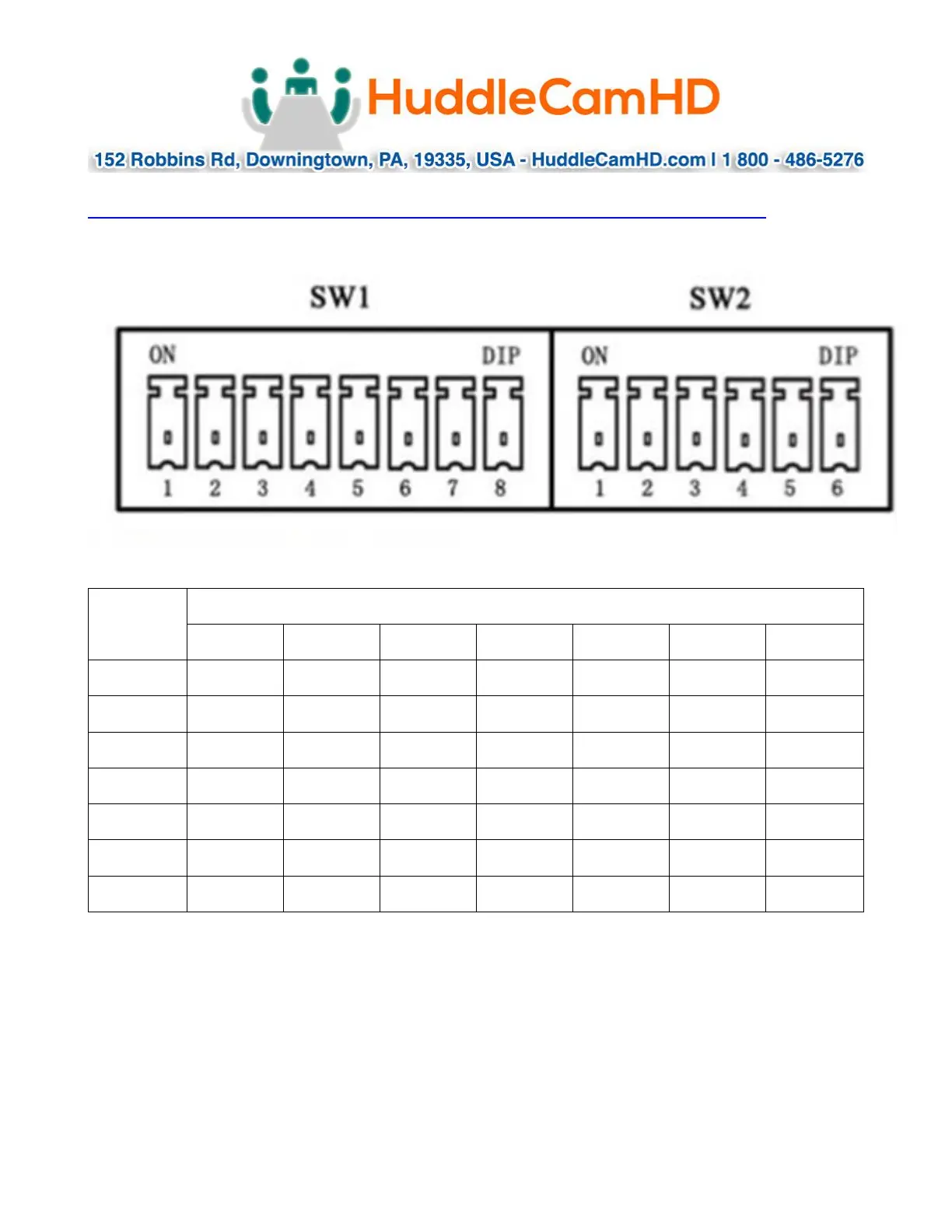
Note: When changing Dip-Switch settings, make all changes with camera powered off.
SW1: Used for setting RS232 address.
Address
SW1 Switch State 1-7, (8 for stand-by)
DIP-1
DIP-2
DIP-3
DIP-4
DIP-6
DIP-7
1
ON
OFF
OFF
OFF
OFF
OFF
2
OFF
ON
OFF
OFF
OFF
OFF
3
OFF
OFF
ON
OFF
OFF
OFF
4
OFF
OFF
OFF
ON
OFF
OFF
5
OFF
OFF
OFF
OFF
OFF
OFF
6
OFF
OFF
OFF
OFF
ON
OFF
7
OFF
OFF
OFF
OFF
OFF
ON
Notes:
1. Broadcast address: If the Joystick is 255 (all dip switches on), any Camera can be
controlled by any address.
2. Test Address: If the dome camera address is 0 (all dip switches off), any address
code can control the dome camera.

Related product manuals