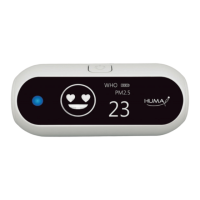
The Huma-i Smart (HI-300) is an indoor air quality monitor designed to provide comprehensive real-time measurements of various environmental parameters. This device aims to help users improve their quality of life by offering detailed air quality data and management capabilities through a dedicated mobile application.
Function Description:
The Huma-i Smart (HI-300) is equipped with multiple sensors to accurately measure:
- Carbon Dioxide (CO2): Measures CO2 levels in parts per million (ppm).
- Volatile Organic Compounds (VOC): Detects VOCs, also measured in ppm.
- Fine Dust (PM1.0, PM2.5, PM10): Measures particulate matter of different sizes (1.0, 2.5, and 10 micrometers) in micrograms per cubic meter (µg/m³).
- Temperature: Measures ambient temperature in Celsius (°C) or Fahrenheit (°F).
- Humidity: Measures relative humidity in percentage (%RH).
The device integrates these individual measurements into an Air Quality Index (AQI), which is displayed on the device's screen and categorized into steps (Good, Moderate, Poor, Unhealthy) with corresponding color changes (Blue, Green, Yellow, Red). An AQI alarm sounds if "Poor" or "Unhealthy" conditions persist for more than 5 minutes, which can be toggled on/off via the mobile app.
Important Technical Specifications:
- Model No: Huma-i smart (HI-300)
- Measurement Range:
- CO2: 400 ~ 5,000ppm
- VOC: 0.000 ~ 9.999ppm
- PM1.0/PM2.5/PM10: 0 ~ 999µg/m³
- Temperature: -30 ~ 100℃ (-22 ~ 212°F)
- Humidity: 0 ~ 99 %RH
- Display: Customized LED display with AM/PM clock.
- Connectivity: Wi-Fi (2.4GHz only 802.11 b/g/n) for mobile app integration.
- App Support: Supports Android and iOS.
- Power Adaptor:
- Input: AC 100/240V, 50/60Hz, USB-C
- Output: 5V/1A external power adaptor
- Battery: Li-polymer @ 650mAh/3.7V (provides approximately 60 minutes of use in battery mode).
- Operating Temperature: -10 ~ 60℃ (14 ~ 140°F)
- Storage Temperature: -25 ~ 60℃ (-13 ~ 140°F)
- Dimension: 136 * 82 * 40mm (5.35 * 3.23 * 1.58 inches)
- Weight: 171g (6.03oz)
- Certifications: CE FCC KC
- FCC ID: 2AC7Z-ESPWROOM32D
Usage Features:
- Real-time Monitoring: Provides simultaneous, real-time measurements of all supported air quality parameters.
- Mobile App Integration: Connects to a mobile app (available on Google Play and Apple App Store) via Wi-Fi, allowing users to:
- Check and manage air quality data anytime, anywhere.
- View historical data for up to 90 days in graphs and numbers.
- Receive real-time notifications of changes in air quality via push messages.
- Access accurate weather information.
- Register the product and set up rooms for monitoring.
- Control device settings like AQI alarm, temperature/humidity display (on/off), temperature unit (°C/°F), display brightness, and display mode (AUTO/OFF).
- Display Modes: The device offers five display modes that can be cycled through using the mode selection button: Clock, VOC, CO2, PM2.5, and PM1.0. An "AUTO mode" can be set via the mobile app to automatically cycle through these values every 5 seconds.
- Battery Mode: The device can operate on its internal battery for approximately 60 minutes. To conserve battery life, it automatically turns off after 30 minutes in battery mode, but this can be extended by pressing the mode selection button or activating the mobile app.
- Automatic Power On/Off: The device automatically turns on when connected to a USB C power source. It can be manually turned off by pressing and holding the mode selection button for 5 seconds in battery mode.
- AQI Alarm: An audible alarm sounds if the AQI remains "Poor" or "Unhealthy" for more than 5 minutes. This alarm can be stopped by pressing the mode selection button and can be enabled/disabled via the mobile app.
- Brightness Adjustment: The screen brightness is automatically adjusted via an illuminance sensor. Users can also manually set brightness to "Dark," "Middle," "Bright," or "AUTO" through the mobile app.
- Data Storage: The device can store up to 90 days of measured data internally. When Wi-Fi is connected, data is automatically sent to the server every 5 minutes. If Wi-Fi is disconnected, stored data is sent to the server upon reconnection.
- Waiting Times for Readings:
- VOC: 15 to 60 seconds.
- CO2: Less than 180 seconds (may take longer on first use).
- PM2.5 and PM1.0: Displayed immediately upon power connection.
Maintenance Features:
- Product Registration: Users must register the product through the Huma-i app after creating a home and room name.
- Firmware Updates: While not explicitly detailed, mobile app integration often allows for firmware updates to improve performance and add features.
- General Care:
- Avoid high temperatures, humid conditions, or prolonged direct sunlight to prevent deformation or malfunction.
- Do not use in environments with high concentrations of fine dust for extended periods, as this may affect measurement accuracy.
- Do not disassemble the product, as this voids the warranty.
- Prevent liquids from entering the product to avoid malfunction, electric shock, or fire.
- Be aware that environmental factors (temperature, humidity, wind) and usage patterns may cause minor errors in readings.
- The measured values are for personal use only, and the manufacturer and seller are not liable for the measured values.

 Need help?
 General

 To Next Page