7
ENGLISH
humantouch.com
6
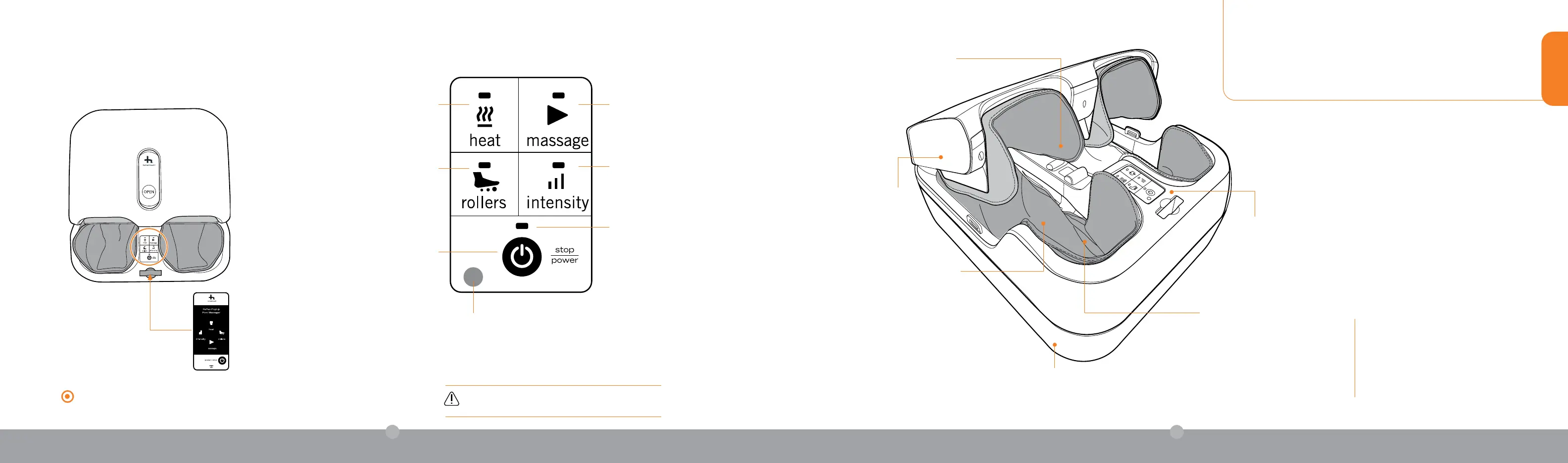
Massage – Press to toggle
between three unique auto-
wellness massage experiences
Heat – Press to add soothing
heat to relax your feet and
enhance your experience
Rollers – Press to toggle
between three underfoot
massage speeds: Slow,
Medium, or Fast
Power/Stop – Stops all motion
Infrared Sensor – Keep clear to ensure
your remote control can communicate
with the massager
Intensity – Press to toggle
between three massage
intensities: Low, Medium, High
Power Indicator – Light flashes
when unit is on and is steady
when massage is in use
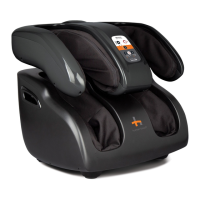
Your foot massager offers a customizable experience to
best suit your needs. Choose from three massage programs,
intensity settings, and underfoot roller speeds, and add heat
for the full experience!
take control
The Reflex PopUp automatically limits your massage to an ideal 15-minute
interval.To restart, simply re-select your favorite massage setting.
Specifications*
Rating: AC 100-240 V, 50-60 Hz
Current: 0.8 A
Product Weight: 11 lb.
*Specifications are subject to change without prior notice.
If your feet feel uncomfortable, discontinue use
immediately.
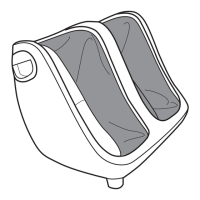
Slot for
remote control
Powerful rollers deliver robust
underfoot reexology massage at
the heel and sole
Compact design is portable and stores
perfectly under a sofa or bed
Pop-up cover opens for
easy entry and exit
Onboard and remote control
for easy access to massage
programs
Fully-encompassing air
compression massage
Soothing heat to relax your feet
and enhance your experience



 To Next Page