9
humantouch.com
8
Choose from 9 Auto Programs based on your current need, or configure your own massage
using the Manual massage menu. You can also control the Cloud Touch air massage focus
and intensity. For an ultra-soothing massage, turn the heat on and connect your smartphone
or tablet to the chair’s speaker system.
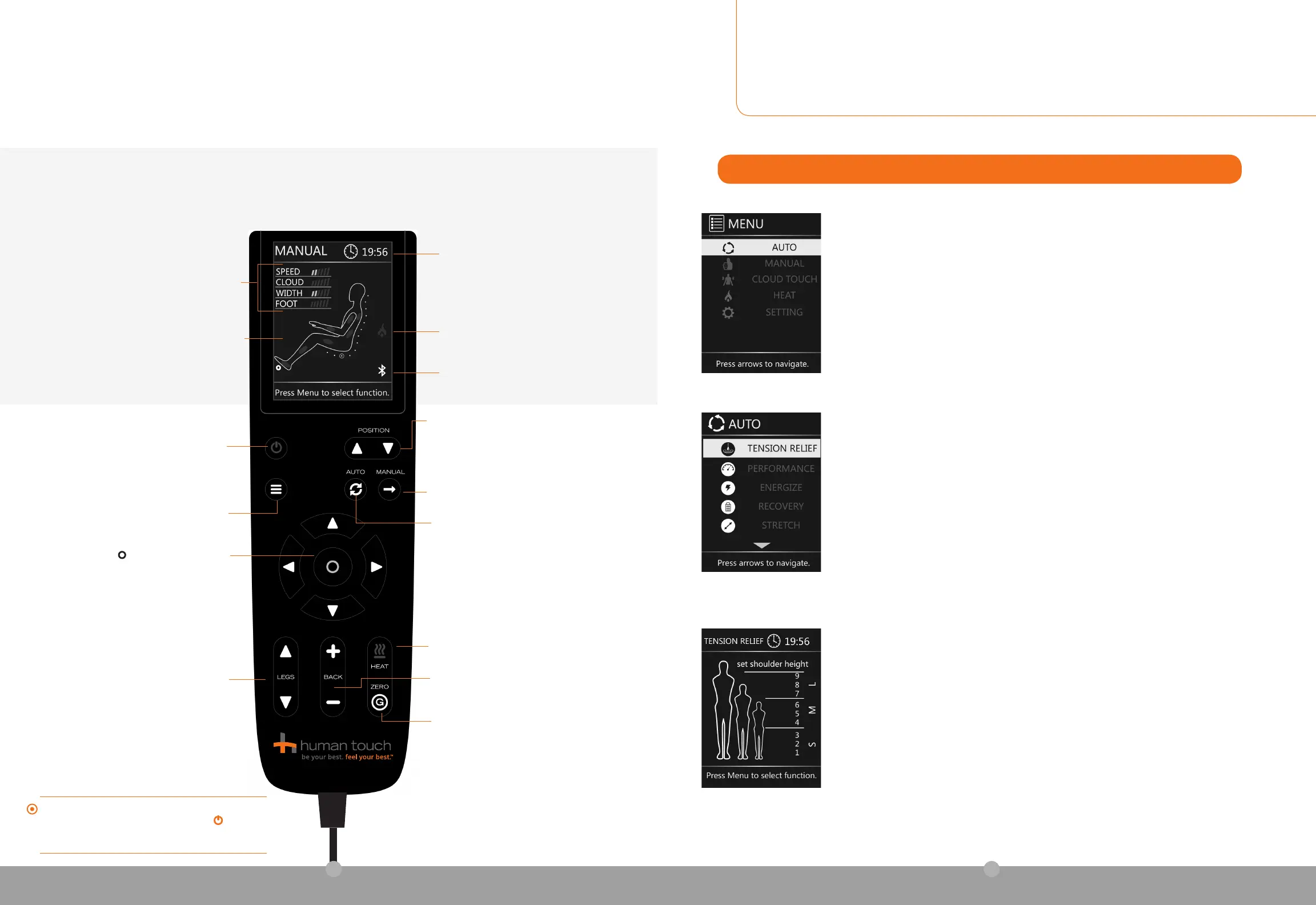
1. From the main menu, select AUTO to display the Auto Programs menu.
USING THE AUTO PROGRAMS
2. Select the desired program. The Set Shoulder Height screen displays.
3. Set the shoulder height to the desired position, ranging from small (1) to large (9). Your massage
automatically maps to the selected shoulder height, for maximum effectiveness.
4. Sit back and enjoy a world-class massage!
NOTE: You can access the Set Shoulder Height screen during any massage by pressing one of the
Position buttons on the remote control.
TENSION RELIEF - Focuses on relieving tension in the neck and shoulders.
PERFORMANCE - Delivers an intense Cloud Touch air massage.
ENERGIZE - Gets you up and moving for the day.
RECOVERY – Moves from your neck and shoulders down to glutes and thighs.
STRETCH - Soothes and stretches you from head to toe.
FULL BODY - Full body massage experience.
UPPER BODY - Focuses the massage on your upper body.
LOWER BODY - Focuses the massage on your lower body.
DEMO – Provides a five-minute overview of the chair’s functions.
The amount of time remaining
in the current massage session
Displays red to indicate heat is on.
Indicates if Bluetooth is on.
(Illustrates the areas currently being massaged)
THE STATUS SCREEN DISPLAYS DURING YOUR MASSAGE, PROVIDING
A QUICK REFERENCE FOR THE FOLLOWING INFORMATION
take control
Menu — Displays the main menu.
Use the arrow buttons to navigate the
menus; press
to select a menu option.
Auto — Displays the Auto Programs menu.
When an auto program is running, press
to toggle among the auto programs. The
active program displays at the top of the
status screen.
ZeroG
®
— Press to automatically position the
chair in ZeroG mode, raising your feet above
your heart for maximum spine relief.
Legs — Press and hold to raise
or lower the footrest.
Heat — Press to toggle the heat on and
off. When the heat is on, the heat icon
on the screen displays red.
Back — Press and hold to recline or
incline the backrest.
Manual — Displays the Manual
massage menu.
Position — Use to move the massage
rollers to the desired position when
enjoying a Zone or Spot massage.
See Using Manual Massage Modes on
page 10 for more information.
On/Off — Press this button to power
on the remote; press again to restore
the chair to the upright position and
power off the remote.
If the chair is not in use for three minutes the controller
display automatically shuts down. Press the
On/Off
button to resume use. The chair resets all settings to the
default position.
SPEED — The percussion massage speed.
CLOUD — The Cloud Touch intensity.
WIDTH — The Tap Touch, Percussion, or rolling
horizontal massage range.
FOOT — The underfoot roller speed.
8



 To Next Page